


Are you struggling to keep your content organized and consistent? A content calendar could be the game-changer you need.
Imagine having a clear plan that saves you time, reduces stress, and helps you reach your audience more effectively. You’ll discover how a simple tool can transform your content strategy and make your work easier. Ready to take control of your content and see real results?
Keep reading to find out how to create and use a content calendar that works for you.

Credit: www.ripl.com
Benefits Of A Content Calendar
A content calendar helps plan and organize your content ahead of time. It brings structure to your marketing efforts. With a clear schedule, you avoid last-minute stress and missed deadlines. Many businesses see great benefits from using a content calendar.
Enhancing Consistency
Posting regularly builds trust with your audience. A content calendar keeps your publishing on track. It prevents gaps and overlaps in your content. Consistent content keeps readers coming back for more.
Improving Time Management
Planning content ahead saves time each week. It reduces the need to create content at the last minute. You can batch tasks like writing, editing, and scheduling. This creates a smoother workflow and less stress.
Boosting Team Collaboration
A shared calendar helps teams work together easily. Everyone knows what content is due and when. It prevents confusion and duplicated efforts. Team members can give feedback and support on time.

Credit: www.exercise.com
Types Of Content Calendars
Content calendars help organize and plan your content. They keep your work on track and save time. Different types of content calendars serve different needs. Choose the right one based on your goals and team size.
Editorial Calendars
Editorial calendars schedule blog posts and articles. They help track topics, deadlines, and authors. This calendar keeps content consistent and well-planned. Teams use it to avoid last-minute rushes. It also helps balance different content types.
Social Media Calendars
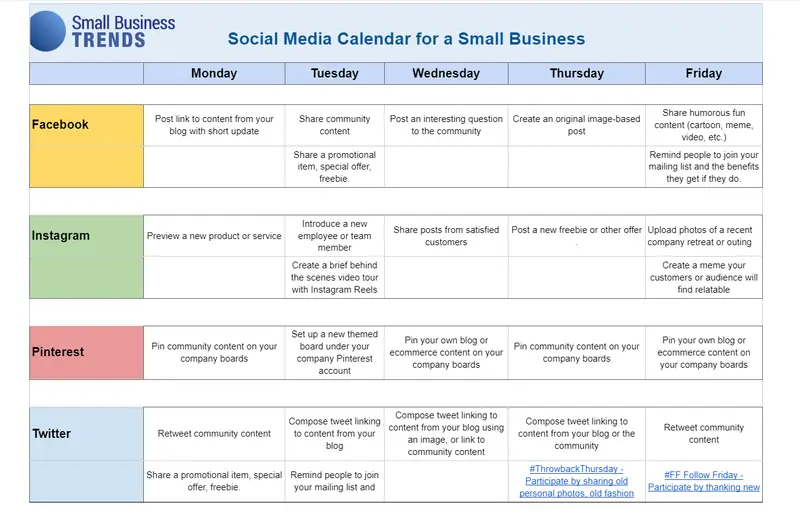
Social media calendars plan posts for platforms like Facebook and Instagram. They organize posting times and messages. This calendar ensures regular updates and audience engagement. It helps coordinate campaigns across channels. Teams use it to track hashtags and trends too.
Campaign-specific Calendars
Campaign-specific calendars focus on special marketing efforts. They track all content related to a single campaign. This calendar aligns emails, ads, and social posts. It ensures the campaign runs smoothly and on time. Teams use it to measure progress and results.
Tools For Creating Content Calendars
Creating a content calendar helps organize your publishing schedule. It keeps your content consistent and planned ahead. Choosing the right tool makes this task easier and more efficient. Different tools suit different needs and skill levels. Some are simple, others have more features. Here are popular options for making content calendars.
Spreadsheets And Templates
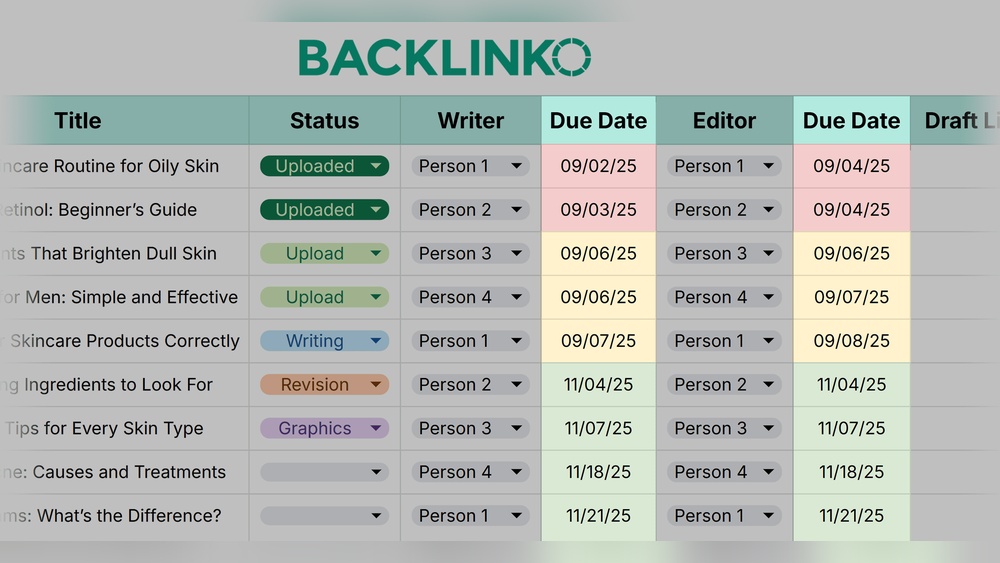
Spreadsheets like Excel or Google Sheets work well for content calendars. They are free and easy to customize. You can create columns for dates, topics, and status. Templates save time and provide structure. Many templates are available online for download. Spreadsheets let you see your schedule clearly in rows and columns. They also allow easy sharing with your team.
Dedicated Software
Dedicated software focuses only on content planning. These tools offer calendars with drag-and-drop features. You can set reminders and deadlines for posts. Many include content ideas and analytics. They help manage multiple channels in one place. Examples include CoSchedule and ContentCal. These tools reduce manual work and improve workflow.
Project Management Platforms
Project management platforms like Trello or Asana help organize content tasks. You create boards or lists for each content piece. Assign tasks to team members with due dates. These platforms support comments and file attachments. They keep everyone on the same page. Using these tools combines content planning with overall project management.
Steps To Build A Content Calendar
Building a content calendar helps you stay organized and consistent. It guides your content creation and publishing process. Follow clear steps to create an effective calendar that fits your goals and audience.
Setting Clear Goals
Start by defining what you want to achieve with your content. Goals can include increasing website traffic, engaging followers, or boosting sales. Clear goals help you focus your efforts and measure success.
Identifying Your Audience
Know who you are creating content for. Identify their age, interests, and problems. Understanding your audience helps you make content that they find useful and interesting.
Planning Content Themes
Choose topics that match your goals and audience needs. Group similar ideas under themes to keep your content organized. Themes make planning easier and keep your message consistent.
Scheduling Publishing Dates
Decide when to publish each piece of content. Spread out posts to keep your audience engaged regularly. A clear schedule avoids last-minute rushes and ensures steady content flow.
Tips For Maintaining Your Calendar
Maintaining a content calendar is key for smooth content creation. It helps keep your team organized and your goals clear. Regular care keeps the calendar useful and relevant. This section offers simple tips to keep your calendar effective and easy to manage.
Regular Updates And Reviews
Check your calendar often to keep it current. Update deadlines and topics as needed. Set a weekly or biweekly time to review it. This keeps the plan aligned with your goals. Remove outdated items and add new ideas. Staying on top prevents last-minute stress.
Adapting To Trends And Feedback
Watch for new trends in your industry. Add fresh topics that match popular interests. Listen to audience feedback and adjust content themes. This keeps your calendar lively and relevant. Flexibility helps you stay connected to your readers. Change plans without losing focus.
Coordinating Across Teams
Share your calendar with everyone involved. Make sure each team member knows their tasks. Use tools that allow easy editing and comments. Clear roles help avoid confusion and delays. Regular meetings improve communication and teamwork. Coordination boosts productivity and content quality.
Credit: influencermarketinghub.com
Measuring Success With A Content Calendar
Measuring success with a content calendar helps you see what works. It shows which posts get attention and which do not. This helps improve your content over time. Using data from your calendar keeps your strategy smart and clear.
Tracking Engagement Metrics
Track likes, shares, comments, and clicks on each post. These numbers show how people react to your content. Watch trends to find popular topics and formats. Engagement tells you if your message connects with the audience.
Analyzing Content Performance
Compare different posts to see which perform best. Look at views and time spent on pages. Note which topics bring more visitors. Use this data to plan future content that fits your audience’s interest.
Adjusting Strategy Based On Data
Change your plan based on what the numbers say. Drop low-performing topics or formats. Focus more on content that gets good responses. Keep testing and learning to make your calendar stronger each month.
Frequently Asked Questions
What Is A Content Calendar And Why Use It?
A content calendar is a schedule for planning content publication. It helps organize topics, deadlines, and channels. Using one ensures consistent posting, improves team collaboration, and boosts audience engagement. It saves time by avoiding last-minute content creation and aligns content with marketing goals.
How Do I Create An Effective Content Calendar?
Start by defining your content goals and target audience. Choose a calendar tool like Google Sheets or Trello. Plan content types, publish dates, and assign responsibilities. Regularly review and adjust based on performance and feedback. Keep it flexible to adapt to trends and business needs.
What Tools Can Help Manage A Content Calendar?
Popular tools include Google Sheets, Trello, Asana, and CoSchedule. These offer easy scheduling, collaboration, and reminders. They help track progress, deadlines, and content ideas. Choosing the right tool depends on team size and workflow preferences.
How Often Should I Update My Content Calendar?
Update your content calendar weekly or monthly. Frequent updates keep it relevant and reflect changes in strategy or market trends. Regular reviews improve planning accuracy and content quality, helping meet marketing goals efficiently.
Conclusion
A content calendar helps you plan and organize your posts. It keeps your ideas clear and deadlines on track. You can avoid last-minute stress and publish regularly. This tool improves your focus and saves time. Consistency builds trust with your audience.
Start small and adjust as you go. A simple calendar makes content easier to manage. Keep it flexible to fit your needs. Using a content calendar leads to better results and less worry. Try it today and see the difference.