


Are you ready to bring your ideas to life in a way that grabs attention and keeps people watching? Creating videos is one of the best ways to connect with your audience, share your story, and make a lasting impact.
Whether you want to promote your business, teach something new, or just have fun, making videos can be easier than you think. You’ll discover simple steps and tips that help you create videos that look professional and keep viewers hooked from start to finish.
Keep reading, and you’ll soon be turning your vision into videos that truly shine.
Benefits Of Video Content
Video content has become a powerful tool for businesses and creators. It grabs attention quickly and keeps viewers interested. Videos combine images, sound, and motion to tell stories clearly and simply. This makes messages easier to understand and remember. Here are some key benefits of using video content.
Higher Engagement Rates
Videos get more clicks and shares than text or images alone. They hold viewers’ attention longer. People prefer watching videos over reading long posts. Videos also encourage comments and interactions. This boosts your presence on social media and websites.
Improved Brand Awareness
Videos help people recognize and remember your brand. They show your style and values through visuals and voice. Consistent video content builds trust with your audience. It makes your brand look professional and reliable. This leads to a stronger connection with customers.
Increased Conversion Rates
Videos can persuade viewers to take action faster. They explain products and services clearly. Demonstrations and testimonials build confidence in your offers. Videos reduce doubts and answer common questions. This often results in more sales or sign-ups.

Credit: www.techsmith.com
Choosing The Right Video Type
Choosing the right video type helps you connect with your audience. Different videos serve different purposes. Picking the best one can boost your message clearly.
Think about your goal. Want to explain a product? Show real customer stories? Or maybe live interaction works best. Each video type fits a unique need.
Explainer Videos
Explainer videos break down complex ideas simply. They use clear visuals and easy words. Great for teaching your audience about your product or service. Short and focused videos keep viewers interested.
Product Demos
Product demos show how your product works. They highlight features and benefits. Helps customers see the value before buying. Use close-ups and clear steps for better understanding.
Customer Testimonials
Customer testimonials build trust quickly. Real people share their honest opinions. This type of video adds credibility to your brand. Viewers relate better to genuine stories.
Live Streams
Live streams create direct interaction with viewers. Answer questions and show behind-the-scenes moments. This real-time format increases engagement and trust. Perfect for events and product launches.
Planning Your Video Content
Planning your video content is the first step to creating videos that connect. It helps you stay focused and organized. Good planning makes your message clear and your video effective.
Start with a clear idea of what you want your video to achieve. Know who will watch it and what they need. Write a script that keeps viewers interested and delivers your message well.
Setting Clear Goals
Define the purpose of your video. Do you want to teach, entertain, or promote? Set simple and specific goals. This guides your video’s style and length. Clear goals help measure your video’s success later.
Understanding Your Audience
Think about who will watch your video. What do they like? What problems do they have? Use this knowledge to make your video useful and relevant. Speak their language and keep it easy to follow.
Crafting A Compelling Script
Write a script that tells a story or explains clearly. Use short sentences and simple words. Keep your message focused. Add a call to action, telling viewers what to do next.
Essential Equipment And Tools
Creating videos needs the right tools and equipment. Good gear helps make videos clear and interesting. This section covers basic tools needed to start making videos.
Cameras And Smartphones
Cameras capture your video’s visuals. Many use smartphones as they have good cameras. A DSLR or mirrorless camera offers better quality. Choose one that fits your budget and needs. Steady shots matter, so use a tripod if possible.
Lighting Setup
Proper lighting makes your video look professional. Natural light works well but can be hard to control. Softbox lights or ring lights help brighten the scene. Position lights to avoid harsh shadows. Good lighting shows details clearly.
Audio Equipment
Clear sound improves video quality greatly. Built-in microphones often pick up background noise. Use an external mic like a lavalier or shotgun mic. Test audio before recording to avoid issues. Quiet spaces also help reduce noise.
Editing Software
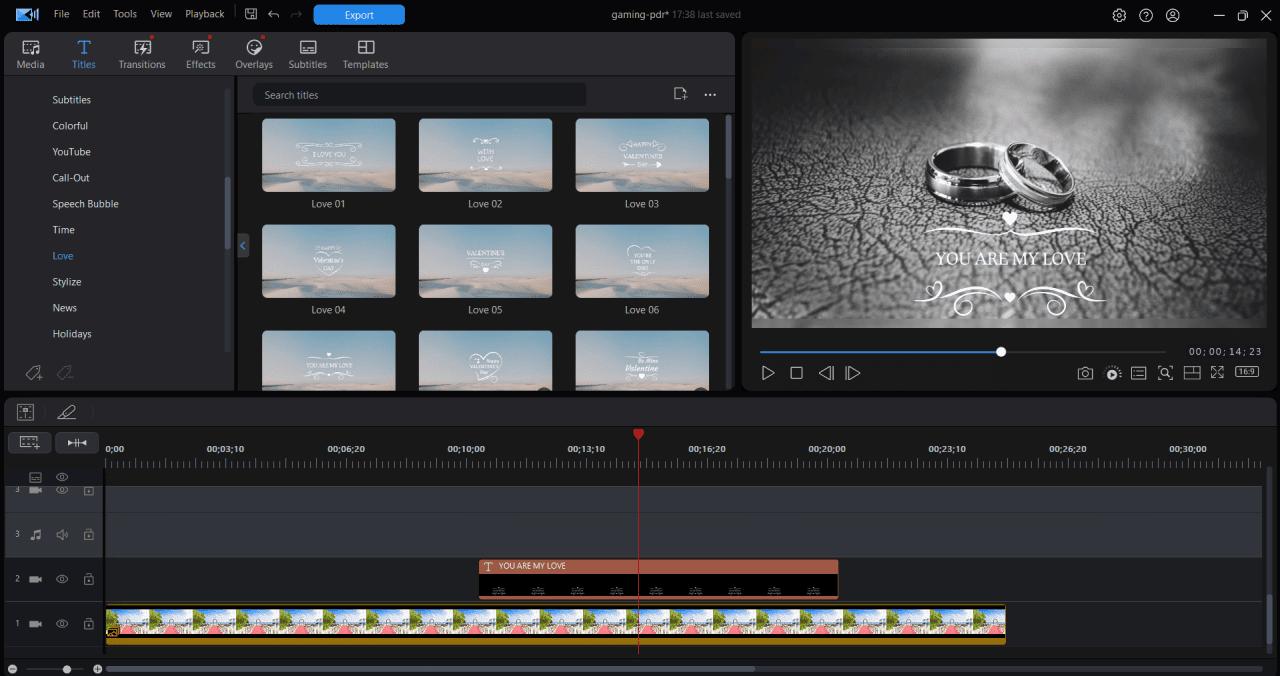
Editing software shapes your final video. Free tools like iMovie or HitFilm Express work well. Paid options like Adobe Premiere Pro offer more features. Cut unwanted parts, add music, and fix colors. Simple edits can make videos more engaging.
Shooting Techniques For Impact
Shooting videos that leave a strong impression requires smart techniques. These techniques help tell your story clearly. They make viewers feel connected and interested.
Focus on how you frame your shots. Use lighting to set the mood. Clear audio helps your message reach the audience. Visual effects add style and fun without overdoing it.
Framing And Composition
Place your subject in the frame carefully. Use the rule of thirds to guide the eye. Avoid centering everything, as it can feel dull. Include some background to add context. Keep the horizon straight to look professional. Move closer to capture emotions and details.
Lighting Tips
Use natural light whenever possible. Shoot near windows or outdoors during the day. Avoid harsh midday sun to prevent strong shadows. Soft, even light works best on faces. Add simple lamps to fill dark spots. Make sure the light source is in front of the subject.
Audio Clarity
Clear sound is as important as good video. Use an external microphone for better quality. Keep the environment quiet to avoid noise. Speak clearly and at a steady pace. Test your audio before shooting the full video. Edit out background noise during post-production.
Using Visual Effects
Use effects to enhance, not distract. Simple transitions keep the flow smooth. Add text to highlight key points. Use slow motion or zoom for dramatic moments. Avoid too many effects that confuse viewers. Keep effects consistent with your video style.
Credit: www.cyberlink.com
Editing For Engagement
Editing shapes how viewers feel about your video. Good editing keeps people watching. It makes the story clear and fun. Engaging editing holds attention and boosts shares. Focus on timing, visuals, and sound for best results.
Cutting For Pacing
Cutting controls the speed of your video. Fast cuts create energy and excitement. Slow cuts help viewers focus on details. Remove extra parts that don’t add value. Keep scenes short to avoid boredom. Match cuts to the mood you want to set.
Adding Captions And Graphics
Captions help viewers understand your message better. They are useful for people who watch without sound. Use clear fonts and simple words. Graphics highlight key points and add style. Use colors that match your brand. Keep visuals clean and easy to follow.
Incorporating Music And Sound Effects
Music sets the tone of your video. Choose tracks that fit the mood and pace. Sound effects make scenes more real and lively. Use effects to emphasize actions or emotions. Balance volume so music does not overpower speech. Silence can be powerful too.
Optimizing Videos For Platforms
Creating videos is just the first step. Optimizing videos for different platforms helps reach more viewers. Each platform has unique rules and formats. Adjusting your video to fit these rules improves engagement and visibility.
Simple changes in size, length, or description can make a big difference. Optimized videos load faster and look better on each platform. This boosts watch time and shares. Understanding these basics helps you grow your audience.
Youtube Best Practices
YouTube favors videos that keep viewers watching longer. Start with a strong hook in the first 10 seconds. Use clear titles with keywords. Descriptions should explain the video well. Add tags that relate to your content. Create custom thumbnails to catch attention. End with a call to action. Consistent uploads improve channel authority and reach.
Social Media Formats
Social platforms like Instagram, Facebook, and TikTok have their own video styles. Vertical videos work best on TikTok and Instagram Stories. Square videos fit Facebook feeds well. Keep videos short and engaging. Use captions since many watch without sound. Bright colors and quick cuts hold attention. Test different lengths to see what works best for your audience.
Seo For Video Content
SEO helps your video appear in search results. Use relevant keywords in titles and descriptions. Write a detailed description with keywords naturally placed. Add subtitles or closed captions to improve accessibility. Use tags and categories wisely. Create a transcript for better indexing. Link videos from your website or blog. This signals search engines your video is valuable and relevant.
Promoting Your Videos
Creating videos is just the first step. Promoting your videos helps reach more people. Without sharing, your effort may go unseen. Smart promotion increases views and engagement. It also builds your audience over time.
Sharing On Social Channels
Social media platforms are great for video promotion. Post videos on Facebook, Instagram, Twitter, and LinkedIn. Each platform has its own audience style. Customize your message to fit the channel. Use short captions to catch attention quickly. Share videos multiple times at different hours. This helps reach people in different time zones.
Collaborations And Influencers
Working with others expands your reach. Find influencers who share your niche. They can share your video with their followers. Collaborations bring new viewers to your content. Choose partners whose audience matches yours. This creates trust and increases video views. Even small influencers can help grow your channel.
Email Marketing Integration
Emails reach people directly and personally. Include your videos in newsletters or campaigns. Write a short intro to explain the video’s value. Use a clear call-to-action to encourage clicks. Videos in emails boost engagement and click rates. Make sure your emails are mobile-friendly. Many people check emails on their phones.
Measuring Video Performance
Measuring video performance helps you understand how well your videos do. It shows what works and what does not. This knowledge guides you to create better videos next time. Tracking data is key to improving your video content and reaching more people.
Tracking Engagement Metrics
Engagement metrics show how viewers interact with your videos. Watch time tells how long people watch. Likes, comments, and shares reveal interest and connection. Click-through rates show if viewers take action after watching. These numbers help measure video success clearly and quickly.
Analyzing Viewer Behavior
Viewer behavior shows how people watch your videos. Check when viewers stop or skip parts. See which sections they rewatch. This tells what excites or bores them. Knowing this helps you create videos that keep attention longer.
Adjusting Strategies Based On Data
Use data to change your video plans. If viewers leave early, try shorter videos. If certain topics get more views, focus on them. Test different styles and see what works best. Data helps you make smart choices for better results.
Credit: influencermarketinghub.com
Frequently Asked Questions
What Are The Best Tools To Create Videos Easily?
Popular video creation tools include Adobe Premiere Pro, Final Cut Pro, and Canva. These tools offer user-friendly interfaces and powerful editing features. Beginners can start with apps like iMovie or InShot for quick results. Choosing the right tool depends on your skill level and project needs.
How Can I Create Engaging Videos For Social Media?
Focus on short, clear content that captures attention quickly. Use bright visuals and strong calls-to-action. Add subtitles for better accessibility. Tailor videos to each platform’s format. Engaging videos boost viewer interaction and increase reach on social media.
What Are Key Steps In Video Creation?
Start with planning and scripting your content. Next, shoot or gather your footage. Then, edit the video to improve flow and add effects. Finally, export and share your video on chosen platforms. Following these steps ensures a polished final product.
How To Optimize Videos For Seo?
Use relevant keywords in your video title and description. Add tags that match your video content. Include transcripts to improve search visibility. Create engaging thumbnails to increase clicks. SEO optimization helps videos rank higher in search results.
Conclusion
Creating videos can boost your message clearly and simply. Videos grab attention and help explain ideas fast. You can use your phone or computer to start. Keep your content short and interesting to hold viewers. Practice will make your videos better over time.
Share your videos on social media or websites for more reach. Remember, anyone can create videos with a bit of effort. Start today and see how video helps you connect with others.