


Want your business to stand out online and attract more local customers? Your Google Business Profile is the key.
It’s more than just a listing—it’s your chance to show up right when people are searching for what you offer. But setting it up and managing it the right way can be tricky. In this guide, you’ll discover simple steps to create, optimize, and use your Google Business Profile to boost your visibility and grow your business.
Keep reading, and you’ll learn how to turn your profile into a powerful tool that works for you 24/7.
Setting Up Your Profile
Setting up your Google Business Profile is the first step to growing your online presence. A well-made profile helps customers find your business easily. It also shows important details like your location and hours. Follow simple steps to create a strong profile that works for you.
Start with the basics. Make sure every detail you add is clear and correct. This builds trust and helps your business show up in local searches.
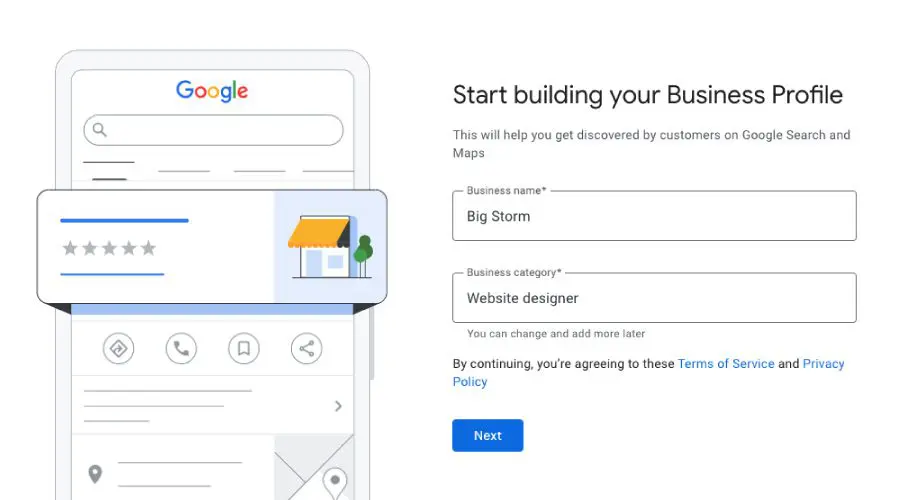
Creating An Account
Visit the Google Business Profile website to begin. Use a Google account you control. This keeps your business info safe and easy to update. Fill in your business name exactly as you use it. Avoid extra words or symbols. Clear names help customers find you fast.
Choosing The Right Business Category
Select a category that best describes your business. Categories help Google show your profile to the right people. Pick the main category that fits your services or products. You can add extra categories later. The right choice improves your chances to appear in searches.
Adding Accurate Contact Details
Enter your phone number and address carefully. Make sure these details match those on your website and other listings. Use a local phone number if possible. This builds local trust. Double-check your business hours. Correct hours prevent customer frustration and missed visits.
Credit: greatbigstorm.com
Optimizing Business Information
Optimizing your business information on Google Business Profile helps attract more customers. Accurate and clear details build trust and improve your local search ranking. Keeping your profile updated shows you care about your business and clients. Simple changes can make a big difference in how people see your business online.
Crafting A Compelling Business Description
Write a short, clear description of your business. Focus on what makes your business special. Use simple words that people easily understand. Mention your main products or services. Avoid jargon or long sentences. A good description helps customers know what to expect.
Selecting High-quality Photos
Choose clear and bright photos that show your business well. Include pictures of your storefront, products, and team. Photos should look professional but natural. Avoid blurry or dark images. Good photos attract customers and increase engagement on your profile.
Updating Business Hours And Services
Keep your business hours accurate and up to date. Add special hours for holidays or events. List all the services you offer clearly. Customers rely on this information to plan their visit. Wrong hours or missing services can cause frustration and lost sales.
Leveraging Customer Reviews
Customer reviews are a key part of your Google Business Profile. They help build trust and show real experiences. Good reviews attract more visitors and improve your local search ranking.
Managing reviews carefully can boost your online reputation. It lets new customers see your business as reliable and friendly. Use reviews to learn what customers like and what needs fixing.
Encouraging Positive Feedback
Ask happy customers to share their experience. Make it easy by sending a direct review link. Remind them gently after a purchase or service. Positive reviews increase your profile’s appeal.
Offer great service every time. A simple “thank you” can encourage more feedback. Make customers feel valued and heard. This leads to more honest and positive reviews.
Responding To Reviews Effectively
Reply to every review, both good and bad. Thank customers for positive comments. Show appreciation and build loyalty. For negative reviews, stay calm and polite.
Answer quickly to show you care. Use simple language and clear solutions. This helps fix problems and shows others you handle issues well. Your replies reflect your business values.
Managing Negative Comments
Read negative reviews carefully. Understand the customer’s problem fully. Avoid blaming or arguing in your response. Apologize sincerely if your business made a mistake.
Offer to fix the issue offline. Give contact details or invite them to talk privately. This shows respect and willingness to improve. Negative reviews handled well can win back trust.
Credit: www.textmymainnumber.com
Utilizing Google Posts
Google Posts offer a simple way to share updates directly on your Google Business Profile. They help businesses connect with customers by showing fresh content on search results. Using Google Posts regularly keeps your profile lively and interesting.
Creating Engaging Content
Write clear and short messages that catch attention quickly. Use simple words and focus on what matters most to your audience. Include a call to action, like ”Learn more” or ”Call now,” to guide readers. Add high-quality images to make posts stand out.
Promoting Events And Offers
Use Google Posts to announce sales, special offers, or events. Share details like dates, times, and benefits clearly. This helps customers decide to visit or buy. Limited-time deals create a sense of urgency and encourage quick action.
Maintaining Regular Updates
Post often to keep your profile active and visible. Fresh updates tell Google your business is alive and ready to serve. Set a schedule for posting weekly or biweekly. Consistency builds trust and helps attract more visitors.
Enhancing Local Seo
Enhancing local SEO improves your business visibility in nearby searches. It helps potential customers find your location easily. Google Business Profile plays a big role in this process. Optimizing your profile drives more local traffic and increases engagement.
Incorporating Relevant Keywords
Use keywords that match what local customers search for. Include these keywords naturally in your business description and services. Think about terms people use for your products or services nearby. Avoid keyword stuffing to keep your profile clear and readable. This helps Google show your profile in relevant local results.
Building Local Citations
Local citations are online mentions of your business name, address, and phone number. These citations boost your business’s trust and authority. Make sure your information is consistent across all directories and websites. Submit your business to local directories, review sites, and social platforms. Accurate citations improve your local search ranking and customer trust.
Tracking Performance With Insights
Google Business Profile offers insights to track your profile’s performance. Check how many people view your listing and interact with it. Analyze which keywords bring the most visitors. Use this data to adjust your profile and improve engagement. Regular monitoring helps you understand what works best for local SEO.
Credit: bandfps.com
Advanced Profile Features
Advanced Profile Features help businesses stand out on Google Business Profile. These tools improve customer interaction and show more about your business. Using these features correctly can attract more local customers and build trust.
Using Q&a Section Strategically
The Q&A section lets you answer common questions about your business. Add clear, helpful answers to avoid confusion. Post questions customers often ask to guide new visitors. Monitor this section regularly to keep information accurate and fresh.
Adding Products And Services
Showcase your products and services directly on your profile. Add images, prices, and short descriptions. This helps customers quickly see what you offer. Keep this section updated to reflect new or changed items.
Setting Up Messaging For Customers
Enable messaging to chat with customers in real time. Respond quickly to questions and requests. This builds trust and improves customer service. Turn on notifications to never miss a message.
Frequently Asked Questions
What Is A Google Business Profile?
A Google Business Profile is a free tool that helps businesses manage their online presence. It shows your business info on Google Search and Maps, improving local visibility and customer engagement.
How Do I Create A Google Business Profile?
Sign in to Google My Business, enter your business details, verify your location, and complete your profile. This process helps your business appear in local search results and attracts customers.
Why Is Google Business Profile Important For Seo?
It boosts local SEO by showing your business in local searches. A complete profile increases trust, improves rankings, and drives more traffic to your website or physical store.
How Can I Optimize My Google Business Profile?
Add accurate business info, upload photos, collect reviews, and post updates regularly. Optimizing your profile enhances visibility and attracts more potential customers through better engagement.
Conclusion
A Google Business Profile helps people find your business easily. Keep your information accurate and updated at all times. Add photos and respond to customer reviews to build trust. Use the tools Google offers to improve your profile. A good profile increases your chances of appearing in search results.
Take small steps every day to improve your presence online. This guide gives you a clear path to follow. Start now and watch your business grow steadily. Simple actions bring steady results.