


Are you curious about who Pinterest users really are and what makes this platform so popular? Whether you’re a business owner, marketer, or just someone who loves scrolling through beautiful ideas, understanding Pinterest users can help you get more out of your time on the site.
Imagine reaching the right people with your pins or discovering new trends that match your interests perfectly. Keep reading to find out what drives Pinterest users, how they behave, and how you can connect with them better than ever before.
This insight could change the way you use Pinterest—and bring you results you didn’t expect.

Credit: blog.hootsuite.com
Pinterest User Trends
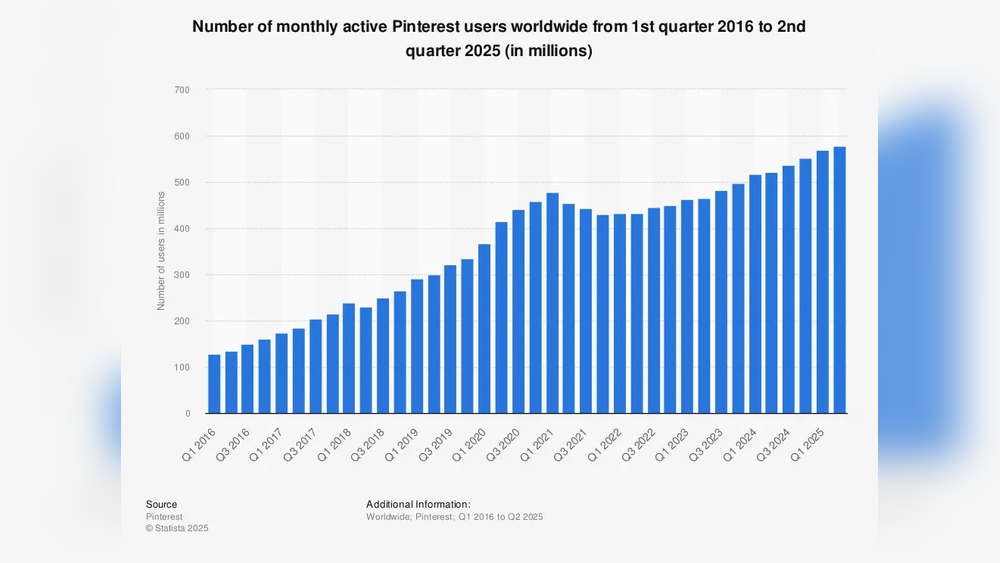
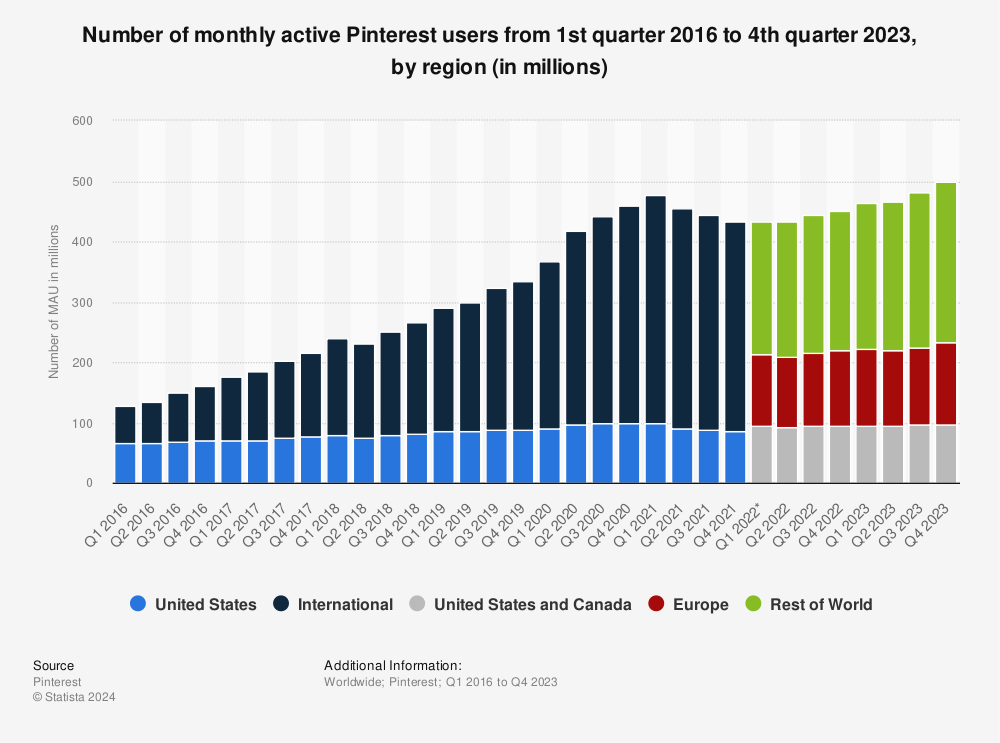
Pinterest continues to grow as a popular platform for ideas and inspiration. Users come from many backgrounds and interests. Understanding the trends helps creators and marketers reach the right audience.
Below, we explore key Pinterest user trends. These include who uses Pinterest and what content they prefer. This insight guides better content creation and marketing strategies.
Demographics And Behavior
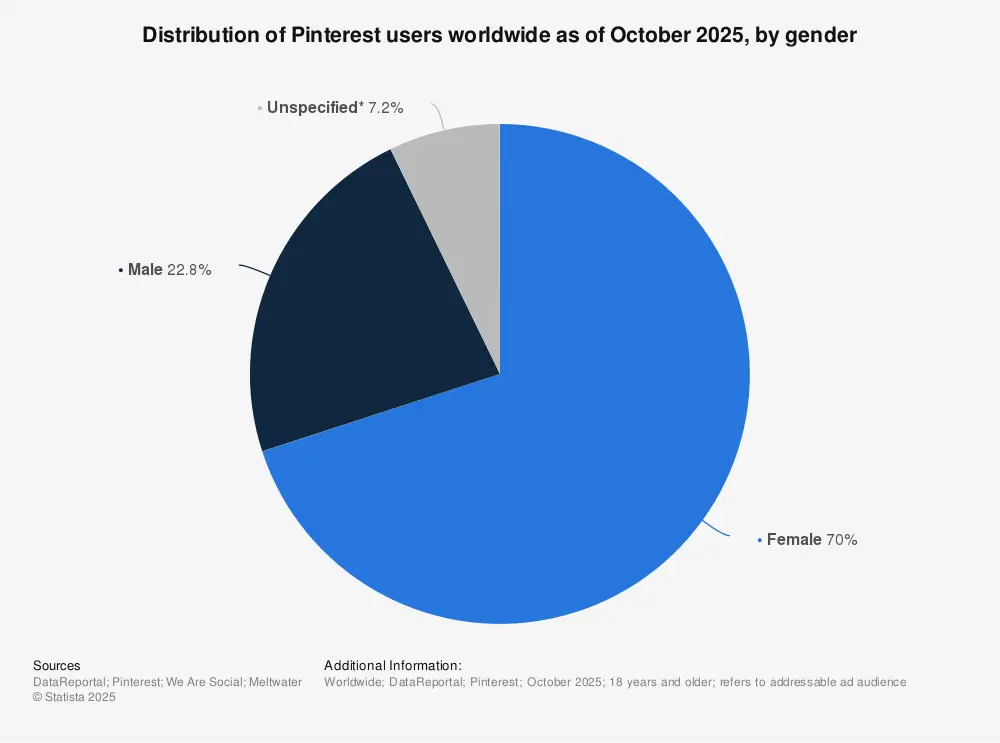
Most Pinterest users are women, but men are joining steadily. The age range is broad, with many users between 18 and 45 years old. Users often visit Pinterest to plan projects or find ideas.
Many users check Pinterest daily or weekly. They save pins and boards to organize their interests. Engagement is high, especially around holidays and seasonal events. Mobile use dominates, with most users browsing on smartphones.
Popular Content Types
Visual content leads on Pinterest. Images and short videos attract the most attention. DIY projects, recipes, and home décor ideas are top favorites. Fashion and beauty pins also perform well.
Content that offers clear steps or inspiration gets more saves. Infographics and how-to guides help users understand topics quickly. Bright, clean visuals tend to get higher engagement. Seasonal and trending topics boost content popularity too.
Optimizing Your Profile
Optimizing your Pinterest profile helps attract more followers and engagement. A strong profile shows who you are and what you offer. It makes people want to explore your pins and boards. Small changes can make your profile stand out in search results. Focus on clear, simple details that tell your story well.
Crafting An Appealing Bio
Your bio is the first chance to introduce yourself. Use short sentences to explain what you do. Include keywords that describe your interests or business. This helps Pinterest show your profile to the right people. Keep your bio friendly and easy to read. Avoid long descriptions that might confuse visitors.
Choosing The Right Profile Image
Pick a clear photo that shows your face or brand logo. A simple, bright image works best on Pinterest. It helps people recognize you quickly. Avoid busy or dark pictures that are hard to see. Make sure your image fits well in the round frame. This small detail improves your profile’s look and feel.
Creating Engaging Pins
Creating engaging pins is key to success on Pinterest. Pins that catch attention invite users to click and share. Good pins tell a story with visuals and words. They stand out in crowded feeds. Crafting pins with care helps grow your audience and drive more traffic.
Focus on clear, bright images and simple, direct text. Make pins useful and interesting to your target audience. Each pin should show value quickly. Think about what users want and how your pin can meet that need.
Design Tips For Visual Appeal
Use vertical images for better display on Pinterest. Bright colors attract eyes and make pins pop. Choose clean fonts that are easy to read. Avoid cluttered backgrounds that distract from the message. Include your logo or website for brand recognition. Keep the design simple but eye-catching. Use contrast between text and background for clarity. Test different styles to see what works best.
Writing Compelling Descriptions
Write clear and short descriptions for each pin. Describe what users will find if they click. Use keywords that match what people search for. Explain benefits or ideas behind the pin. Ask questions to engage users and invite comments. Avoid long sentences or complex words. Make the description helpful and honest. Update descriptions regularly to keep them relevant.
Leveraging Keywords And Seo
Using keywords and SEO on Pinterest helps more people find your content. It makes your pins and boards show up in search results. This brings more visitors and potential followers. Understanding how to use keywords well can improve your Pinterest presence.
Keywords help Pinterest understand what your pins are about. This helps the platform suggest your content to the right audience. SEO is not just for websites. It works on Pinterest too.
Keyword Research Techniques
Start with simple words that describe your content. Think about what your audience might type in search. Use Pinterest’s search bar to see suggested phrases. These suggestions show popular searches related to your topic.
Check your competitors’ pins for keywords they use. Look at pin titles, descriptions, and board names. Use tools like Google Keyword Planner for extra ideas. Focus on short and long phrases that match your niche.
Optimizing Boards And Pins
Include keywords in your board titles and descriptions. This helps Pinterest categorize your boards correctly. Write clear and short descriptions that include main keywords. For pins, add keywords in titles and detailed descriptions.
Use keywords naturally to avoid keyword stuffing. Add relevant hashtags to increase reach. Organize pins into boards with clear themes. This makes your profile easier to navigate and helps SEO.
Using Rich Pins Effectively
Using Rich Pins effectively helps Pinterest users get more from their content. Rich Pins show extra details on each Pin. This makes Pins more useful and interesting. They help users see important info without leaving Pinterest.
Rich Pins come in different types. Each type shows special information. They make Pins stand out and gain more clicks and saves. Using Rich Pins can grow your audience and improve engagement on Pinterest.
What Are Rich Pins?
Rich Pins add extra data to regular Pins. They pull info directly from your website. This info shows on the Pin itself. For example, product prices, recipe ingredients, or article headlines.
Types Of Rich Pins
There are four main types: product, recipe, article, and app Pins. Product Pins show price and availability. Recipe Pins list ingredients and cooking time. Article Pins display the headline and author. App Pins provide a download button.
How To Enable Rich Pins
First, add meta tags to your website. Then, validate your Pins using Pinterest’s tool. After approval, your Pins will show extra info automatically. This process takes a few steps but is simple to follow.
Benefits Of Using Rich Pins
Rich Pins increase trust with users. They provide more context about your content. Pins with more details get higher engagement. This leads to more traffic to your site or store.
Tips For Best Results
Keep your website data accurate and updated. Use clear and simple descriptions. Choose high-quality images for your Pins. Check your Rich Pins regularly to ensure they work well.
Credit: www.statista.com
Timing And Frequency Of Posts
Timing and frequency of posts on Pinterest matter a lot. Pinning at the right time can help your content reach more people. Posting too much or too little can hurt your visibility. Finding a good balance boosts engagement and grows your audience steadily.
Best Times To Pin
Evenings and weekends often see the highest Pinterest traffic. People browse Pinterest after work and on days off. Try pinning between 8 PM and 11 PM for better reach. Saturdays also bring many active users. Experiment with different times to find what works for your audience.
Maintaining Consistency
Pin regularly to keep your profile active and visible. Posting daily is ideal but three to five pins a day also works. Avoid long gaps without pinning. Consistency helps Pinterest recognize your account as reliable. This can improve your chances of appearing in search results.
Engaging With The Pinterest Community
Engaging with the Pinterest community helps build strong connections. It makes your profile more visible and trusted. Interaction encourages others to follow and share your ideas. Active participation creates a positive experience for everyone.
Simple actions like replying and sharing can grow your network. Being part of group boards opens many opportunities for collaboration. These steps help you learn from others and share your creativity widely.
Responding To Comments
Replying to comments shows you care about your audience. It builds trust and encourages more people to interact. Keep your replies polite and helpful. Answer questions clearly and thank users for their feedback. This keeps conversations alive and positive. Quick responses show you are active and interested.
Collaborating On Group Boards
Group boards allow multiple users to share content in one place. Joining these boards helps you reach a larger audience. Collaborate by posting quality pins that fit the board’s theme. Respect the rules set by the board owner. Collaboration brings fresh ideas and new followers. It also helps you learn what works best on Pinterest.
Analyzing Performance Metrics
Analyzing performance metrics is key to understanding Pinterest users. It shows how well pins and boards attract attention. Data helps to know what works and what does not. This information guides future content choices. Tracking these numbers regularly helps improve your Pinterest strategy.
Tracking Engagement Rates
Engagement rates show how users interact with your content. This includes repins, clicks, comments, and likes. High engagement means your pins interest people. Low engagement signals a need for change. Use Pinterest Analytics to check these numbers. Focus on pins with the best results. Watch for trends in user behavior over time.
Adjusting Strategies Based On Data
Data reveals what content gets the most attention. Change your pin designs or descriptions to fit user preferences. Try posting at different times to find the best schedule. Test new keywords to improve search visibility. Drop tactics that fail to attract users. Small adjustments can lead to better results. Stay flexible and ready to adapt your plan.
Credit: influencermarketinghub.com
Frequently Asked Questions
Who Are The Main Users Of Pinterest?
Pinterest users mainly include creative professionals, DIY enthusiasts, and shoppers. They seek inspiration for fashion, home decor, recipes, and more. The platform appeals to all ages but is especially popular among women aged 25-45 looking for visual ideas and trends.
How Do Pinterest Users Engage With Content?
Pinterest users engage by pinning, saving, and sharing images or videos. They organize content into boards based on interests. Users also search for ideas, follow creators, and click on pins to visit external websites for more information or shopping.
Why Do Pinterest Users Prefer The Platform?
Users prefer Pinterest because it offers visual inspiration and easy content discovery. It helps plan projects, find new trends, and shop ideas in one place. The platform’s personalized feed enhances user experience by showing relevant and creative content regularly.
What Demographics Dominate Pinterest Users?
Pinterest’s largest user base consists of women aged 25-45. However, the platform is growing among men and younger audiences. Urban and suburban users often dominate, with interests spanning fashion, food, home decor, and lifestyle topics.
Conclusion
Pinterest users enjoy discovering ideas and sharing their interests. The platform brings people together through images and creativity. It helps find inspiration for many projects and hobbies. Everyone can explore topics they love at their own pace. Staying active on Pinterest can grow your audience and ideas.
Keep exploring, saving pins, and connecting with others. Your next great idea might just be a click away. Pinterest offers a simple way to learn and share daily. Try to enjoy the process and stay curious.