


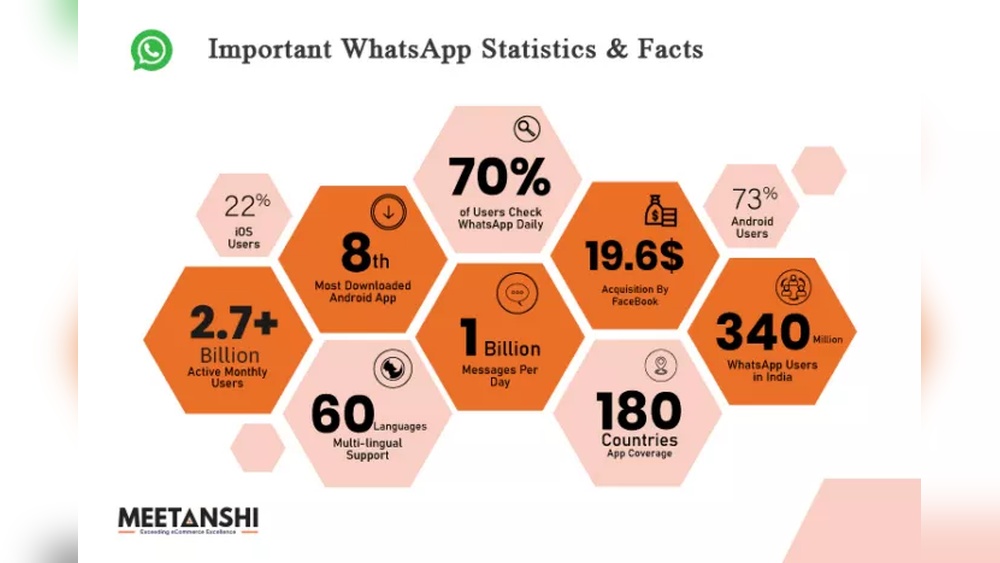
Are you curious about how millions of people connect daily through one simple app? Whatsapp users like you are part of a massive global community that changes the way we chat, share, and stay close.
Whether you use it to catch up with friends, work with colleagues, or keep family updated, understanding who these users are and how they make the most of Whatsapp can help you unlock new ways to communicate smarter and faster.
Keep reading to discover surprising facts and tips that can make your Whatsapp experience even better.
Optimize Privacy Settings
Optimizing privacy settings on WhatsApp helps protect your personal information. It keeps your chats and profile safe from unwanted views. You can decide who sees your activity and details. Simple changes make your WhatsApp experience more secure and private.
Control Last Seen And Online Status
Last Seen shows when you last used WhatsApp. You can choose to share it with everyone, only contacts, or nobody. Hiding your online status stops others from knowing when you are active. These settings help you stay private and avoid unwanted messages.
Manage Profile Visibility
Your profile photo, about info, and status can be shown or hidden. You decide if everyone, just your contacts, or no one can see them. Limiting who views your profile reduces risks of strangers accessing your data. This control keeps your personal details safe.
Customize Block And Report Options
Blocking stops specific people from messaging or calling you. Reporting lets WhatsApp know about spam or bad behavior. Customize these options to protect yourself from harassment or scams. Using block and report tools keeps your chats clean and safe.
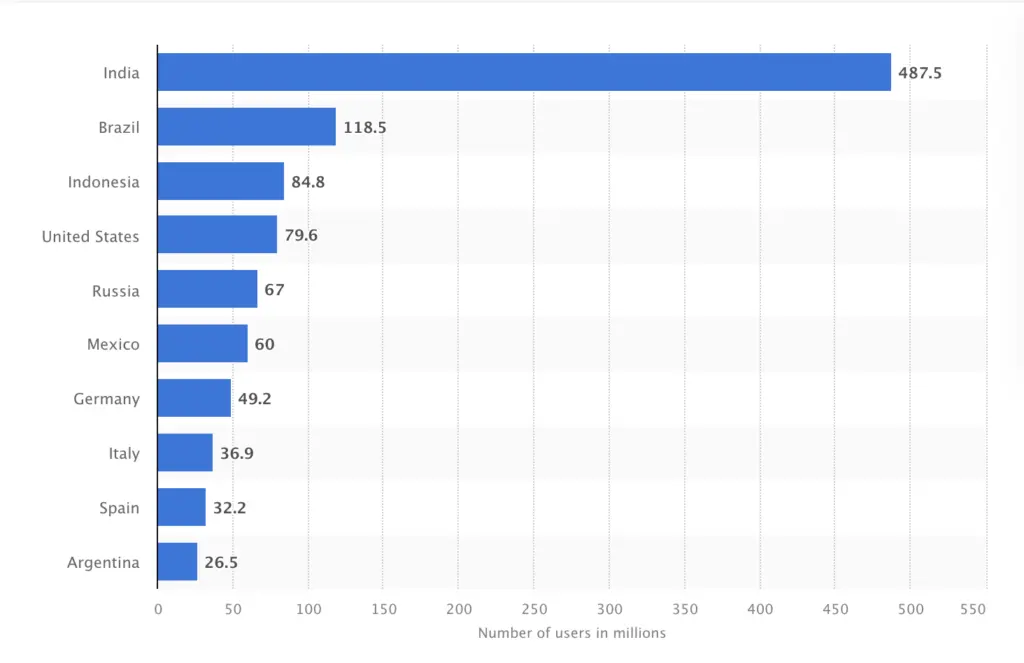
Credit: influencermarketinghub.com
Enhance Chat Organization
Keeping your WhatsApp chats neat helps you find messages fast. It reduces stress and saves time. Good chat organization keeps important talks at hand. It stops your screen from looking messy. Simple tricks can make your WhatsApp easier to use every day.
Try using WhatsApp’s built-in tools to sort your chats. They help keep your messages clear. You can focus on what matters most. Let’s explore how to organize chats smartly on WhatsApp.
Use Starred Messages Effectively
Star messages that hold key details. It can be an address, phone number, or important reminder. Tap and hold a message, then tap the star icon. Access all starred messages from the menu. This keeps your important notes in one place. No more scrolling through long chats to find them.
Archive And Mute Conversations
Archive chats you don’t need right now. They disappear from your main list but stay saved. It keeps your chat list clean and focused. Use mute to stop notifications from noisy groups. This helps you avoid constant alerts. You stay calm and check messages when ready.
Create And Manage Groups
Create groups for family, friends, or work. Group chats keep related talks together. Name groups clearly for easy recognition. Manage group settings to control who can send messages. This reduces spam and keeps chats relevant. Groups help share news and plans fast.
Boost Messaging Efficiency
Boosting messaging efficiency on WhatsApp saves time and improves communication. Simple tools and smart habits help you chat faster and clearer. These tips make messaging smooth and less stressful.
Try these easy methods to send messages quickly and effectively.
Utilize Quick Replies And Shortcuts
Quick replies let you send common messages fast. Save phrases you use often. Tap and send without typing again. Shortcuts reduce repetitive typing. They help keep chats moving quickly.
Create shortcuts for greetings, answers, or directions. Use WhatsApp’s tools or phone keyboard features. This saves effort and speeds up your replies.
Send Voice Notes With Clarity
Voice notes are faster than typing long texts. Speak clearly and pause between sentences. This helps the listener understand you better.
Find a quiet place to record. Avoid background noise for clear sound. Keep notes short for easy listening. Clear voice notes improve your message’s impact.
Explore Multimedia Sharing Tips
Sharing photos, videos, and documents adds value to chats. Choose good-quality files that load quickly. Compress large files to save data and time.
Label documents clearly before sending. Use captions for images to explain context. These small steps make your messages more useful and easy to follow.
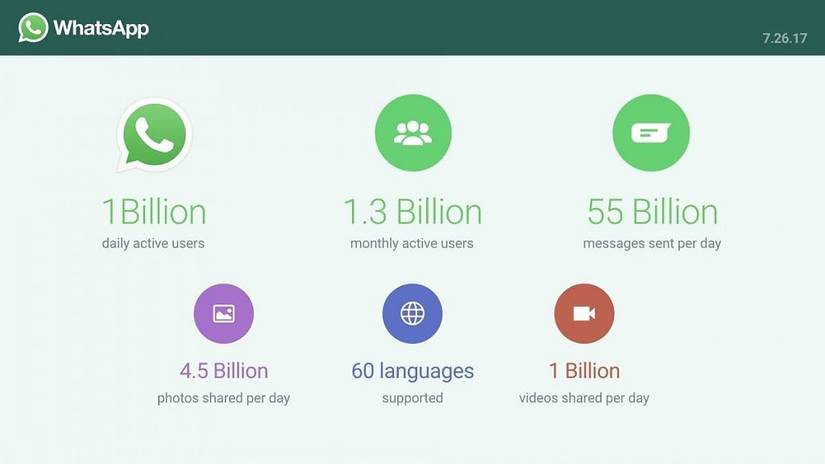
Credit: www.xda-developers.com
Leverage Advanced Features
WhatsApp offers many features beyond simple messaging. These features help users stay safe, connect easily, and share moments creatively. Using these tools can improve your WhatsApp experience.
Explore these advanced options to get more from the app.
Enable Two-step Verification
Two-step verification adds extra security to your WhatsApp account. It asks for a PIN when you register your number again. This stops others from accessing your chats without permission. Turn it on in the settings under “Account.” It protects your data and gives peace of mind.
Use Whatsapp Web And Desktop
WhatsApp Web and Desktop let you use WhatsApp on your computer. You can send messages and share files without touching your phone. Just scan a QR code from your phone’s WhatsApp app. It keeps your chats synced and makes typing faster. A great way to stay connected while working.
Explore Status Updates Creatively
Status updates share your thoughts or moments with friends. Use photos, videos, and text to express yourself. Add colors, stickers, or drawings to make posts lively. Update often to keep friends interested. It’s a fun way to communicate beyond messages.
Optimize Data And Storage
WhatsApp can use a lot of data and storage on your phone. This happens because photos, videos, and voice messages save automatically. These files fill up space fast and slow down your phone. You need to control data use and manage storage well. Doing this keeps WhatsApp running smoothly. It also frees up space for other apps and files.
Control Media Auto-download
WhatsApp downloads photos, videos, and audio automatically. This can waste your data and storage. You can stop auto-download in WhatsApp settings. Choose to download files only on Wi-Fi. Or download media only when you want. This saves data and stops your phone from filling up fast.
Manage Storage Usage
Check how much space WhatsApp uses on your phone. Open storage settings in WhatsApp to see big files. Delete old videos and photos you don’t need. Clear chats with lots of media to free space. Regular cleaning stops your phone from slowing down.
Backup Chats Regularly
Backing up chats saves your messages and media to the cloud. Set WhatsApp to back up chats daily or weekly. This keeps your data safe if you lose your phone. You can delete old chats from your phone without losing them forever.

Credit: piunikaweb.com
Frequently Asked Questions
What Is The Total Number Of Whatsapp Users Worldwide?
WhatsApp has over 2 billion active users globally as of 2024. It is one of the most popular messaging apps worldwide. The app’s user base spans across more than 180 countries, making it a leading communication platform.
How Do Whatsapp Users Benefit From End-to-end Encryption?
WhatsApp’s end-to-end encryption ensures only the sender and receiver can read messages. This provides strong privacy and security. Users can confidently share personal information without fear of interception or hacking.
Which Age Groups Primarily Use Whatsapp?
WhatsApp is popular among users aged 18 to 44. It appeals to young adults, professionals, and families for daily communication. The app’s easy interface attracts a diverse range of age groups globally.
Can Businesses Connect With Whatsapp Users Effectively?
Yes, WhatsApp Business allows companies to engage users directly. It offers tools for customer support, product updates, and promotions. This helps businesses build stronger relationships and increase customer satisfaction.
Conclusion
WhatsApp users enjoy easy and fast messaging every day. It connects people across the world instantly. Group chats help friends and families stay close. Voice and video calls make talks feel personal. The app keeps messages private and safe. Many use it for work and fun alike.
WhatsApp keeps growing as more people join. It stays simple and useful for all ages. A tool that helps us share moments quickly. Everyone can benefit from using WhatsApp in daily life.