Are you wondering how much Google Ads will really cost your business? You’re not alone.
Understanding the price behind those clicks can feel confusing and overwhelming. But knowing what to expect can help you plan your budget smartly and get the best results without overspending. You’ll discover the key factors that affect Google Ads costs and learn simple ways to control your spending while maximizing your returns.
Keep reading to find out exactly what you need to know before you start advertising with Google Ads.
Credit: adsbot.co
Google Ads Pricing Models
Google Ads uses different pricing models to charge advertisers. Each model fits different goals and budgets. Understanding these models helps you choose the best option for your campaign.
Pricing depends on how you want to pay for ads. You can pay for clicks, impressions, or actions. Each method has its own cost structure and benefits.
Cost Per Click (cpc)
CPC means you pay only when someone clicks your ad. This model is popular for driving traffic to websites. You set a maximum bid for each click, and actual costs may vary.
CPC helps control costs and measure interest. It works well if you want visitors to take action on your site.
Cost Per Thousand Impressions (cpm)
CPM charges you for every 1,000 times your ad shows. It focuses on brand awareness rather than clicks. CPM is good for campaigns aiming for broad visibility.
You pay even if no one clicks the ad. This model suits businesses wanting to reach many people quickly.
Cost Per Acquisition (cpa)
CPA means you pay only when a specific action happens. Actions can be purchases, sign-ups, or downloads. This model targets conversions, not just clicks or views.
CPA can be cost-effective for campaigns focused on results. It helps avoid spending on uninterested users.
Factors Influencing Google Ads Costs
Google Ads costs vary for every advertiser. Several factors influence how much you pay. Understanding these can help you manage your budget effectively.
Costs depend on your industry, audience, and goals. Knowing what affects prices makes your campaigns smarter and more efficient.
Keyword Competition
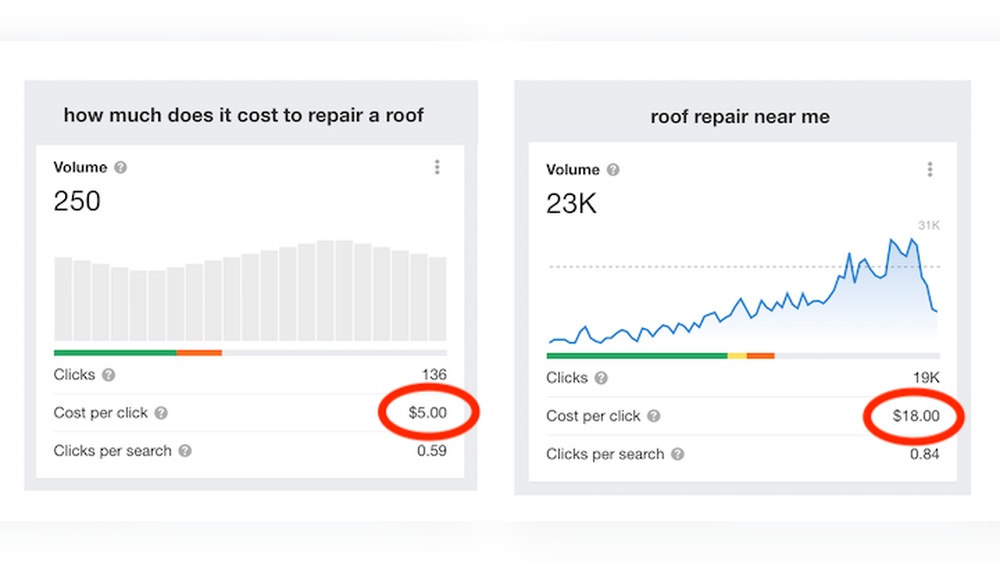
Keywords are the words people search for on Google. Some keywords are very popular and many advertisers want them. High competition keywords cost more per click. Low competition keywords are cheaper but get fewer searches.
Choosing the right keywords balances cost and reach. Research helps find affordable keywords with good traffic.
Quality Score Impact
Google gives each ad a Quality Score. It measures how relevant your ad and landing page are. Higher scores lower your cost per click. Google rewards useful and clear ads.
Good ads get better placement and cost less. Improving ad quality saves money and improves results.
Geographic Targeting
You can choose where your ads appear by location. Ads shown in big cities usually cost more. Smaller towns or rural areas often have cheaper ads. Targeting the right area affects your cost and audience size.
Focus on locations that matter most for your business.
Ad Rank And Bid Strategy
Ad Rank decides the position of your ad on the page. It depends on your bid and Quality Score. Higher bids can win better positions but cost more. Different bid strategies fit different goals and budgets.
Choosing a smart bid strategy controls costs and helps meet your targets.
Setting Your Google Ads Budget
Setting your Google Ads budget is an important step in your advertising journey. It controls how much you spend and helps you get the best results. A clear budget plan keeps your ads running smoothly without overspending.
Knowing how to set and manage your budget helps you reach your goals. You can start small and grow your budget as you learn what works best.
Daily Vs Monthly Budgeting
Choose between daily and monthly budgets based on your needs. A daily budget limits spend each day. This keeps costs steady and easy to control.
A monthly budget sets a total spend for the whole month. This gives more flexibility on busy days and slower days. It helps spread your budget evenly over time.
Allocating Budget By Campaign
Divide your budget across different campaigns. Focus more money on campaigns that bring better results. Spend less on those that need improvement.
Allocating budget by campaign helps you control where your money goes. It ensures important products or services get enough attention.
Adjusting Budget Based On Performance
Check your ad results regularly. Increase budget on high-performing campaigns to get better returns. Lower budget on campaigns that do not perform well.
Adjusting your budget based on performance keeps your ads efficient. It prevents waste and helps grow your business steadily.
Credit: www.vertical-leap.uk
Smart Bidding Strategies
Smart bidding strategies help you control how much you pay for Google Ads. They use Google’s machine learning to adjust bids automatically. This improves your ad performance and controls costs. You can choose the right strategy based on your goals and budget.
Manual Bidding
Manual bidding lets you set the exact cost per click (CPC). You decide how much to pay for each click on your ad. This option gives you full control but needs time and attention. It works well if you know your market and want to manage costs closely.
Enhanced Cpc
Enhanced CPC adjusts your manual bids to get more conversions. Google raises or lowers your bids based on the chance of a click leading to a sale. It keeps you in control but adds a smart boost. This helps improve results without extra work.
Target Cpa
Target CPA aims to get conversions at a set cost per action (CPA). You tell Google the price you want to pay for each conversion. The system then adjusts bids to meet this goal. It saves time and helps keep costs steady.
Maximize Conversions
Maximize Conversions focuses on getting the most conversions within your budget. Google automatically sets bids to use your budget fully. This strategy is good if you want more sales or leads quickly. You do not need to set individual bid amounts.
Estimating Costs For Different Industries
Estimating Google Ads costs varies by industry. Each business has unique needs and competition levels. These factors affect the price per click and budget requirements.
Understanding costs helps plan your advertising budget better. It also shows what to expect in different markets and sectors.
E-commerce
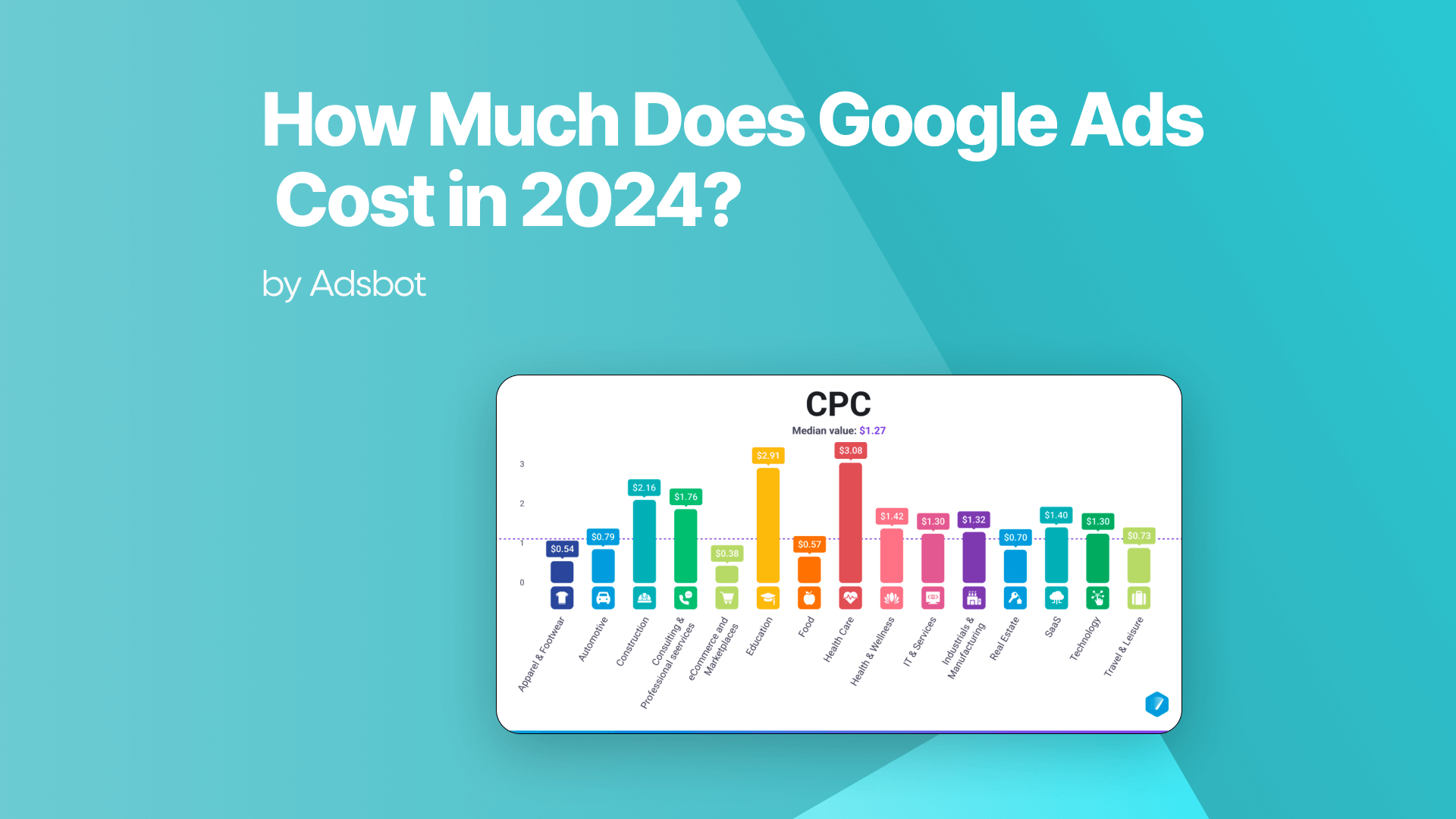
E-commerce businesses often face high competition. Popular products drive up the cost per click (CPC). The average CPC ranges from $0.70 to $1.50.
Seasonal sales and promotions also change costs. More clicks mean higher daily budgets. Still, e-commerce ads can deliver quick sales and good returns.
Local Services
Local service providers usually pay less per click. Costs range from $1 to $4 depending on the service and area. Plumbing, cleaning, and repair services have steady demand.
Targeting a small geographic area reduces waste. Ads reach only nearby customers. This focus keeps costs manageable and leads to more calls.
B2b Companies
B2B ads often cost more per click. The CPC can be $3 to $8 or higher. Complex products require detailed ads and longer sales cycles.
Businesses target decision-makers with specific keywords. The goal is quality leads, not just clicks. A higher budget can bring better prospects and growth.
Tips To Lower Google Ads Costs
Lowering Google Ads costs helps you get better results without spending more. Small changes can make your ads work smarter. Focus on key areas that control your ad spend. This guide shares simple tips to reduce your costs and improve ad performance.
Improving Quality Score
Quality Score affects your cost per click and ad rank. Google gives better prices to ads with high Quality Scores. Make your ads relevant to the keywords you use. Write clear, useful ad text that matches what users want. Use landing pages that load fast and have good content. Better Quality Scores mean lower costs and better ad placement.
Negative Keywords Usage
Negative keywords stop your ads from showing on irrelevant searches. This saves money by avoiding clicks from uninterested users. Regularly add negative keywords to your campaigns. Check search term reports to find words that waste budget. This keeps your ads focused on the right audience. It helps you spend only on clicks that matter.
Ad Scheduling
Set your ads to run at times when users are active. Avoid showing ads during hours with low traffic or poor results. Analyze your campaign data to find the best days and times. Scheduling ads saves money by targeting peak periods. It increases the chance of getting clicks that lead to sales.
Geotargeting Effectively
Geotargeting lets you show ads only in specific locations. Focus your budget on areas where customers are more likely to buy. Exclude places with low interest or poor conversion rates. Use location data to refine your targeting. This lowers costs by reducing wasted clicks from irrelevant regions.
Measuring Return On Investment
Measuring return on investment (ROI) helps you see if Google Ads are worth the cost. It shows how much money you earn compared to what you spend. This helps you spend wisely and improve your ads over time. You can track sales, leads, or any action that matters to your business. Let’s explore simple ways to measure ROI effectively.
Tracking Conversions
Conversions are actions users take after clicking your ad. These can be purchases, sign-ups, or calls. Tracking conversions tells you which ads bring results. You set up conversion tracking in your Google Ads account. It uses a small code snippet on your website. This code counts every time a visitor completes a goal. Knowing conversions helps you focus on ads that work best.
Using Google Analytics
Google Analytics gives detailed data about your website visitors. It shows how visitors found your site and what they do there. Linking Google Ads with Analytics gives deeper insights. You can see user behavior after clicking ads. This helps find weak points in your sales process. Analytics also tracks goals like time spent or pages viewed. Using this data improves your ad strategy and boosts ROI.
Cost Vs Revenue Analysis
Compare how much you spend on ads to the money earned. Subtract ad costs from total revenue to find profit. This shows if ads are making or losing money. Divide revenue by ad cost for a return ratio. A ratio above 1 means you earn more than you spend. Use this analysis regularly to adjust budgets and bids. This keeps your ad campaigns profitable and efficient.
Credit: fitsmallbusiness.com
Frequently Asked Questions
How Much Does Google Ads Cost Per Click?
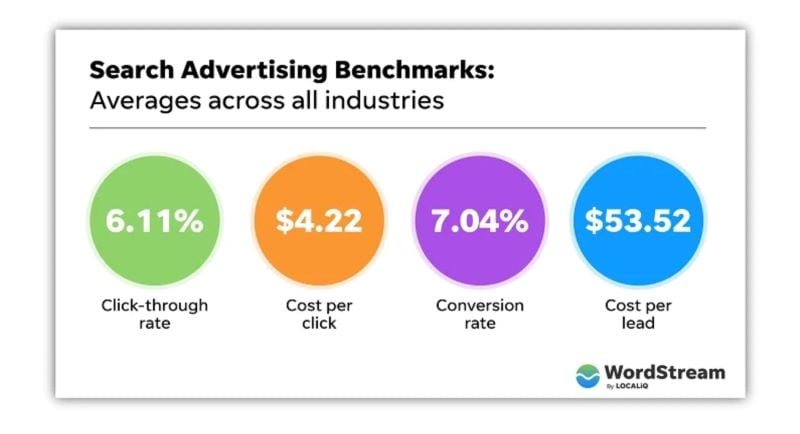
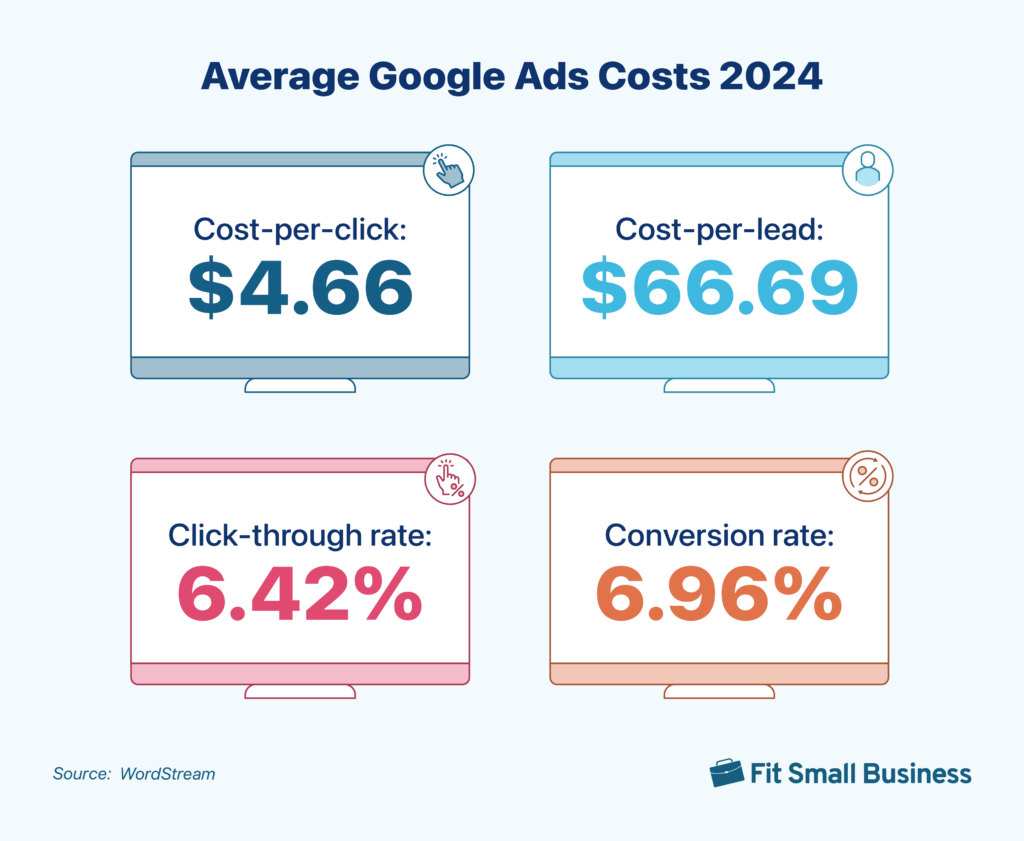
Google Ads cost per click varies by industry and competition. On average, it ranges from $1 to $2. Highly competitive keywords can cost more, while niche markets might be cheaper. You set a maximum bid to control costs and only pay when someone clicks your ad.
What Is The Minimum Budget For Google Ads?
There is no official minimum budget for Google Ads. You can start with as little as $1 per day. However, a higher budget increases ad visibility and data for optimization. Small daily budgets are suitable for testing campaigns before scaling.
How Does Google Ads Pricing Work?
Google Ads uses a pay-per-click (PPC) model. Advertisers bid on keywords, and the highest bidder wins the ad placement. You only pay when someone clicks your ad, not for impressions. The actual cost depends on competition, Quality Score, and your maximum bid.
Can I Control My Google Ads Spending?
Yes, you can control spending by setting daily or monthly budgets. Google Ads stops showing your ads once the budget is reached. You can also pause or adjust campaigns anytime to manage costs effectively.
Conclusion
Google Ads costs depend on your budget and goals. You pay only when someone clicks your ad. Setting a daily limit helps control spending. Prices vary by industry and competition level. Small budgets can still bring good results. Tracking your ads helps improve performance over time.
Start with a clear plan and adjust as needed. This way, you get the best value for your money. Understanding costs helps you decide if Google Ads fits your business. Keep testing to find what works best for you.
Vill du ha expertstöd med din Google Ads-strategi? Kontakta Hive Creatives så hjälper vi dig maximera avkastningen på din annonsbudget.