If you want your website to stand out and attract more visitors, understanding SEO is a must. But where do you start?
SEO Basics For Beginners will guide you step-by-step, using simple language and clear examples. You’ll learn how to make your site easier to find on search engines like Google. Imagine turning your website into a magnet that pulls in the right people — that’s exactly what good SEO can do for you.
Keep reading, and by the end, you’ll have the tools to boost your online presence and grow your audience.
Credit: my-tech-diary.medium.com
What Is Seo
SEO stands for Search Engine Optimization. It helps websites appear higher in search results. This makes it easier for people to find them. SEO is important for anyone with a website. It improves visibility and drives more visitors.
Search engines like Google use complex rules. These rules decide which pages show first. SEO follows these rules to rank better. It involves many small steps that add up.
What Seo Does
SEO improves a website’s chance to show on search engines. It targets keywords people type when searching. Good SEO helps match these keywords with your content. This brings relevant visitors to your site.
Search engines scan the internet for pages. They collect information and organize it. Then, they rank pages based on relevance and quality. SEO helps your page meet these standards.
Types Of Seo
There are three main types of SEO. On-page SEO focuses on content and keywords on your site. Off-page SEO deals with links from other sites. Technical SEO improves site speed and structure.
How Search Engines Work
Search engines help people find information on the internet. They work by scanning websites and deciding which pages to show for each search. Understanding how they work can improve your website’s chances of being found.
Search engines use special programs to explore the web. These programs read the content on pages and collect data. This process is called crawling.
Crawling The Web
Crawling means the search engine sends out bots or spiders. These bots visit websites and follow links. They collect information from each page they visit.
They look for text, images, and other content. They also check if a page works well on phones and computers.
Indexing Information
After crawling, search engines organize the data. This step is indexing. It stores the information in a huge database.
Indexing helps the search engine find pages quickly. It also checks if the content is useful and relevant.
Ranking Pages
When someone searches, the engine looks in its index. It tries to find the best pages for that search.
Ranking depends on many factors. These include keywords, page speed, and links from other sites.
The higher a page ranks, the more visible it is to users.
Keyword Research Strategies
Keyword research is the first step in SEO. It helps find words people use to search online. Using the right keywords can bring more visitors to your site. Good keywords match what your audience wants. They also fit your content well. This section covers simple strategies for keyword research.
Finding The Right Keywords
Start with words related to your topic. Think about what your audience types in search boxes. Use simple, clear terms. Include questions people ask. Check for words with high search volume but low competition. Choose keywords that fit your content’s purpose. Avoid very broad or too specific terms.
Tools For Keyword Research
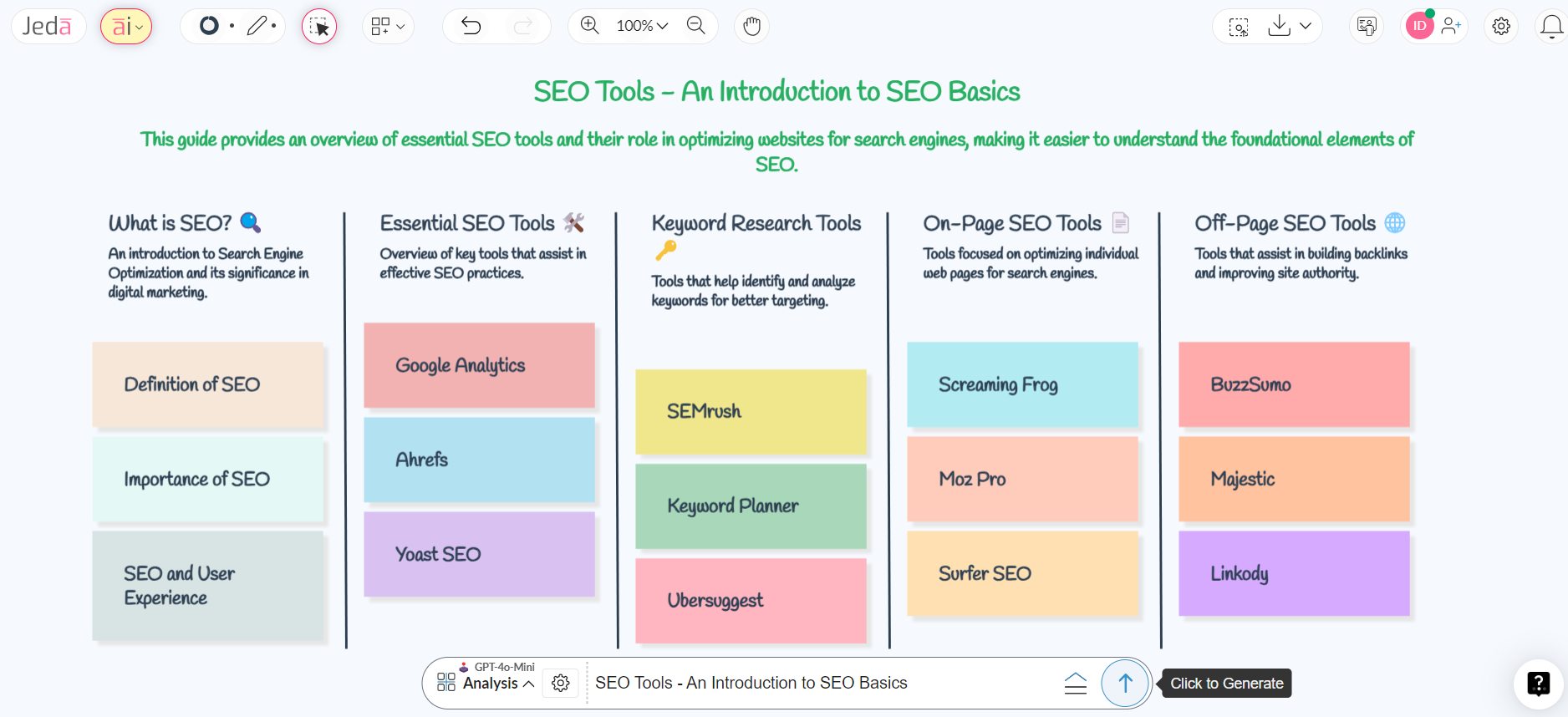
Several free and paid tools help find keywords. Google Keyword Planner shows popular search terms. Ubersuggest gives ideas and difficulty scores. AnswerThePublic reveals questions people ask online. These tools show search volume and trends. Use them to pick keywords that fit your topic. Try different tools for best results.
Analyzing Competitor Keywords
Look at keywords your competitors use. Visit their websites and check page titles and headings. Use tools like SEMrush or Ahrefs to see their top keywords. Find keywords they rank for but you don’t. Target similar keywords if they match your content. Learn from their strategy but make your content unique.
Credit: www.linkedtea.com
On-page Seo Techniques
On-page SEO techniques help improve your website’s visibility in search engines. These methods focus on optimizing elements within your web pages. They make it easier for search engines to understand and rank your content. Good on-page SEO also enhances user experience.
Using the right techniques can increase traffic and keep visitors engaged. Below are some key areas to focus on for beginners.
Optimizing Titles And Meta Descriptions
Titles and meta descriptions show up in search results. They tell users what your page is about. Use clear and relevant keywords in your titles. Keep titles under 60 characters to avoid cutting off.
Meta descriptions should be concise and informative. Aim for 150-160 characters. Make descriptions inviting to encourage clicks. Avoid keyword stuffing. Write naturally and clearly.
Using Header Tags Effectively
Header tags (H1, H2, H3, etc.) organize content on your page. Use one H1 tag for the main title. Use H2 and H3 tags for subheadings. This helps readers scan content quickly.
Header tags also tell search engines about your content structure. Include keywords in headers but keep them relevant. Clear headers improve both SEO and user experience.
Improving Url Structure
URLs should be short, clear, and easy to read. Use words that describe the page content. Avoid long strings of numbers or symbols. Separate words with hyphens, not underscores.
Good URLs help search engines understand your page topics. They also make sharing links easier. Keep URLs consistent across your website.
Enhancing Content Quality
High-quality content attracts visitors and keeps them longer. Write useful and original content. Avoid copying from other sites. Use simple language and short sentences.
Focus on answering questions your audience may have. Add examples or details to explain points. Update content regularly to stay relevant.
Technical Seo Basics
Technical SEO is the foundation of a strong website. It helps search engines find and understand your pages. Without it, your content may not rank well. This section covers simple technical SEO tasks anyone can do.
Improving Site Speed
Fast websites keep visitors happy. They also get better rankings on search engines. Use tools like Google PageSpeed Insights to check your speed. Compress images, reduce server response time, and minimize code. These steps help your site load quickly on any device.
Mobile-friendly Design
More people use phones to browse the web. A mobile-friendly site adjusts to different screen sizes. Use responsive design so your content fits all devices. Test your site with Google’s Mobile-Friendly Test tool. Easy navigation and readable text improve user experience.
Fixing Crawl Errors
Search engines use crawlers to read your site. Crawl errors stop them from accessing pages. Check Google Search Console for crawl error reports. Fix broken links, missing pages, and server errors. Clean site structure helps search engines index your content properly.
Link Building Essentials
Link building is a key part of SEO. It helps search engines find and trust your site. Good links bring more visitors and improve your ranking. Focus on building links that add value. Avoid shortcuts that can harm your site’s reputation.
Earning Quality Backlinks
Quality backlinks come from trusted and relevant websites. Create useful content that others want to share. Write guides, answer questions, or offer unique insights. Reach out to bloggers and webmasters politely. Share your content and explain why it helps their audience. Guest posting on reputable sites is another good way. Always aim for natural, earned links. These links boost your site’s authority and traffic.
Avoiding Bad Links
Bad links come from spammy or irrelevant sites. They can lower your search ranking. Steer clear of link farms and paid links. Do not use automated tools to build links quickly. Check your backlink profile regularly for suspicious links. Use tools like Google Search Console for this. Disavow links that seem harmful. Protect your site’s trustworthiness by keeping links clean and relevant.
Measuring Seo Success
Measuring SEO success is key to improving your website. It shows what works and what needs change. Without tracking, you cannot know if your efforts bring results.
Start with simple steps. Look at how your site ranks on search engines. Use tools to see visitor behavior. These actions help you understand your SEO performance better.
Tracking Rankings
Tracking rankings means checking your website’s position on search results. Higher rankings bring more visitors. Use tools like Google Search Console or other ranking trackers. Check your keywords regularly. Note changes and patterns over time. This data shows if your SEO strategies help your site grow.
Using Analytics Tools
Analytics tools provide details about your website visitors. Google Analytics is a popular choice. It shows visitor numbers, behavior, and traffic sources. You learn which pages attract visitors and which do not. Monitor bounce rates and session duration. This helps you adjust your content and SEO tactics. Regular use of analytics guides better decisions for your site.
Credit: www.amazon.com
Common Seo Mistakes To Avoid
Many beginners make simple SEO mistakes that hurt their site’s ranking. Avoiding these errors saves time and effort. It also helps your website perform better on search engines.
Some mistakes seem small but cause big problems. Knowing them early keeps your SEO on track. Here are common SEO mistakes to watch out for.
Using Too Many Keywords
Stuffing your content with keywords looks unnatural. Search engines may see this as spam. Focus on using keywords naturally. Write for people, not just robots.
Ignoring Mobile Users
Many visitors use phones to browse websites. Sites that do not work well on mobile lose traffic. Make sure your site looks good and works fast on phones.
Skipping Meta Descriptions
Meta descriptions help search engines understand your page. They also show up in search results. Not adding them means missed chances to attract clicks.
Copying Content From Other Sites
Duplicate content lowers your site’s trust with search engines. Always write original text. Unique content improves your ranking and attracts visitors.
Neglecting Site Speed
Slow websites frustrate users and search engines. A fast site keeps visitors longer. Use tools to check your speed and fix issues quickly.
Frequently Asked Questions
What Is Seo And Why Is It Important For Beginners?
SEO stands for Search Engine Optimization. It helps websites rank higher in search results. Beginners benefit by attracting more traffic and improving online visibility.
How Do Keywords Improve Seo For Beginners?
Keywords connect your content with user searches. Using relevant keywords increases your chances of ranking higher. Choose keywords wisely for better SEO results.
What Are On-page Seo Basics Every Beginner Should Know?
On-page SEO includes optimizing titles, headers, URLs, and content. It improves site relevance and user experience. Beginners should focus on keyword placement and meta descriptions.
How Long Does It Take To See Seo Results?
SEO results usually take 3 to 6 months to appear. It depends on competition, content quality, and website optimization. Consistency and patience are key for success.
Conclusion
SEO basics help your website show up in search results. Use clear keywords that match what people search for. Write simple, helpful content that answers questions. Make sure your site works well on phones and loads quickly. Keep learning and updating your pages often.
Small efforts add up to better online visibility. Start with these easy steps and watch your website grow. SEO is a tool anyone can use to reach more people. Keep practicing, and your skills will improve over time.