Are you tired of constant ads interrupting your online experience? You’re not alone.
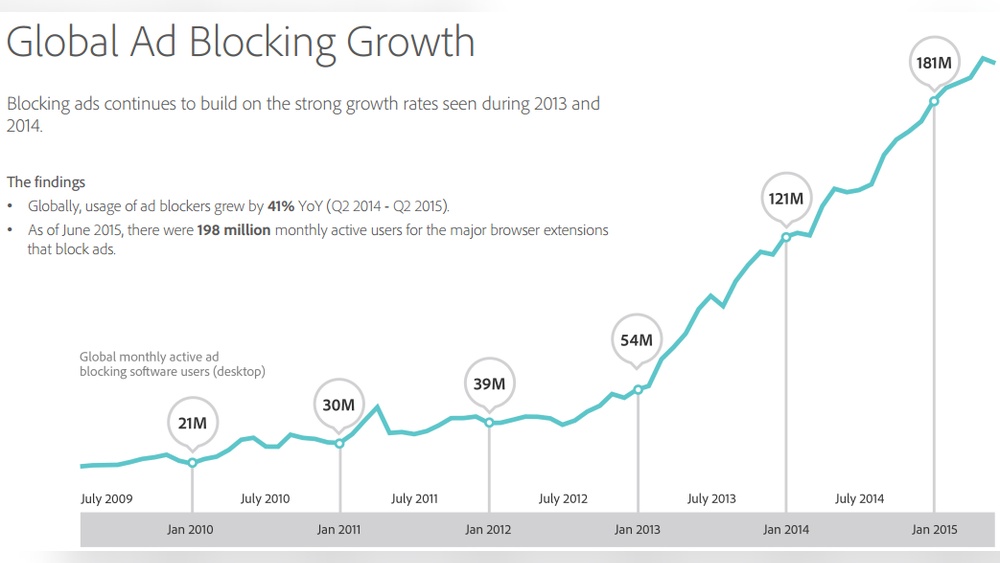
Millions of users like you turn to ad blockers to take control of what they see on their screens. But what does being an ad blocker user really mean for your browsing, your privacy, and even the websites you visit?
Keep reading to discover how ad blockers impact your internet life and what you should know to make the best choices for yourself.
Credit: www.thinkwithgoogle.com
Why Use Ad Blockers
Ad blockers have become popular tools for many internet users. They help improve the online experience by stopping ads from showing on websites. Using ad blockers brings several benefits that make browsing smoother and safer.
Improving Page Load Speed
Ads often slow down website loading times. Some ads use large files or videos. Blocking these ads makes pages load faster. Faster pages save time and reduce frustration. This is helpful for users with slow internet connections.
Reducing Distractions
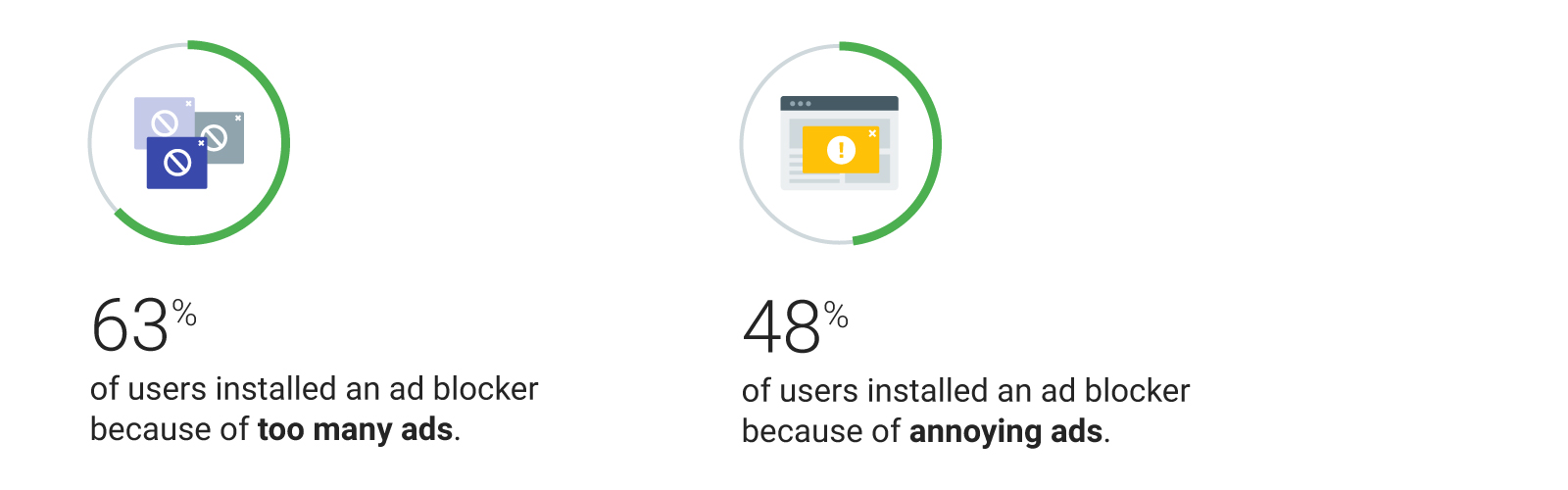
Ads can be annoying and distracting. Pop-ups and flashy banners pull attention away from content. Ad blockers remove these distractions. This helps users focus on the main information. Browsing becomes cleaner and more enjoyable.
Enhancing Privacy
Many ads track user behavior online. They collect data without clear permission. Ad blockers stop these trackers from working. This protects personal information and browsing habits. Users gain more control over their privacy.
Choosing The Right Ad Blocker
Choosing the right ad blocker can improve your web experience. It stops annoying ads and speeds up page loading. But not all ad blockers work the same way. Some block all ads, while others let some show. Picking one depends on your needs and devices.
Popular Ad Blocker Options
Several ad blockers are popular among users. AdBlock Plus is easy to use and blocks most ads. uBlock Origin is lightweight and uses less memory. Ghostery focuses on blocking trackers along with ads. Each offers different features and settings.
Compatibility With Browsers
Check if the ad blocker works with your browser. Most work on Chrome, Firefox, and Edge. Some also support Safari and Opera. Mobile browser support varies. Installing the right version ensures smooth performance.
Balancing Blocking And Allowing Ads
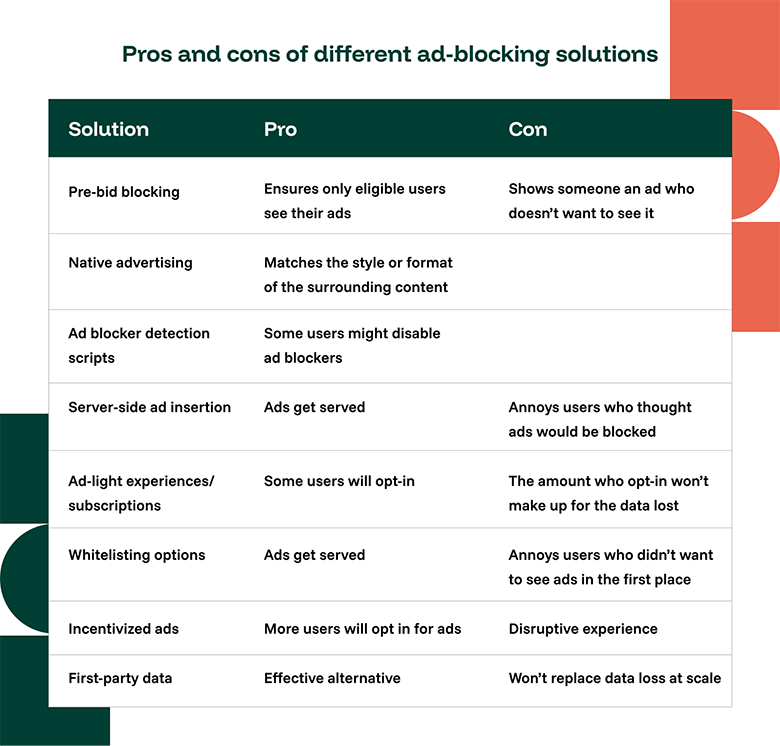
Some ads support websites you like. Many ad blockers let you whitelist trusted sites. This means ads on those sites will show. Balancing blocking and allowing keeps sites running. Adjust settings to fit your preferences and browsing habits.
Customizing Ad Blocker Settings
Customizing ad blocker settings helps control your online experience. You decide which ads to block or allow. This balance keeps browsing smooth and fair for websites you like. Adjusting settings fits your needs and keeps ads from being too annoying.
Whitelisting Trusted Sites
Whitelisting lets you support favorite websites. It stops the ad blocker on certain sites. These sites can show ads without being blocked. This helps websites earn money while you browse. Add sites you trust to the whitelist easily.
Blocking Specific Content Types
You can block certain ad types only. Choose to block pop-ups, video ads, or banners. This option avoids blocking all ads at once. It keeps important content visible and stops distractions. Tailor your ad blocker for the best view.
Managing Filters And Updates
Filters decide which ads get blocked. Update filters regularly for better ad blocking. Some ad blockers let you add custom filters. Manage these filters for more control. Keep your ad blocker working well with updates.
Avoiding Common Issues
Ad blockers improve your web experience by removing ads. Still, they can cause problems on some websites. Knowing how to avoid these issues helps you use ad blockers smoothly. Below are tips to handle common challenges.
Dealing With Site Breakage
Sometimes, ad blockers stop parts of a website from working. Buttons or videos may not load correctly. Try turning off the ad blocker on that site. Refresh the page after disabling it. This often fixes the problem quickly.
Another option is to update your ad blocker. New versions fix bugs and improve compatibility. If the problem continues, try a different ad blocker. Some work better with certain sites.
Handling Anti-ad Blocker Messages
Many sites show messages asking you to disable your ad blocker. These messages can block content or stop you from using the site. You can whitelist the site to allow ads there. This stops the message from appearing.
Use ad blockers that have stealth modes. These modes hide your ad blocker from the site. This helps you avoid anti-ad blocker messages while still blocking ads.
Troubleshooting Performance Problems
Ad blockers can slow down your browser or cause crashes. Clear your browser cache regularly to keep speed high. Disable extra browser extensions that may conflict with your ad blocker.
Check your ad blocker’s settings. Lower filter lists can improve performance. Restart your browser if it feels slow. Regular updates keep your ad blocker running smoothly.
Enhancing Security Beyond Ad Blocking
Ad blockers help stop annoying ads and trackers. But security needs more than just blocking ads. Protecting your online life means adding extra layers of safety. Simple tools and habits can keep your data safe. Here are easy ways to boost security beyond ad blocking.
Using Vpns And Privacy Extensions
VPNs hide your IP and encrypt your internet data. This makes it hard for others to spy on your activities. Privacy extensions block trackers and prevent websites from collecting your info. These tools work well with ad blockers to keep you private online.
Keeping Software Updated
Updates fix security holes in your apps and system. Running old software can leave you open to attacks. Set your devices to update automatically. This keeps your computer and phone safe from new threats.
Safe Browsing Practices
Visit only trusted websites. Avoid clicking on suspicious links or pop-ups. Use strong, unique passwords for each site. Be careful with downloads and email attachments. These habits help stop malware and protect your privacy.
Credit: funnel.io
Supporting Content Creators
Supporting content creators is important for a healthy internet. Creators spend time and effort making articles, videos, and other materials. Ads help them earn money to keep producing content. Many users block ads but still want to support creators. Finding a balance helps everyone enjoy content without frustration.
Using Acceptable Ads Programs
Acceptable Ads programs allow some non-intrusive ads. These ads do not disrupt your experience. Users can whitelist sites they trust. This way, creators get ad revenue without annoying users. Many ad blockers offer this option. It helps keep websites free and supported.
Donating Or Subscribing
Donations give direct support to creators. Many websites have donation buttons or Patreon links. Subscriptions offer regular income for creators. Subscribers may get extra content or perks. This support reduces reliance on ads. It helps creators focus on quality content.
Balancing Ad Blocking With Fair Use
Ad blocking is a personal choice. Blocking all ads can hurt small creators. Some ads are necessary for free content. Users can block aggressive or harmful ads. Allowing some ads keeps websites alive. Balance means supporting creators while enjoying a clean web.

Credit: www.statista.com
Frequently Asked Questions
What Are The Main Benefits Of Using Ad Blockers?
Ad blockers improve browsing speed by removing ads and reduce distractions. They protect privacy by blocking trackers and prevent malware from malicious ads. Overall, they create a cleaner, safer online experience for users.
How Do Ad Blockers Affect Website Revenue?
Ad blockers reduce ad impressions, leading to lower revenue for websites relying on ads. This can impact free content availability and site maintenance. Some sites use alternative monetization methods or ask users to disable blockers.
Are Ad Blockers Legal To Use?
Yes, ad blockers are legal in most countries. They are considered user tools to control online experience. However, some websites may restrict access if they detect ad blocker usage, encouraging users to whitelist their site.
Can Ad Blockers Block All Types Of Online Ads?
Ad blockers block most display, video, and pop-up ads but may not catch all native or sponsored content. Effectiveness depends on the blocker’s filters and updates. Users may still see some ads depending on the site.
Conclusion
Ad blockers help users avoid unwanted ads and distractions. They make browsing faster and cleaner. Many people choose them for privacy and safety reasons. Still, some websites rely on ads to offer free content. Balancing user experience and website support is key.
Understanding both sides helps users make smart choices. Use ad blockers wisely to enjoy a better web. Stay aware of how ads impact your online time. Keep control over your browsing with simple tools.