Have you ever watched a video and wondered what comes next? That moment when the screen changes, showing you new videos, invites you to subscribe, or highlights something important—that’s called an end screen.
If you want to keep your viewers engaged and grow your channel, mastering the end screen is a game changer. You’ll discover how to create powerful end screens that grab attention and guide your audience exactly where you want them to go.
Ready to turn those last seconds into your biggest opportunity? Let’s dive in.

Credit: www.shutterstock.com
Crafting Effective End Screens
End screens help keep viewers on your channel. They guide people to watch more videos or subscribe. Crafting a good end screen can boost your channel’s growth. It also improves viewer engagement and watch time.
To create effective end screens, focus on clear goals. Know what action you want viewers to take next. Use simple and clear design. Keep the end screen short and focused.
Key Elements To Include
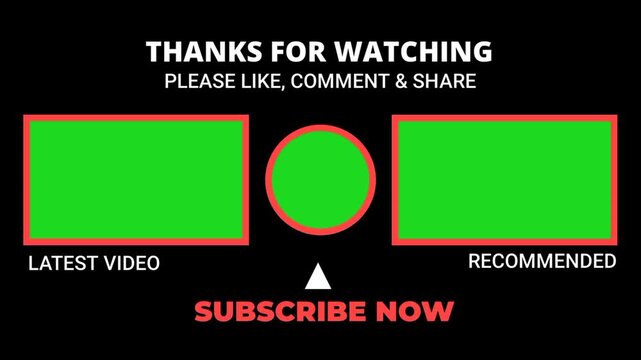
Include a strong call to action. Ask viewers to subscribe or watch another video. Add video or playlist links for easy access. Place your channel icon for quick subscription.
Show relevant videos that fit your channel style. Use clear text to explain each link. Avoid clutter to keep viewers focused. Timing matters: show the end screen in the last 5-20 seconds.
Design Tips For Visual Appeal
Use bright colors that match your brand. Make text large and easy to read. Balance images and space to avoid crowding. Use simple fonts for clarity.
Keep a clean layout with clear sections. Use contrast to make elements stand out. Test your end screen on mobile and desktop. Make sure it looks good on all devices.
Credit: stock.adobe.com
Optimizing Video Suggestions
Optimizing video suggestions on your end screen helps keep viewers watching longer. It guides them to other videos they may like. This boosts your channel’s watch time and growth. Small changes make a big difference.
Choosing Related Content
Select videos that match the current video’s topic. This keeps viewers interested and engaged. For example, if your video is about cooking, suggest other cooking videos. Avoid unrelated videos that may confuse or bore viewers. Relevant suggestions increase the chance viewers will click next.
Using Playlists To Increase Watch Time
Playlists group videos with similar themes or series. Adding playlists to your end screen helps viewers watch more videos in a row. It creates a smooth viewing experience. Playlists also make it easier for viewers to find what they want next. This simple step can boost your channel’s total watch time significantly.
Call-to-action Strategies
Call-to-action strategies at the end screen help guide viewers on what to do next. They keep the audience engaged and increase channel growth. Clear, simple actions work best. These steps help build a strong connection with viewers.
Encouraging Subscriptions
Ask viewers to subscribe for more videos. A friendly reminder boosts subscription rates. Show the subscribe button on the end screen. Tell viewers why subscribing helps them stay updated. Use phrases like ”Subscribe for new content.” Keep it short and direct.
Prompting Comments And Likes
Invite viewers to comment and like the video. Questions encourage more comments. For example, ask what they think or want to see next. Liking the video supports the channel. Remind viewers that their feedback matters. This creates a sense of community and trust.
Timing And Placement Tricks
Timing and placement are key to effective end screens on videos. They guide viewers to take action or watch more content. Done right, they keep viewers engaged until the very last second.
Small changes in when and where you place end screens can make a big difference. The goal is to catch the viewer’s attention without interrupting their experience. Thoughtful timing and smart placement help boost clicks and views.
Best Moments To Show End Screens
Show end screens in the last 5 to 20 seconds of your video. This is when viewers expect a wrap-up or next steps. Avoid placing them too early to keep interest high.
Use end screens after a strong closing message or scene. This keeps viewers focused and ready to act. Avoid sudden shifts that confuse or distract.
Avoiding Viewer Drop-off
Start the end screen just before the video ends. This prevents viewers from leaving too soon. It also gives time for clickable elements to appear clearly.
Place end screen elements away from distracting parts of the video. Keep them visible but not blocking important visuals. This helps maintain viewer attention.
Analyzing Performance Metrics
Analyzing performance metrics is key to improving your video end screens. It helps you see how viewers interact with your content at the final moment. This data shows what works and what needs change. Understanding these numbers helps you make smart choices for your channel’s growth.
Tracking Click-through Rates
Click-through rate (CTR) measures how many viewers click on your end screen links. A high CTR means viewers find your suggestions interesting. Low CTR signals the need for better design or placement. Watch which elements get the most clicks. Use this data to improve your end screen layout.
Adjusting Based On Viewer Behavior
Viewers act differently on each video. Some watch until the end, others leave early. Check when viewers stop watching and adjust your end screen timing. Test different styles and positions to fit your audience. Small changes can increase engagement and clicks.

Credit: www.shutterstock.com
Frequently Asked Questions
What Is An End Screen In Videos?
An end screen appears in the last 5-20 seconds of a video. It promotes other videos, playlists, or channels. It helps increase viewer engagement and channel growth by encouraging viewers to watch more content or subscribe.
How Do I Add An End Screen To My Video?
To add an end screen, go to YouTube Studio. Select your video, then click “End screen” under the editor tab. Choose templates or customize elements like video links, subscribe buttons, or playlists to display at the video’s end.
Why Are End Screens Important For Youtube Growth?
End screens increase watch time by directing viewers to more content. They boost channel engagement and subscriber count. Using end screens strategically helps improve video SEO and overall channel performance.
Can I Customize End Screens For Different Videos?
Yes, you can customize end screens for each video. Tailor elements like video links or subscribe buttons based on the video’s content. Customization enhances viewer experience and encourages relevant actions.
Conclusion
End screens help keep viewers watching your videos longer. They guide your audience to other content you made. Adding clear calls to action can boost your channel’s growth. Simple designs work best to avoid distractions. Test different end screen styles to see what fits your style.
Use end screens to build a loyal viewer base. Small changes can make a big difference in engagement. Keep your end screens relevant and easy to follow. Try using them in every video for steady results.