Have you ever wondered why some pages on your website get little to no traffic, no matter how much effort you put into them? These hidden pages are known as orphan pages, and they could be quietly hurting your site’s performance.
If you want your website to shine and attract more visitors, understanding orphan pages is crucial. Keep reading to discover what orphan pages are, why they matter to your SEO, and how you can find and fix them to boost your site’s success.
Credit: mangools.com
What Are Orphan Pages
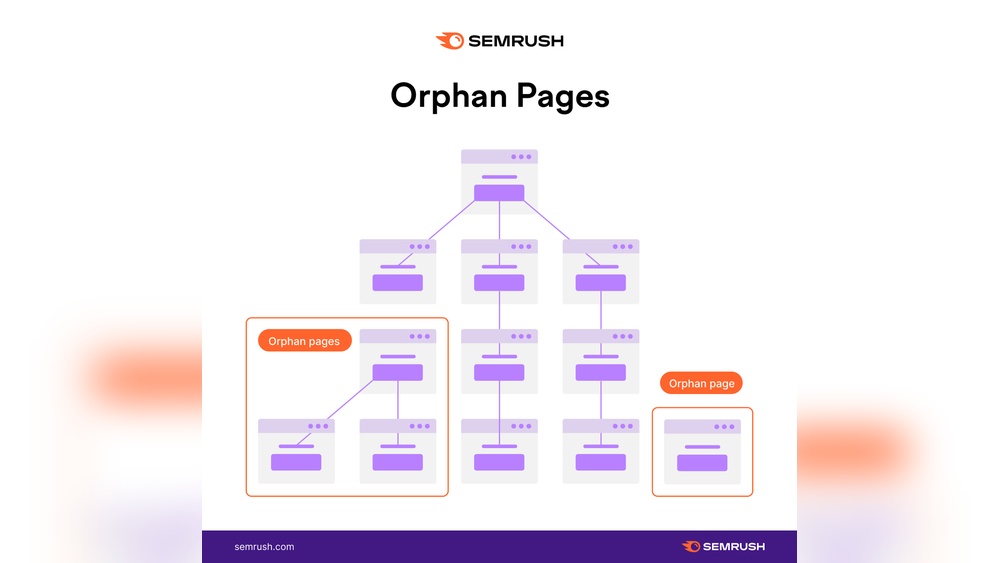
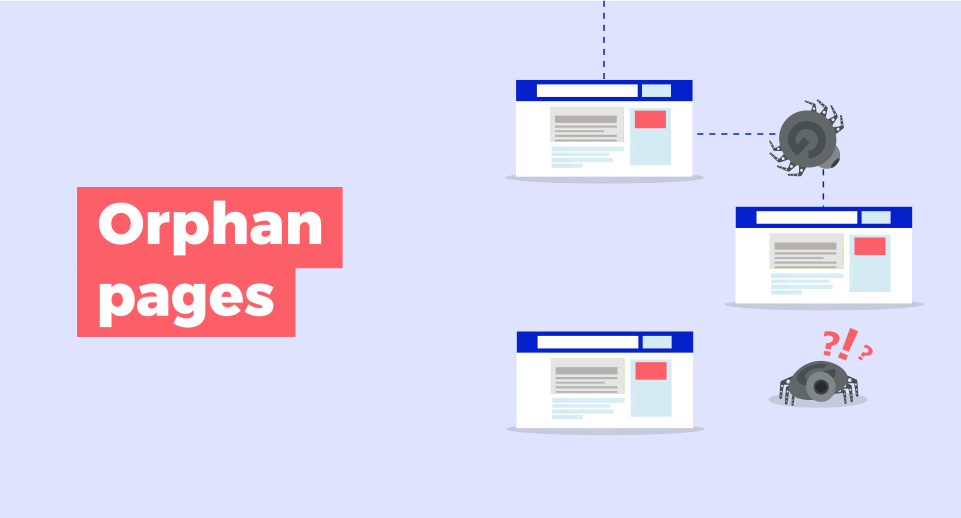
Orphan pages are web pages that have no links from other pages on the same website. These pages exist but are not connected to the main site structure. Users and search engines struggle to find them easily.
Orphan pages can cause problems for website ranking and user experience. Search engines may not index these pages properly. Visitors may miss important content hidden on orphan pages.
What Makes A Page An Orphan Page?
A page becomes an orphan when no other page links to it. This means no internal navigation or menus point to it. The page stands alone without any pathway from the main site.
How Orphan Pages Affect Seo
Search engines use links to discover and rank pages. Orphan pages lack these links, so they may be ignored. This reduces the chances of the page appearing in search results.
Common Causes Of Orphan Pages
Orphan pages often happen after website redesigns or updates. Sometimes, pages are created but never linked. Broken links or removed menus can also isolate pages.
Ways To Identify Orphan Pages
Use website crawlers or SEO tools to find orphan pages. They check which pages have no incoming internal links. This helps to spot and fix the problem quickly.

Credit: backlinko.com
Why Orphan Pages Hurt Seo
Orphan pages are web pages with no links pointing to them. Search engines struggle to find and index these pages. This reduces your site’s overall visibility.
Without internal links, orphan pages lose value in search rankings. They do not pass link equity or authority. This weakens your website’s SEO strength.
Poor CrawlabilitySearch engines use links to crawl websites. Orphan pages have no links leading to them. Crawlers may miss or ignore these pages entirely. This limits how much of your site gets indexed.
Lower Indexing RateGoogle and other search engines prioritize pages with clear paths. Orphan pages often remain unindexed. If a page is not indexed, it cannot appear in search results. This lowers your website’s reach and traffic.
Lost Link ValueInternal links help distribute authority across pages. Orphan pages do not receive link value from other parts of the site. This makes them weaker in search rankings. Your site’s overall SEO health suffers.
Poor User ExperienceUsers find content through navigation and links. Orphan pages are hard to reach for visitors. This frustrates users and increases bounce rates. Search engines see this as a sign of low-quality sites.
How To Find Orphan Pages Quickly
Orphan pages are web pages with no links from other pages on your site. Finding them fast helps improve your site’s structure and SEO. These pages can lose traffic and reduce user experience. Several easy methods help spot orphan pages quickly. Use tools and data you already have. No need for complex setups.
Using Crawl Tools
Crawl tools scan your website and list all linked pages. They show pages that do not appear in the site’s link structure. Compare this list with your full list of URLs. Pages missing from the crawl results are orphan pages. Popular crawl tools include Screaming Frog and Sitebulb. These tools are easy to use and provide detailed reports. Run a crawl regularly to keep track.
Leveraging Google Analytics
Google Analytics records page visits and traffic sources. Check pages with traffic but no inbound links from your site. These might be orphan pages. Use the Behavior > Site Content > All Pages report. Filter pages with low or no entrances from internal sources. This method helps find pages users visit directly or from search engines. It highlights orphan pages that still attract visitors.
Checking Server Logs
Server logs record every page visit on your website. Analyze logs to find pages accessed without internal referrals. These pages often lack links from other pages. Use log analysis tools or export logs for review. This method reveals orphan pages not shown in crawl tools or analytics. Checking server logs gives a complete view of user activity.
Strategies To Fix Orphan Pages
Orphan pages are pages on your website without links from other pages. They can hurt your SEO and reduce user engagement. Fixing orphan pages helps search engines find all your content. It also improves navigation for visitors. Use clear strategies to connect these pages to your site.
Adding Internal Links
Internal links connect pages within your website. Add links to orphan pages from popular posts or main pages. Use relevant anchor text for each link. This helps search engines understand the page topic. It also guides visitors to related content easily.
Updating Navigation Menus
Navigation menus show the main sections of your site. Include orphan pages in your menu if they are important. This makes the pages easy to find and access. Keep menus simple and organized to improve user experience. A clear menu structure helps search engines crawl your site better.
Creating Content Hubs
Content hubs group related pages under one topic. Build a hub by linking orphan pages to a main hub page. This creates a strong internal link network. It increases page authority and user interest. Content hubs also make your site easier to explore and understand.
Benefits Of Optimizing Orphan Pages
Optimizing orphan pages brings many benefits to your website. These pages often get ignored by search engines and visitors. Fixing them can improve your site’s structure and visibility.
Better site structure helps users find content easily. It also helps search engines understand your site. This can lead to higher rankings and more traffic.
Improved Search Engine Rankings
Orphan pages are hard for search engines to find. Adding links to these pages helps search engines crawl your site better. This can boost your page rankings and bring more visitors.
Increased User Engagement
Users find relevant content faster with proper links. This keeps visitors on your site longer. Higher engagement reduces bounce rates and improves overall site performance.
Better Link Equity Distribution
Linking orphan pages shares the value of strong pages. This helps weaker pages gain authority. Your entire site becomes stronger in search engine eyes.
More Traffic Opportunities
Optimized orphan pages attract visitors from search engines. They provide additional entry points to your website. This increases overall traffic and potential leads.
Enhanced Content Visibility
Orphan pages often hide valuable content. Linking these pages makes content easy to find. This improves content reach and user satisfaction.
Common Mistakes To Avoid
Orphan pages cause problems for websites. They are pages with no links from other pages. These pages are hard for visitors and search engines to find.
Many website owners make mistakes that create orphan pages. Avoiding these errors helps improve site navigation and SEO. Below are common mistakes to watch for.
Ignoring Internal Linking Structure
Not linking new pages to existing pages creates orphan pages. Each new page needs links from other important pages. This helps search engines find and rank the page.
Using Too Many Isolated Pages
Creating many pages without connections leads to poor site flow. Visitors get lost, and search engines skip these pages. Keep your pages connected through clear links.
Skipping Regular Site Audits
Failing to check for orphan pages causes them to grow unnoticed. Regular audits help spot and fix these pages. Use tools to find pages without inbound links.
Neglecting Navigation Menus
Not adding important pages to menus hides them from users. Menus guide visitors and search engines alike. Include all key pages in your navigation structure.
Relying Only On External Links
External links alone don’t help search engines find orphan pages. Internal links are necessary to connect pages within your site. Build a strong internal linking system.
Tools To Streamline Orphan Page Management
Managing orphan pages can be tricky and time-consuming. These pages have no links from other parts of your website. Tools can help find and fix them fast. They make the process clear and simple. Using the right tools saves time and improves your site’s SEO.
Seo Crawlers For Identifying Orphan Pages
SEO crawlers scan your website for orphan pages. They show pages that have no internal links. Tools like Screaming Frog and Sitebulb work well. They give easy reports to spot orphan pages quickly.
Google Analytics For Traffic Analysis
Google Analytics helps check which pages get no visits. Orphan pages often have very low or zero traffic. This tool shows traffic patterns and user behavior. It helps decide which orphan pages to keep or delete.
Content Management Systems With Link Reports
Some CMS platforms offer built-in link reports. These reports list pages without incoming links. WordPress plugins like Yoast SEO or Rank Math provide this feature. It helps maintain proper site structure and fix orphan pages fast.
Automated Link Building Tools
Automated tools suggest where to add internal links. They help connect orphan pages to relevant content. Tools like Link Whisper make linking easy and natural. This improves navigation and user experience on your site.

Credit: www.glowmetrics.com
Frequently Asked Questions
What Are Orphan Pages In Seo?
Orphan pages are web pages without any internal links pointing to them. They remain isolated, making it hard for users and search engines to find them. This can negatively impact SEO since these pages do not pass link equity or receive traffic.
How Do Orphan Pages Affect Website Ranking?
Orphan pages limit search engine crawling and indexing. Since they lack internal links, search engines may ignore or devalue them. This reduces the overall SEO value and can harm your site’s ranking and visibility in search results.
How Can I Find Orphan Pages On My Website?
Use SEO tools like Screaming Frog or Google Search Console to identify orphan pages. These tools analyze your site’s link structure and highlight pages without internal links. Regular audits help keep your site organized and SEO-friendly.
What Are Effective Ways To Fix Orphan Pages?
Add internal links from relevant pages to orphan pages. Update navigation menus or create related content sections. This improves user experience and helps search engines discover and rank these pages better.
Conclusion
Orphan pages hurt your website’s performance and user experience. They stay hidden from visitors and search engines. Fixing orphan pages helps improve site navigation and ranking. Start by finding pages without links pointing to them. Then, add internal links from related content.
Regular checks keep your site clean and easy to use. A well-linked website helps both users and search engines find important content. Don’t let orphan pages waste your effort. Connect every page and boost your website’s value.