
If you want your website to stand out and attract more visitors, Yoast is the tool you need. Imagine having a simple guide that helps your content rank higher on search engines without any technical hassle.
Yoast does exactly that—it makes SEO easy and effective for you. By using Yoast, you can improve your website’s visibility, drive more traffic, and turn casual visitors into loyal followers. Keep reading to discover how Yoast can transform your website and boost your online success.
Credit: yoast.com
Yoast Seo Basics
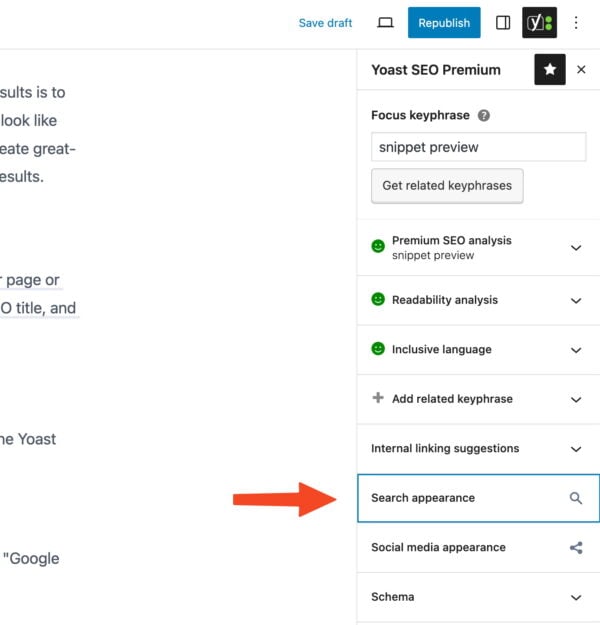
Yoast SEO is a popular tool for improving website rankings on search engines. It helps you make your content easy to read and find online. This tool guides you to use the right keywords and organize your pages well. Many people use Yoast to improve their website’s SEO without needing expert skills. Understanding the basics of Yoast SEO can help you get better results.
Key Features Of Yoast
Yoast offers many features to help improve your website. It checks your content for keywords and readability. It gives suggestions to make your text clearer and SEO-friendly. The plugin creates a sitemap to help search engines find your pages. It also allows you to set titles and descriptions for each post. Yoast warns about duplicate content and broken links. You can control how your site appears on social media platforms. These features work together to boost your site’s visibility.
Installing And Setting Up
Installing Yoast is simple and quick. Go to your WordPress dashboard and open the plugins section. Search for “Yoast SEO” and click install. After installation, activate the plugin to start using it. The setup wizard helps you configure basic settings. You choose your site type and connect to search engines. Set your preferred keywords and titles during setup. The plugin runs automatically after setup, guiding your SEO work. You can adjust settings anytime from the Yoast menu.

Credit: wordpress.org
Optimizing Content With Yoast
Yoast helps improve your content for search engines and readers. It guides you to write clear and focused text. The tool checks important SEO elements. This keeps your content strong and easy to find.
Crafting Focus Keywords
Choose one main keyword for each page or post. Yoast shows how well you use it. Place the keyword in titles, headings, and the first paragraph. Use it naturally without stuffing. This helps search engines understand your topic.
Improving Readability Scores
Yoast analyzes your text for easy reading. It checks sentence length and paragraph size. Short sentences make content clearer and faster to read. Use transition words to connect ideas smoothly. Simple words keep readers engaged and reduce confusion.
Using Meta Descriptions Effectively
Write a short summary for each page using Yoast’s meta description box. Keep it under 160 characters. Include your focus keyword early in the description. This snippet shows in search results. A clear meta description boosts clicks and attracts the right audience.
Technical Seo Enhancements
Technical SEO is key to helping search engines find and understand your website. Yoast SEO offers tools to improve your site’s technical setup. These tools make your site easier to crawl and index, which helps your pages rank better. Below are some important technical SEO features in Yoast.
Managing Xml Sitemaps
XML sitemaps tell search engines about your site’s structure. Yoast creates and updates sitemaps automatically. This helps search engines discover new and updated pages fast. You can also control which pages appear in the sitemap. This keeps your sitemap clean and focused on important content.
Configuring Robots.txt
Robots.txt guides search engine bots on what to crawl. Yoast lets you edit this file right from your WordPress dashboard. You can block pages that should not appear in search results. This helps protect private or duplicate content from being indexed.
Setting Up Breadcrumbs
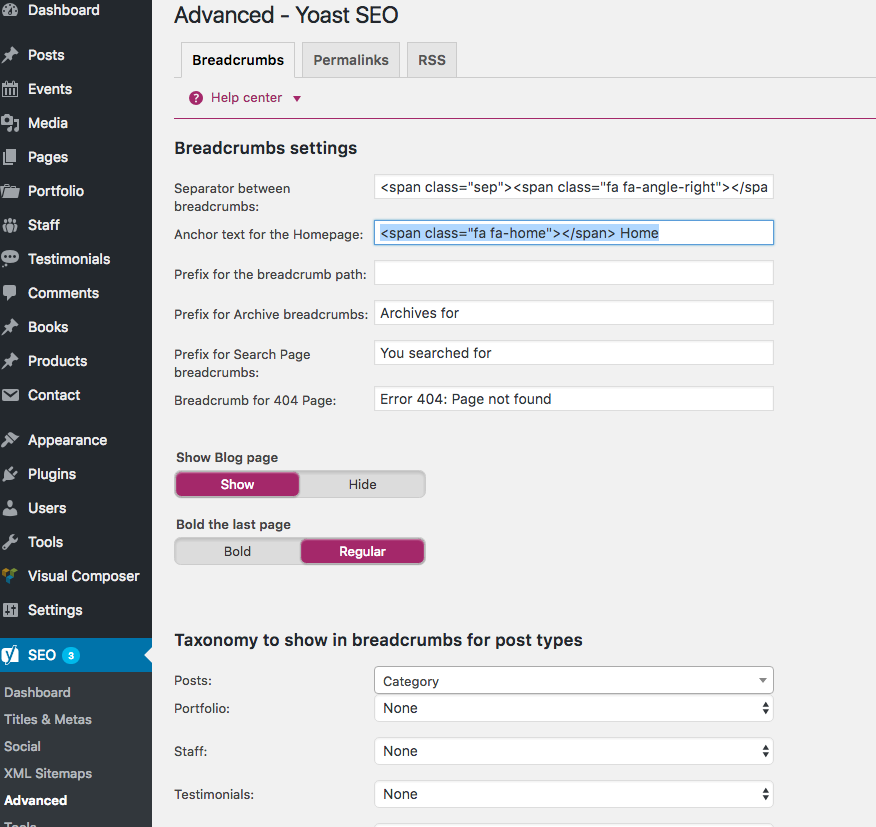
Breadcrumbs improve navigation for users and search engines. Yoast helps add breadcrumbs easily without coding. Breadcrumbs show the path to the current page. This makes your site structure clear and boosts your SEO.
Credit: totalwptheme.com
Advanced Yoast Strategies
Advanced Yoast strategies help improve your website’s SEO beyond basics. These tactics focus on technical details and data analysis. Using them can boost your site’s visibility and attract more visitors.
Yoast offers tools that many users do not fully explore. Learning to use these can give you a real advantage. Let’s dive into some key strategies to enhance your SEO efforts.
Leveraging Schema Markup
Schema markup adds special code to your pages. This code helps search engines understand your content better. Yoast makes it easy to add schema without coding skills.
Use schema to show details like articles, events, or products. This can improve your search result appearance. Rich snippets with stars, dates, or prices attract more clicks.
Make sure to select the correct schema type for each page. This accuracy helps search engines connect your content to user queries. Yoast’s schema builder guides you through this process.
Optimizing For Social Media
Yoast lets you control how your pages look on social media. You can set titles, descriptions, and images for Facebook and Twitter.
Good social media previews increase shares and traffic. Use clear, simple text and eye-catching images. This makes your posts stand out in crowded feeds.
Customize each page’s social settings in Yoast to match your brand voice. Consistent branding builds trust and recognition across platforms.
Analyzing Seo Data
Yoast provides valuable SEO data and insights. Use the SEO analysis tool to check keyword use and readability scores.
Track your focus keyword performance and fix issues Yoast highlights. This keeps your content aligned with SEO best practices.
Regularly review the data to improve your posts over time. Small updates can lead to better rankings and more visitors.
Common Mistakes To Avoid
Using Yoast SEO can improve your website’s ranking and visibility. Avoiding common mistakes helps you get the best results. Some errors can hurt your SEO efforts without you knowing.
Focus on these key areas to avoid typical pitfalls. Simple changes can make a big difference in your SEO performance.
Overstuffing Keywords
Adding too many keywords makes your content hard to read. It feels unnatural and can confuse visitors. Search engines may punish this by lowering your ranking. Use keywords wisely and keep your text clear and smooth.
Ignoring Mobile Optimization
Most users browse on mobile devices today. Sites not optimized for mobile lose visitors fast. Yoast helps check mobile friendliness. Ensure your site looks good and works well on all screens.
Neglecting Regular Updates
SEO rules change often. Ignoring updates can make your site outdated. Yoast releases new features and improvements regularly. Keep the plugin updated to stay ahead in search results.
Frequently Asked Questions
What Is Yoast Seo And How Does It Work?
Yoast SEO is a WordPress plugin that optimizes website content for search engines. It analyzes keywords, readability, and metadata to improve rankings. The plugin provides real-time feedback to enhance SEO elements like titles, descriptions, and internal links.
How Do I Install And Set Up Yoast Seo?
To install Yoast SEO, go to your WordPress dashboard, click Plugins, then Add New. Search for ”Yoast SEO,” install, and activate it. Follow the setup wizard to configure site settings, connect social profiles, and optimize your content.
Can Yoast Seo Improve My Website’s Google Rankings?
Yes, Yoast SEO helps improve Google rankings by optimizing on-page SEO. It ensures proper keyword usage, meta tags, and readability. This increases your website’s visibility and attracts more organic traffic through better search engine performance.
Is Yoast Seo Free Or Paid?
Yoast SEO offers both free and premium versions. The free version covers essential SEO features. The premium version includes advanced tools like multiple focus keywords, internal linking suggestions, and content insights for enhanced optimization.
Conclusion
Yoast helps improve your website’s SEO step by step. It guides you to write clear, strong content for readers and search engines. Using Yoast can make your site easier to find on Google. It also keeps your pages organized and well-structured.
This tool fits both beginners and those who want better results. Try adding Yoast to your site for simple SEO help. Small changes can bring steady growth. Give it a chance and watch your website grow over time.