If you want your website to stand out and attract more visitors, you need the right tools. Yoast can help you make your content easier to find on search engines like Google.
Imagine turning your posts into magnets that draw people in, without spending hours figuring out complicated SEO tricks. You’ll discover how Yoast can boost your site’s visibility and make your life easier. Keep reading to learn how to get the most out of this powerful tool and watch your traffic grow.
Why Yoast Matters
Yoast matters because it simplifies SEO for everyone. It helps websites rank better in search engines. Many people find SEO hard and confusing. Yoast makes the process clear and easy.
It gives clear advice while you write. This helps your content reach more readers. With Yoast, SEO is not just for experts. It’s a tool that anyone can use.
Seo Challenges Without Tools
SEO can be difficult without the right tools. It is easy to miss important steps. You may forget to use keywords correctly. Titles and descriptions might not attract clicks. It is hard to check if your text is easy to read. Many people struggle to fix these problems alone.
Key Features Of Yoast
Yoast shows how well your content uses keywords. It checks readability and gives simple tips. The plugin helps create good titles and descriptions. It shows if your text is too long or short. Yoast also helps with technical SEO tasks. It guides you to improve your site’s structure. These features save time and improve results.

Credit: www.g2.com
Setting Up Yoast
Setting up Yoast is the first step to improve your website’s SEO. This plugin helps search engines understand your content better. It guides you through easy steps to optimize your pages. The setup process is simple and does not take much time.
Installation Steps
Go to your WordPress dashboard. Click on “Plugins” and select “Add New.” Type “Yoast SEO” in the search bar. Find the plugin and click “Install Now.” After installation, click “Activate.” Yoast SEO is now ready to use on your site.
Basic Configuration
Open the Yoast SEO menu in your dashboard. Follow the setup wizard to enter your site details. Choose your site type and company or person name. Set your search engine visibility preferences. The wizard helps you configure key SEO settings quickly.
Connecting To Webmaster Tools
Verify your site with Google Search Console or Bing Webmaster Tools. Get the verification code from the chosen tool. Paste the code in Yoast’s Webmaster Tools section. Save the changes to connect your site. This step helps track your website’s search performance.
Optimizing Content With Yoast
Optimizing content with Yoast helps improve your website’s SEO. It guides you step-by-step to make your posts easier to find. Yoast checks different parts of your content and gives clear tips to boost your rankings. This tool works well for beginners and experts alike.
Using Focus Keywords
Focus keywords tell search engines what your page is about. Yoast lets you enter one main keyword or phrase. It checks how often and where you use this keyword in your text. Aim to include the focus keyword in the title, first paragraph, and headings. This helps search engines connect your content to user searches.
Analyzing Readability
Good readability keeps visitors on your site longer. Yoast analyzes sentence length and word use. It suggests breaking long sentences into shorter ones. It also points out complex words and passive voice. Simple, clear sentences make your content easier to understand and more engaging.
Improving Meta Descriptions
Meta descriptions show a short summary in search results. Yoast helps you write clear and concise meta descriptions. It checks length and keyword presence. A well-crafted meta description can increase clicks from search engines. Use it to highlight the main idea of your page.
Advanced Yoast Features
Yoast offers powerful tools beyond basic SEO settings. These advanced features help improve site structure and search engine understanding. Using them can boost your site’s visibility and user experience.
Xml Sitemaps
XML sitemaps guide search engines through your website. They list all important pages for easy indexing. Yoast creates these sitemaps automatically. This saves time and ensures no page is missed by search bots. You can customize which content appears in the sitemap. This control helps focus on your best pages.
Breadcrumbs Navigation
Breadcrumbs show visitors their path on your site. They appear at the top of pages. Yoast helps add breadcrumbs without coding. This feature improves site navigation and user experience. It also helps search engines understand your site structure. Clear breadcrumbs reduce bounce rates and keep visitors exploring.
Schema Markup Integration
Schema markup adds extra data to your pages. Search engines use this data to show rich results. Yoast inserts schema automatically for posts and pages. It supports many content types like articles, products, and events. This helps your listings stand out in search results. Better visibility can lead to more clicks and traffic.
Common Yoast Mistakes To Avoid
Yoast SEO is a popular tool for website optimization. Many users make common mistakes that reduce its effectiveness. Avoiding these errors helps improve your site’s ranking and user experience. Focus on correct use for the best results.
Keyword Stuffing Risks
Using too many keywords harms your content. It feels unnatural and lowers readability. Search engines can detect this and may penalize your site. Use keywords wisely and keep content clear and natural.
Ignoring Readability Scores
Yoast provides a readability score for your text. Ignoring this score can make your content hard to read. Clear, simple sentences keep visitors engaged. Use shorter sentences and easy words for better scores.
Overlooking Mobile Optimization
Many users browse on mobile devices. Yoast helps check mobile optimization but many skip this step. A site that is not mobile-friendly loses visitors fast. Ensure your content and layout work well on phones and tablets.

Credit: yoast.com
Measuring Seo Success With Yoast
Measuring SEO success with Yoast helps improve your website over time. You get clear data about your content’s performance. This data guides your next steps. It shows what works and what needs change.
Tracking Keyword Rankings
Yoast helps track your keyword rankings easily. It shows how your pages rank on search engines. You can see which keywords bring visitors. This helps focus on words that matter most. Tracking rankings also reveals chances to improve.
Using Yoast Insights
Yoast Insights gives a deep look at your content. It shows how often keywords appear and where. The tool points out strong and weak spots. This helps keep your writing clear and on topic. Insights make your SEO efforts smarter and precise.
Adjusting Strategy Based On Data
Data from Yoast guides your SEO strategy changes. You can fix pages that perform poorly. Adjust keywords or improve content quality. Regular updates keep your site fresh for search engines. Use data to test new ideas and track results.
Yoast Alternatives And Complements
Yoast is a popular SEO plugin for WordPress. It helps improve website rankings and content quality. Many users want to explore other options or tools to use with Yoast. These alternatives and complements can boost your SEO efforts. They offer features that Yoast may not cover fully.
Other Seo Plugins
Several SEO plugins offer different features than Yoast. Rank Math is a strong option. It has a clean interface and many built-in tools. All in One SEO Pack provides easy setup and good support. SEOPress is another choice. It focuses on simplicity and speed. Each plugin has unique strengths. Trying them helps find the best fit for your site.
Tools To Pair With Yoast
Yoast works well with extra SEO tools. Google Search Console shows how your site performs in search. It gives data on clicks and impressions. Keyword research tools like Ubersuggest or Ahrefs help find popular search terms. Content analysis tools improve readability and keyword use. Image optimization plugins speed up loading times. Combining these tools with Yoast creates a stronger SEO plan.
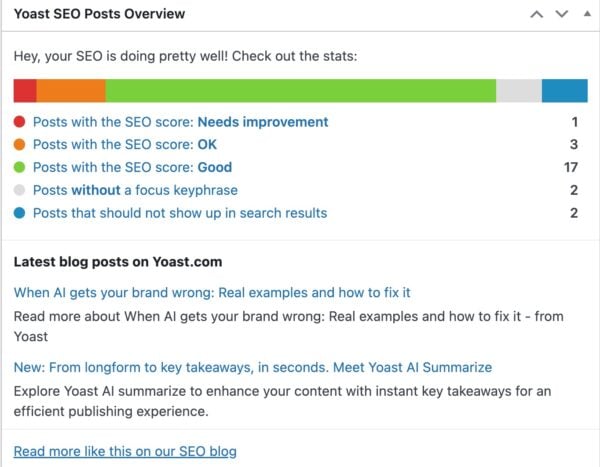
Credit: yoast.com
Frequently Asked Questions
What Is Yoast Seo And How Does It Work?
Yoast SEO is a WordPress plugin that optimizes websites for search engines. It analyzes content and provides real-time SEO suggestions. It helps improve readability, meta descriptions, keywords, and technical SEO elements to boost your site’s ranking and visibility.
How Do I Install Yoast Seo On WordPress?
To install Yoast SEO, go to your WordPress dashboard. Navigate to Plugins > Add New. Search for ”Yoast SEO,” then click ”Install Now” and ”Activate. ” After activation, configure settings using the setup wizard for best SEO results.
Can Yoast Seo Improve My Website’s Ranking?
Yes, Yoast SEO improves ranking by optimizing on-page SEO elements. It enhances keyword use, readability, meta tags, and technical SEO. These improvements help search engines better understand your content and increase your website’s chances of ranking higher.
Is Yoast Seo Suitable For Beginners?
Absolutely, Yoast SEO is beginner-friendly. Its intuitive interface guides users through SEO best practices. The plugin offers clear instructions and a traffic light system to help beginners optimize content efficiently without needing technical SEO knowledge.
Conclusion
Yoast helps improve your website’s SEO step by step. It guides you to write better content for search engines and readers. You can check your pages easily and fix issues fast. This tool makes SEO less confusing for beginners. Use Yoast to keep your site clear and organized.
Small changes can bring steady traffic growth. Give it time and watch your site perform better in search results. Simple, smart, and effective – that’s what Yoast offers.