Are you wondering how your website’s performance really affects your visitors? Understanding Core Web Vitals can be the key to unlocking better user experience and higher rankings on search engines.
This study breaks down what Core Web Vitals are, why they matter to you, and how you can improve them to keep your audience engaged and coming back for more. Keep reading to discover simple, actionable insights that could transform your site’s success.
Core Web Vitals Basics
Core Web Vitals are important for website performance and user experience. They measure how fast and smooth a site loads and how quickly users can interact. These metrics help website owners understand what needs improvement to keep visitors happy. Search engines also use these signals to rank pages better.
Understanding Core Web Vitals basics is key for website success. Let’s explore the main metrics and why they matter for SEO.
Key Metrics Explained
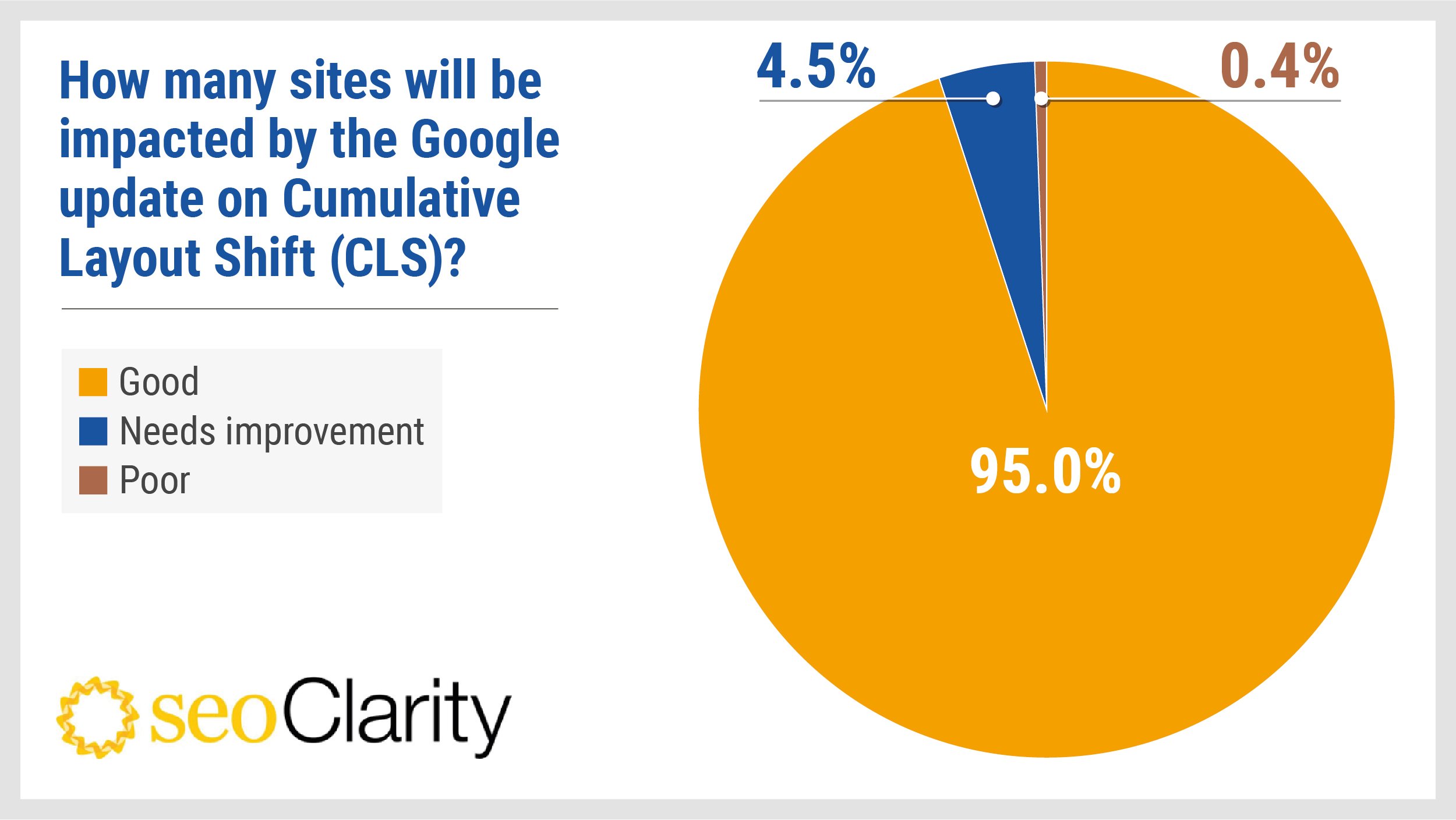
There are three main Core Web Vitals metrics. First is Largest Contentful Paint (LCP). It measures how fast the main content appears on the screen. A good LCP score is under 2.5 seconds. Next is First Input Delay (FID). It checks how quickly a page responds to user actions like clicks. A good FID is less than 100 milliseconds. Last is Cumulative Layout Shift (CLS). It tracks visual stability and unexpected page movement. A good CLS score is below 0.1.
Why They Matter For Seo
Google uses Core Web Vitals as ranking factors. Fast and stable sites rank higher in search results. These metrics reflect real user experience. Better scores mean visitors stay longer and interact more. Slow or unstable pages cause users to leave quickly. Improving Core Web Vitals can lead to more traffic and better engagement.
Credit: www.seoclarity.net
Measuring Core Web Vitals
Measuring Core Web Vitals helps website owners improve user experience. These metrics focus on loading speed, interactivity, and visual stability. Tracking them shows how real users feel when they visit a site. Accurate measurement guides better site design and performance.
Tools And Techniques
Several tools measure Core Web Vitals quickly and clearly. Google’s PageSpeed Insights reports on key metrics like Largest Contentful Paint and Cumulative Layout Shift. Chrome User Experience Report collects data from real users worldwide. Lighthouse offers detailed audits and performance scores. Web Vitals Chrome Extension tracks metrics in real time. These tools provide a clear picture of site health.
Interpreting The Data
Data shows how well a site performs for users. Scores fall into three groups: good, needs improvement, or poor. Good scores mean fast loading and smooth interactions. Poor scores highlight delays or layout shifts that frustrate visitors. Focus on trends, not single numbers. Look for patterns over time to spot issues. Fixing problems improves both user experience and search rankings.
Impact On Search Rankings
Core Web Vitals affect how Google ranks websites. These metrics measure user experience factors like loading speed, interactivity, and visual stability. Sites with better scores tend to rank higher in search results. This change pushes website owners to improve their site’s performance.
Search engines want to show users pages that load fast and feel smooth. Poor Core Web Vitals can hurt a site’s visibility. Understanding this impact helps site owners focus on the right improvements.
Correlation With Traffic
Websites with strong Core Web Vitals often see more organic traffic. Fast loading times keep visitors on the page longer. This reduces bounce rates and signals quality to search engines. Pages that respond quickly encourage users to explore more content. Better user experience leads to higher engagement and more visits.
Case Studies On Ranking Changes
Several sites improved their rankings after fixing Core Web Vitals issues. One example showed a 20% traffic increase after reducing page load time. Another site climbed in search results by improving interactivity scores. These cases prove that optimizing Core Web Vitals helps search rankings. Simple fixes can lead to notable improvements in visibility.

Credit: scandiweb.com
Improving Core Web Vitals
Improving Core Web Vitals is essential for better website performance. These metrics affect how users see and interact with a site. Faster loading, smooth interaction, and stable visuals keep visitors happy. This guide explains key steps to boost Core Web Vitals scores.
Optimizing Loading Speed
Loading speed is the time a page takes to appear fully. Reduce file sizes like images and scripts. Use modern formats such as WebP for images. Minimize the number of requests to the server. Enable browser caching to store files locally. Use a content delivery network (CDN) to deliver content faster. Clean up unnecessary code to speed up loading.
Enhancing Interactivity
Interactivity means how quickly a page responds to user actions. Keep JavaScript code light and efficient. Break large tasks into smaller parts to avoid delays. Use lazy loading for non-essential scripts. Monitor and reduce input delay for clicks and taps. Prioritize important user interactions first. Test pages with real users to find delays.
Stabilizing Visual Content
Visual stability prevents unexpected shifts on the page. Always set size attributes for images and videos. Reserve space for ads and embeds to avoid layout jumps. Avoid inserting content above existing elements. Use CSS transform animations instead of layout changes. Check for any elements that move during loading. Stable pages create better user experiences.
Common Challenges And Solutions
Core Web Vitals measure how fast and smooth a website feels to users. Many websites face common problems that hurt these scores. Fixing these issues helps improve user experience and search rankings.
Two major challenges are handling large media files and managing third-party scripts. Both can slow down a site and cause poor Core Web Vitals. Understanding these problems and their solutions is key.
Handling Large Media Files
Large images and videos take time to load. This delays page speed and hurts user experience. Compress images without losing quality. Use modern formats like WebP for smaller file sizes.
Lazy loading helps by loading images only when visible. Resize images to fit the screen size. Avoid auto-playing videos as they increase loading time.
Managing Third-party Scripts
Third-party scripts add features but slow down pages. They block the main content from loading fast. Limit the number of scripts used on your site.
Load scripts asynchronously so they don’t delay page display. Remove unnecessary scripts that do not add value. Test scripts regularly to ensure they perform well.
Future Trends In Web Performance
Web performance is changing fast. New tools and ideas shape how websites work and rank. Core Web Vitals help us measure user experience. They focus on speed, stability, and responsiveness. The future will bring updates to these metrics. Sites must adapt to stay ahead.
Evolving Metrics
Core Web Vitals will grow. Google plans to add new measures. These could track more user behaviors. For example, interaction delays or visual shifts. Metrics will become more detailed and precise. This helps webmasters better understand user pain points. Staying aware of changes is key. Tools will update to reflect new standards.
Preparing For Algorithm Updates
Search engines will update ranking rules often. Sites that meet new performance goals rank higher. Regular testing and improvements become necessary. Use real user data to guide changes. Focus on fast loading and smooth interactions. Fix layout shifts and slow responses quickly. Monitoring helps catch issues before updates roll out.

Credit: agencyfifty3.com
Frequently Asked Questions
What Are Core Web Vitals And Why They Matter?
Core Web Vitals are key metrics measuring website user experience. They focus on loading, interactivity, and visual stability. Google uses these metrics for ranking. Improving them boosts site performance and user satisfaction.
How Do Core Web Vitals Affect Seo Rankings?
Google includes Core Web Vitals in ranking algorithms. Sites with better scores gain higher search visibility. Poor scores can lead to lower rankings. Optimizing Core Web Vitals improves both SEO and user engagement.
Which Tools Analyze Core Web Vitals Performance?
Popular tools include Google PageSpeed Insights, Lighthouse, and Search Console. These tools measure loading speed, interactivity, and layout shifts. They provide actionable insights to improve Core Web Vitals scores.
How Can I Improve My Website’s Core Web Vitals?
Focus on faster loading times, reducing JavaScript, and optimizing images. Use lazy loading and minimize layout shifts. Regularly test and monitor metrics with Google tools for ongoing improvements.
Conclusion
Core Web Vitals affect how users see your website. Fast loading and smooth interaction keep visitors happy. Poor scores can make users leave quickly. Focus on improving these key areas for better results. Small changes can boost your site’s performance.
Keep testing regularly to track your progress. Good Core Web Vitals help search engines trust your site. A better user experience means more visits and engagement. Stay aware of updates and adapt your strategy. Your website’s success depends on how well it performs.