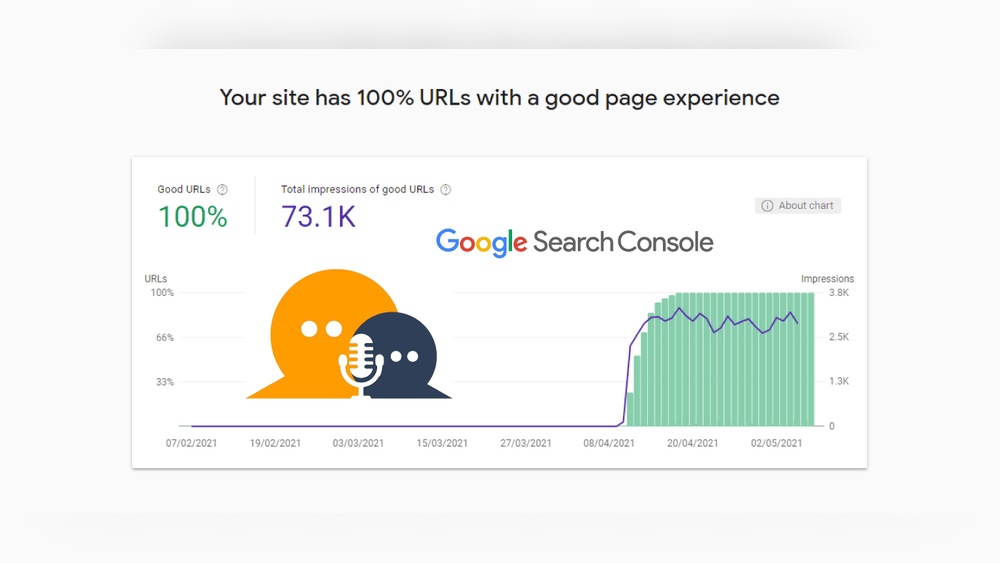
If you want your website to stand out and keep visitors happy, you need to pay attention to Core Web Vitals. These simple but powerful metrics show how fast and smooth your site feels to users.
When your site scores well, people stay longer, trust you more, and come back again. But if your Core Web Vitals are weak, you might be losing visitors without even realizing it. You’ll discover exactly what Core Web Vitals are, why they matter for your site, and how you can improve them step by step.
Ready to make your website faster and more user-friendly? Let’s dive in.
Core Web Vitals Basics
Core Web Vitals Basics cover important factors for website performance. These factors affect user experience on your site. Google uses them to rank pages in search results. Understanding Core Web Vitals helps improve your site’s speed and usability.
Focus on these basics to make your website faster and easier to use. This section explains what Core Web Vitals are and the key metrics you need to know.
What Are Core Web Vitals
Core Web Vitals are a set of specific website performance metrics. They measure how fast and smoothly a page loads and works. Google considers these metrics important for user experience. Sites that score well tend to rank higher in search results.
Core Web Vitals focus on real user experience, not just technical data. They help identify issues that slow down your site or make it hard to use.
Key Metrics Explained
Core Web Vitals include three main metrics: Largest Contentful Paint (LCP), First Input Delay (FID), and Cumulative Layout Shift (CLS).
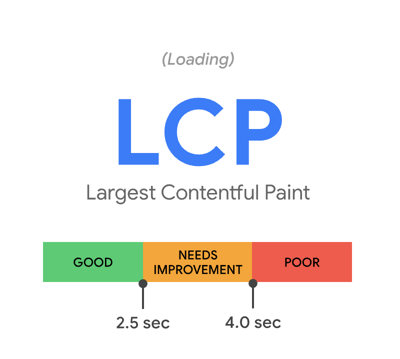
- Largest Contentful Paint (LCP): Measures loading speed of the main content. A good LCP is 2.5 seconds or less.
- First Input Delay (FID): Measures how quickly a page responds to user actions. Aim for an FID under 100 milliseconds.
- Cumulative Layout Shift (CLS): Measures visual stability by tracking unexpected layout shifts. A good score is less than 0.1.
Improving these metrics leads to faster, more stable, and user-friendly websites. These key numbers guide developers and site owners in optimizing performance.

Largest Contentful Paint (lcp)
Largest Contentful Paint (LCP) measures how fast the main content of a webpage loads. It tracks the time taken for the largest visible element, like an image or text block, to appear fully on the screen. LCP helps understand the loading speed from a user’s view.
Fast LCP means users see the main content quickly. Slow LCP can cause frustration and higher bounce rates. Search engines use LCP as a ranking factor to ensure better user experience.
Impact On User Experience
LCP affects how users feel about a website. A quick LCP makes the site feel responsive and smooth. Users stay longer and interact more. Slow LCP makes users leave before the page loads. It lowers trust and satisfaction. Sites with good LCP often get better search engine rankings.
Tips To Improve Lcp
Start by optimizing images. Use proper formats and compress files. Remove unnecessary scripts that block rendering. Use a fast hosting service to reduce server time. Implement lazy loading for below-the-fold content. Minimize CSS and JavaScript that delay rendering. Preload key resources to speed up loading. Monitor LCP regularly with tools like Google PageSpeed Insights.
First Input Delay (fid)
First Input Delay (FID) measures the time from when a user first interacts with a page to when the browser responds. It shows how quickly a website reacts to clicks, taps, or key presses. A low FID means the site feels fast and responsive. A high FID causes frustration and can make visitors leave.
Why Fid Matters
Users expect pages to respond immediately. Slow responses create a bad experience. Search engines use FID as a ranking factor. Sites with good FID scores rank better in search results. Fast interaction also boosts user trust and engagement.
Ways To Reduce Fid
Break up long tasks into smaller parts. Use web workers to run scripts in the background. Optimize JavaScript to load only what is necessary. Minimize third-party scripts that block the main thread. Keep your code clean and efficient to improve response time.
Cumulative Layout Shift (cls)
Cumulative Layout Shift (CLS) measures unexpected page movements. It tracks how much visible content shifts during page load. Sudden shifts confuse users. They click wrong buttons or lose their reading place. A low CLS score means a stable page. This improves user experience and site trust.
Effects Of Layout Shifts
Layout shifts frustrate visitors. They cause accidental clicks on ads or links. This leads to poor site navigation. Users may leave the page quickly. High bounce rates hurt search rankings. Shifts reduce user confidence. Visitors doubt the site’s quality. This impacts conversions and sales.
Strategies To Minimize Cls
Reserve space for images and ads. Use fixed size attributes in HTML. Avoid inserting new content above existing content. Load fonts and styles early. Use animations carefully to prevent layout jumps. Test pages with tools like Google Lighthouse. Fix issues before publishing. Stable layouts keep visitors happy and engaged.
Measuring Core Web Vitals
Measuring Core Web Vitals helps improve your website’s user experience. These metrics show how fast and smooth your pages load. They also reveal how easy it is for visitors to interact with your site. Tracking these scores regularly can help keep your site performing well.
Tools For Assessment
Google provides free tools to check Core Web Vitals. PageSpeed Insights gives detailed reports on your page’s loading speed and interactivity. The Chrome User Experience Report collects real user data to show actual performance. Lighthouse, built into Chrome DevTools, offers lab test results for deeper analysis.
Other tools include Web Vitals extension and Search Console. These tools highlight which areas need improvement. Use them to monitor your site’s health over time.
Interpreting The Results
Core Web Vitals focus on three main scores: Largest Contentful Paint, First Input Delay, and Cumulative Layout Shift. Each score has a threshold for good, needs improvement, or poor. Aim for scores in the good range to ensure a smooth user experience.
Look closely at which metric is lagging. A slow Largest Contentful Paint means your page takes too long to load. High First Input Delay shows delayed user interaction. A large Cumulative Layout Shift means page elements move unexpectedly.
Fixing these issues improves visitor satisfaction and helps your site rank better on search engines.
Core Web Vitals And Seo
Core Web Vitals are key metrics from Google that measure user experience. They focus on loading speed, interactivity, and visual stability of a website. These factors directly affect how visitors feel when they browse your site.
Search engines use Core Web Vitals to judge website quality. Better scores can lead to better search rankings. This makes Core Web Vitals important for SEO and online success.
Google’s Algorithm Updates
Google updates its algorithm often to improve search results. Core Web Vitals became part of ranking factors in 2021. Sites with poor user experience may rank lower now. Google wants to show faster and easier-to-use sites first. These updates push website owners to improve performance and user satisfaction.
Ranking Benefits Of Optimization
Optimizing Core Web Vitals can boost your search rankings. Faster loading times keep visitors from leaving your site. Better interactivity helps users navigate smoothly. Visual stability stops annoying shifts during page load. Together, these improvements increase user trust and engagement. Higher rankings mean more traffic and potential customers for your site.
Advanced Optimization Techniques
Core Web Vitals measure how users experience your website. Advanced optimization techniques help improve these metrics beyond basic fixes. These methods target critical areas that affect site speed and usability. Implementing them can lead to faster loading times and better interaction.
Improving Server Response Times
Server response time affects how quickly your site starts to load. Reduce delays by using fast hosting providers. Enable caching to store copies of your pages. Use a Content Delivery Network (CDN) to serve content closer to users. Optimize your database queries and reduce unnecessary server processes. These steps cut down waiting time and improve user experience.
Optimizing Images And Media
Large images slow down your pages. Compress images without losing quality. Choose modern formats like WebP for smaller file sizes. Resize images to fit display dimensions exactly. Lazy-load images so they load only when visible. Use videos sparingly and host them on external platforms. These strategies reduce page weight and speed up loading.
Enhancing Javascript Performance
Heavy JavaScript can block page rendering. Minify scripts to remove extra spaces and comments. Defer non-essential JavaScript to load after main content. Split large scripts into smaller parts and load only what is needed. Avoid long-running scripts that freeze the browser. Optimized JavaScript improves interactivity and responsiveness.
Monitoring And Maintaining Metrics
Monitoring and maintaining Core Web Vitals is key for a healthy website. These metrics measure user experience and site performance. Regular checks help catch issues early. They keep your site fast and user-friendly.
Setting Up Regular Audits
Run audits often to track your Core Web Vitals scores. Use tools like Google PageSpeed Insights or Lighthouse. Schedule checks weekly or monthly. This creates a routine to spot problems fast. Keep a record of your scores for comparison.
Focus on metrics like Largest Contentful Paint, First Input Delay, and Cumulative Layout Shift. These show how your site loads and responds. Fix issues as soon as you find them. Regular audits keep your site smooth and stable.
Adapting To Future Changes
Core Web Vitals evolve with web technology updates. Stay alert to Google’s announcements and guidelines. Update your monitoring tools to match new standards. Adjust your site to meet new performance goals.
Test new features or designs carefully. Changes can affect loading speed or interactivity. Keep improving your site based on fresh data. Adapting helps maintain good user experience over time.
Frequently Asked Questions
What Are Core Web Vitals In Seo?
Core Web Vitals are key metrics measuring user experience on websites. They focus on loading speed, interactivity, and visual stability, impacting SEO rankings. Optimizing these improves site performance and user satisfaction, which Google prioritizes in search results.
How Do Core Web Vitals Affect Website Ranking?
Google uses Core Web Vitals as ranking signals. Better scores enhance visibility and user trust. Poor performance can lower rankings, reduce traffic, and harm user engagement. Thus, optimizing these metrics is essential for SEO success and better search engine placement.
Which Metrics Are Included In Core Web Vitals?
Core Web Vitals include Largest Contentful Paint (LCP), First Input Delay (FID), and Cumulative Layout Shift (CLS). LCP measures loading speed, FID tracks interactivity, and CLS evaluates visual stability. Together, they assess overall user experience on webpages.
How Can I Improve My Core Web Vitals Scores?
Improve scores by optimizing images, reducing JavaScript, and enabling caching. Use lazy loading and minimize layout shifts for better stability. Regularly test with tools like Google PageSpeed Insights to track and enhance your Core Web Vitals effectively.
Conclusion
Core Web Vitals measure how fast and smooth a website works. They help improve user experience and search rankings. Focus on loading speed, interactivity, and visual stability. Small changes can make a big difference. Regularly check your site’s Core Web Vitals scores.
Better scores mean happier visitors and more traffic. Keep your website simple and fast for best results. Websites that perform well will stay ahead in search engines. Start improving today for a stronger online presence.