If you want your website to succeed, you need to understand how people find it online. That’s where Google Search Console comes in.
This powerful tool gives you clear insights into how Google sees your site. Imagine knowing exactly which keywords bring visitors, spotting issues before they hurt your ranking, and discovering ways to make your site stand out. You’ll learn how to use Google Search Console to boost your website’s performance and get ahead of your competition.
Keep reading—your website’s success depends on it.
Credit: developers.google.com
What Google Search Console Does
Google Search Console helps website owners see how Google views their site. It shows data about search traffic and site performance. This tool helps find and fix issues that affect search rankings.
It works as a bridge between your website and Google. You get insights to improve your site’s visibility. It also sends alerts about problems Google finds on your site.
Key Features
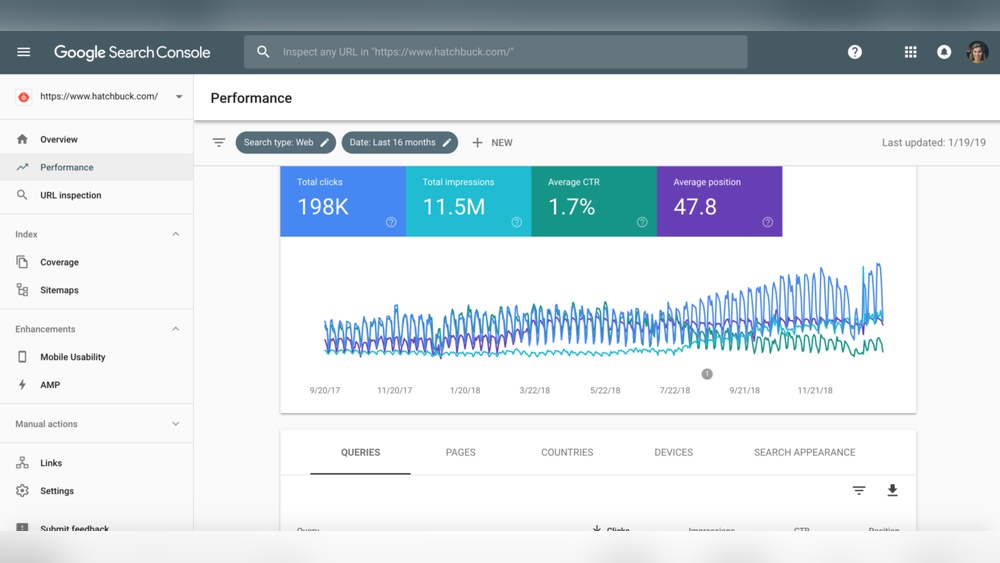
Google Search Console shows which keywords bring visitors to your site. It reports how often your pages appear in search results. You can see the click-through rate for each page.
The tool highlights errors like broken links or mobile usability issues. It lets you submit sitemaps for better indexing. You can also check if Google found any security problems.
It shows backlinks, which are links from other sites to yours. This helps understand your site’s reputation. Plus, you can test if your pages are mobile-friendly and fast.
How It Supports Seo
Google Search Console helps improve your site’s search ranking. It points out which keywords you rank for and how to boost them. Fixing errors found by the tool improves user experience.
The data helps find new content ideas based on search queries. Tracking performance over time shows what works and what does not. You can see how Google indexes your pages.
Submitting sitemaps speeds up the indexing process. Alerts about security issues protect your site from penalties. Overall, it guides you to make your site easier to find.
Setting Up Your Account
Setting up your Google Search Console account is the first step to monitor your website’s performance in Google Search. It helps you find errors, track keywords, and improve your site’s visibility. This process is simple and does not take much time.
Follow clear steps to connect your site and start getting valuable insights. Two important parts of the setup are verifying your website and connecting to other tools. These steps make sure you have full control and better data for your site.
Verifying Your Website
Verification proves you own the website. Google offers several ways to verify your site. You can use HTML file upload, HTML tag, Google Analytics, Google Tag Manager, or domain name provider.
Upload an HTML file to your website’s root folder. Or add a meta tag to your homepage’s code. If you use Google Analytics or Tag Manager, just connect them. Verification confirms your access and starts data collection.
Connecting To Other Tools
Linking other Google tools improves your site’s data and insights. Connect Google Analytics to see user behavior alongside search data. Use Google Ads to track ad performance and keywords together.
Integrate with tools like PageSpeed Insights for speed reports. Connecting these tools helps you make better decisions based on complete data. It saves time and gives a clear picture of your site’s health.
Tracking Website Performance
Tracking website performance is key to improving your site’s success. Google Search Console offers tools to see how your site does in search results. It shows important data about visitors and their actions. This helps you make smart changes to attract more people.
Understanding this data is simple and useful. You get clear reports that show what works and what needs fixing. Let’s explore how to analyze your search traffic and monitor clicks and impressions.
Analyzing Search Traffic
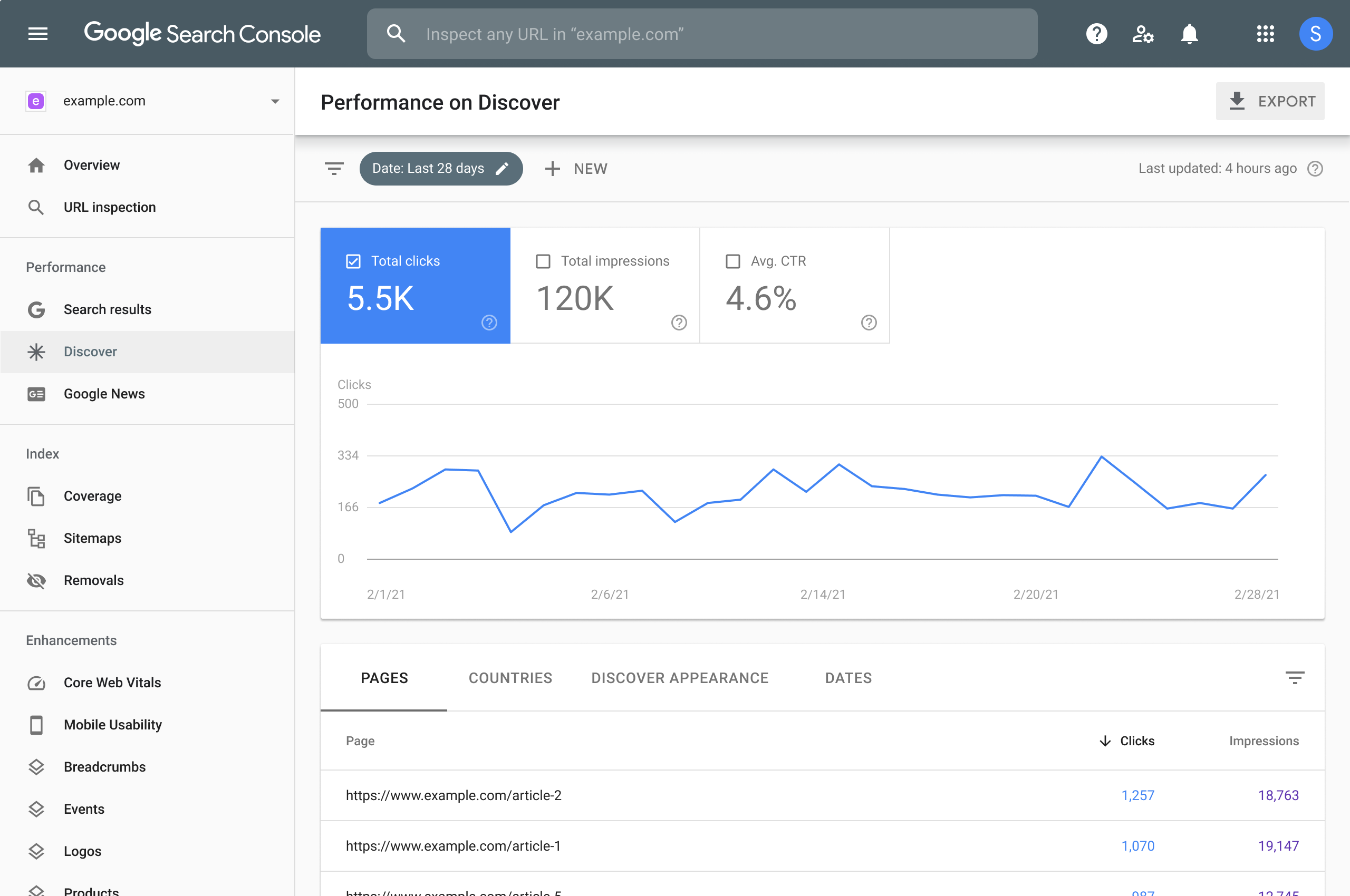
Google Search Console shows the keywords people use to find your site. It tells you which pages get the most visitors. You can see where your site appears in search results. This helps you spot which topics interest your audience. Focus on these to improve your content and reach.
Knowing your traffic sources also helps track seasonal trends. You can plan content around popular times. This makes your site more relevant and timely.
Monitoring Clicks And Impressions
Clicks are the number of times people visit your site from search results. Impressions show how often your site appears in searches. Comparing clicks and impressions reveals how well your titles and descriptions work.
A low click rate means you might need better titles or summaries. High impressions with low clicks suggest your site is visible but not inviting. Use this data to improve your search snippets and attract more visitors.

Credit: andisites.com
Fixing Website Issues
Fixing website issues is vital for good search engine ranking and user experience. Google Search Console helps you find and solve many common problems. It shows detailed reports about your site’s health. This allows you to keep your website running smoothly and attract more visitors.
Regular checks using Search Console prevent small issues from becoming big problems. It guides you step-by-step to correct errors. A well-maintained site loads faster and works better on all devices. This improves your site’s trust and visibility in Google search results.
Identifying Crawl Errors
Crawl errors happen when Google cannot access certain pages. These errors stop Google from indexing your content. Search Console lists all crawl errors in the Coverage report. You can see errors like “404 Not Found” or server issues.
Fixing crawl errors helps Google find and show your pages. You can fix broken links or update missing pages. After fixing, you can ask Google to re-crawl your site. This ensures all your important pages appear in search results.
Resolving Mobile Usability Problems
Mobile usability issues affect how your site looks on phones and tablets. Search Console highlights problems like small text or buttons too close together. It shows which pages have mobile usability errors.
Fix these issues to improve user experience on mobile devices. Make text readable without zooming. Ensure clickable elements have enough space. A mobile-friendly site ranks better and keeps visitors longer.
Optimizing Content For Search
Optimizing content for search is a key step to improve your website’s visibility. It helps your pages appear higher in Google search results. Better visibility means more visitors and potential customers. Google Search Console offers tools that make this process easier. You get clear insights into how your content performs and what to fix.
Using Search Analytics Data
Search Analytics shows the keywords people use to find your site. It also reveals your pages’ click rates and impressions. This data helps you understand what works and what does not. Focus on pages with high impressions but low clicks. These pages need better titles or descriptions. Adjusting these elements can increase your click-through rate. Track changes over time to see if performance improves.
Improving Keywords And Rankings
Check which keywords bring traffic and which do not. Add relevant keywords that match user searches. Avoid stuffing keywords; keep the content natural and clear. Use keywords in titles, headings, and throughout the text. Update old content to include new, trending keywords. Monitor rankings regularly to find new opportunities. Small changes can lead to better search rankings.
Credit: www.trailblaze.marketing
Enhancing User Experience
Enhancing user experience is key to keeping visitors on your site. Google Search Console offers tools to improve how users interact with your pages. It helps identify problems and areas that need improvement. Better experience means visitors stay longer and return more often.
Speed And Core Web Vitals
Page speed directly affects user satisfaction. Slow pages cause visitors to leave quickly. Google Search Console shows Core Web Vitals data. These metrics measure loading time, interactivity, and visual stability. Fixing issues in these areas helps pages load faster and run smoother. Faster sites keep users happy and engaged.
Mobile-friendly Design
Most people browse on phones and tablets. A mobile-friendly design ensures your site looks good on small screens. Google Search Console tests mobile usability and points out problems. Easy navigation, readable text, and proper button sizes improve mobile experience. Mobile-friendly sites rank higher and attract more visitors.
Leveraging Advanced Tools
Google Search Console offers powerful tools to help website owners manage their sites. Using these advanced tools improves site visibility and performance. They help identify issues and ensure Google understands your content clearly.
Understanding how to use these features can boost your SEO efforts. Two key tools are submitting sitemaps and using the URL inspection tool. Both provide valuable insights and control over your website’s presence on Google.
Submitting Sitemaps
A sitemap is a file listing all important pages on your site. Submitting it to Google helps the search engine find and index your pages faster. This increases the chance your pages will show up in search results.
To submit a sitemap, upload it in the Search Console under the “Sitemaps” section. Google will check the file for errors and report back. Keep your sitemap updated to include new or changed pages.
Using Url Inspection
The URL Inspection tool shows how Google views a specific page on your site. It reveals if the page is indexed or has any errors. This helps you fix problems that stop pages from appearing in search results.
Enter any URL from your website to see its status. The tool also lets you request indexing for new or updated pages. Use this feature to speed up Google’s crawling and improve site visibility.
Measuring Traffic Growth
Measuring traffic growth is key to understanding your website’s success. Google Search Console provides clear data about how many people visit your site. It shows where your visitors come from and what they search for. This helps you see if your SEO efforts work well. Tracking traffic helps improve your site and reach more users over time.
Using Google Search Console, you can measure growth in traffic step-by-step. Start by setting clear goals and benchmarks. Then track progress regularly to see changes and trends. This process guides your next moves and keeps your website improving.
Setting Goals And Benchmarks
Start by deciding what you want to achieve with your traffic. Choose clear goals like increasing visitors by 20% in three months. Use Search Console data to find your current traffic levels. These numbers are your benchmarks. They give you a starting point to measure growth. Goals should be simple and realistic. Clear goals make it easy to check if you meet them.
Tracking Progress Over Time
Check your traffic data regularly using Google Search Console. Look at total clicks, impressions, and average position. Compare these numbers week by week or month by month. Notice patterns or sudden changes. Tracking progress shows if your SEO work pays off. It also helps spot problems early. Keep notes on what changes you make and how traffic reacts. This keeps your growth steady and controlled.
Frequently Asked Questions
What Is Google Search Console Used For?
Google Search Console helps monitor website performance in Google search results. It tracks indexing, search traffic, and site errors. It also provides insights to improve SEO and user experience. It’s essential for website owners to optimize their visibility on Google.
How Do I Verify My Website In Google Search Console?
To verify your website, add your site to Search Console. Choose a verification method like HTML file upload, meta tag, or DNS record. Follow the step-by-step instructions provided. Verification confirms you own the site and allows access to its data.
Can Google Search Console Improve My Seo Rankings?
Yes, it provides data on keywords, click-through rates, and impressions. You can fix indexing errors and optimize content based on user queries. Using this information helps improve your site’s search performance and boosts SEO rankings effectively.
How Often Does Google Search Console Update Data?
Google Search Console data typically updates every 2 to 3 days. Some reports may have a slight delay. Regular updates help you track website changes and search trends promptly for better site management.
Conclusion
Google Search Console helps you see how your website performs. It shows what people search to find your site. You can fix problems that stop Google from reading your pages. This tool also tells you which pages get the most visits.
Use it to improve your site step by step. Regular checks keep your website healthy and easy to find. Start using Google Search Console to know your site better. It makes managing your website simpler and clearer.