
When you visit a website or use an app, how easy and enjoyable it feels matters a lot. That’s what UX, or user experience, is all about.
It’s the secret ingredient that keeps you coming back and makes tasks feel simple instead of frustrating. If you’ve ever wondered why some websites just work smoothly while others leave you confused, understanding UX can change the way you see digital products—and even help you create better ones yourself.
Let’s dive into what UX really means and how it can make a big difference for you.
Key Principles Of Ux Design
UX design shapes how users feel when they use a product. It aims to make every interaction smooth and clear. Good UX design helps users reach their goals easily. Understanding its key principles is essential for creating effective designs.
User-centered Focus
User-centered focus means designing with the user in mind at all times. It requires knowing who the users are and what they need. Designs should solve real problems and fit user habits. Testing with users helps find issues early and improve the design.
Consistency And Simplicity
Consistency keeps design elements uniform across a product. It helps users learn and predict how things work. Simple design avoids clutter and confusion. Clear buttons, labels, and layouts make navigation easy. Users stay focused and complete tasks faster.
Accessibility Matters
Accessibility ensures everyone can use the product, including people with disabilities. Designs should work with screen readers and keyboard navigation. Text must be readable with good contrast. Accessible design opens doors to a wider audience and better user experience.

Credit: maze.co
Designing For User Engagement
Designing for user engagement means creating experiences that keep users interested and active. Good design guides users smoothly through a site or app. It makes tasks easier and more enjoyable. Engaged users spend more time and return often.
Every detail matters. Interactive elements, layout, color, and typography all affect engagement. Thoughtful choices help users feel connected and confident.
Interactive Elements That Work
Buttons, sliders, and forms invite users to act. Clear feedback, like color changes or animations, shows responses instantly. Simple interactions reduce confusion and build trust. Use interactive elements that match user goals. Avoid clutter. Too many options can overwhelm.
Visual Hierarchy And Layout
Visual hierarchy guides the eye to important parts first. Use size, spacing, and contrast to highlight key content. A clean layout helps users find what they want fast. Group related items together. Break content into small sections for easy reading.
Effective Use Of Color And Typography
Color draws attention and creates mood. Use it to highlight calls to action and separate sections. Choose readable fonts with enough size and spacing. Consistent typography builds a strong brand feel. Avoid too many font styles. Keep the design simple and clear.
Optimizing Navigation
Optimizing navigation improves user experience by making websites easy to use. Simple and clear navigation helps users find what they want quickly. Good navigation reduces frustration and keeps visitors on your site longer.
Clear Menus And Paths
Menus should be simple and easy to understand. Use common words for menu items. Group similar items together. Paths should show users where they are on the site. Breadcrumbs help users go back easily.
Minimizing User Effort
Reduce the number of clicks to reach content. Avoid deep menu layers that confuse visitors. Use search bars for quick access. Clear labels save time and effort.
Responsive Design Techniques
Navigation must work well on all devices. Menus should adapt to small screens. Use touch-friendly buttons for mobiles. Responsive design ensures smooth navigation everywhere.
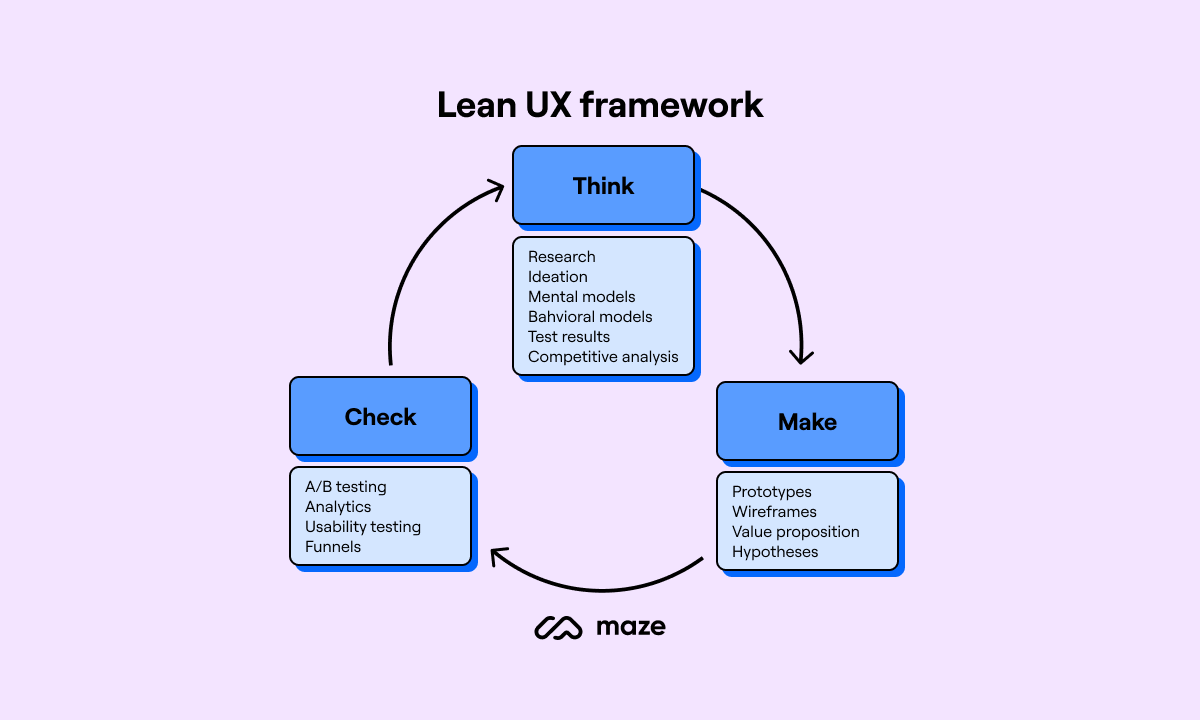
Credit: maze.co
Enhancing User Feedback
User feedback is key to a smooth and clear experience. It helps users know what is happening and what to do next. Good feedback reduces confusion and makes tasks easier.
This section covers simple ways to improve user feedback. These methods guide users and keep them informed during interactions.
Microinteractions And Animations
Small animations show users that their actions work. A button changing color or a checkmark appearing gives quick feedback. These tiny effects feel natural and keep users engaged. They also help users understand the flow of tasks.
Error Messages And Help
Clear error messages stop frustration. They tell users what went wrong and how to fix it. Simple language and examples make messages easy to follow. Offering quick help or tips saves time and reduces mistakes.
Loading States And Progress Indicators
Loading screens show users that the system is working. Progress bars or spinning icons prevent users from leaving. They provide patience and trust by showing time left or steps done. This feedback keeps users calm and ready.
Testing And Iteration
Testing and iteration form the backbone of great UX design. They help find problems early. They also improve the product step by step. Testing shows how real users interact with the design. Iteration uses this insight to make changes that enhance usability. This ongoing process shapes a product that is easy and pleasant to use.
Usability Testing Methods
Usability testing checks how users complete tasks on a product. Common methods include moderated and unmoderated tests. Moderated tests involve a facilitator guiding users. Unmoderated tests let users work on their own. Both reveal where users struggle or succeed. Remote testing is also popular. It allows users to test from any location. These methods help catch issues early and improve user satisfaction.
Analyzing User Behavior
User behavior analysis tracks how people use a product. Tools like heatmaps and session recordings show clicks and movements. This data reveals what attracts attention and what confuses users. Analyzing patterns helps identify barriers to smooth interaction. It also highlights features that users enjoy. This insight supports smarter design decisions and better user flows.
Incorporating Feedback
User feedback is vital for refining designs. Collect feedback through surveys, interviews, or feedback forms. Prioritize common pain points and suggestions. Make changes based on real user needs. Testing again after changes checks if improvements work. Continuous feedback loops keep the design aligned with users’ expectations and goals.

Credit: en.wikipedia.org
Frequently Asked Questions
What Is Ux And Why Is It Important?
UX stands for User Experience. It focuses on improving user satisfaction by enhancing usability and accessibility. Good UX leads to higher engagement, retention, and conversions.
How Does Ux Design Impact Website Success?
UX design ensures websites are intuitive and easy to navigate. It reduces bounce rates and boosts user interaction, driving business growth.
What Are Key Principles Of Effective Ux Design?
Key principles include usability, accessibility, consistency, and user-centered design. These elements create seamless and enjoyable digital experiences for users.
How Do Ux And Ui Differ?
UX focuses on overall user experience, while UI deals with visual design and interactive elements. Both work together for a successful product.
Conclusion
Good UX helps users find what they need quickly. It makes websites and apps easy and fun to use. Simple design and clear steps keep users happy. When users enjoy their experience, they come back more often. Every business benefits from good UX.
Start focusing on UX to improve your site today. Small changes can make a big difference. Keep your users in mind at all times. Better UX means better results for everyone.