


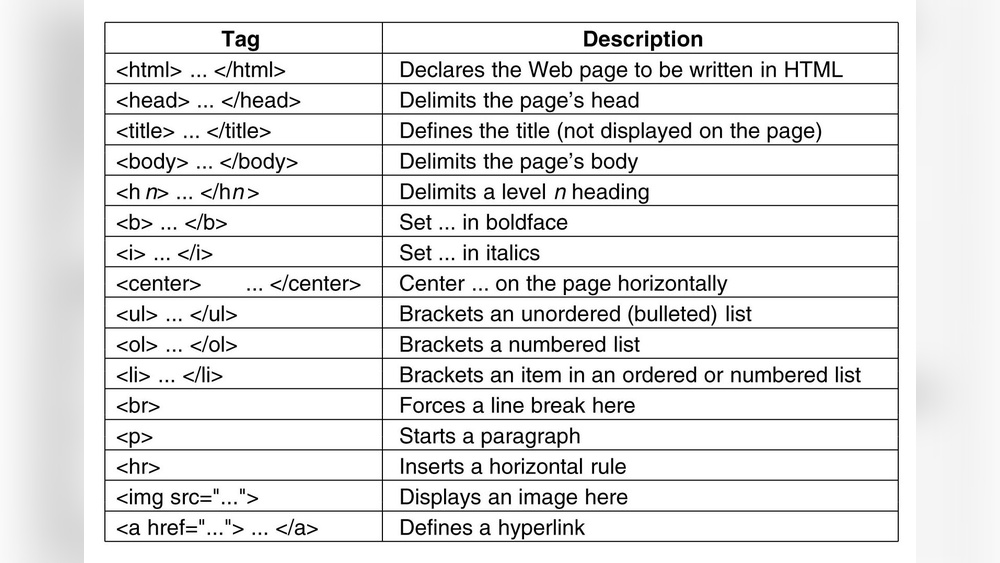
If you want to build a website or improve your web pages, understanding HTML tags is a must. These simple codes are the building blocks that tell your browser how to display content.
Without them, your site would look like plain text with no style or structure. Imagine having the power to organize your content, add images, create links, and much more—all with just a few lines of code. You’ll discover how HTML tags work and how you can use them to make your website clear, attractive, and easy to navigate.
Keep reading, and you’ll unlock the key to controlling your web content like a pro.

Credit: www.codewithfaraz.com
Importance Of Html Tags For Seo
HTML tags help search engines understand your website content. They tell the search engine what parts of the page are most important.
Proper use of HTML tags improves how your site ranks in search results. It makes your content easier to read for both users and search engines.
Title Tag: Defining Page Titles
The
Meta Description Tag: Summarizing Content
The description tag gives a short summary of the page. Search engines often use this text below the title in results. A good description encourages users to visit your site.
H1 To H6 Tags: Organizing Content
Heading tags create a clear structure for your content. The
tag is the main heading. Subheadings use to tags. This helps search engines and users follow your content easily.
tags. This helps search engines and users follow your content easily.
Alt Attribute: Describing Images
The
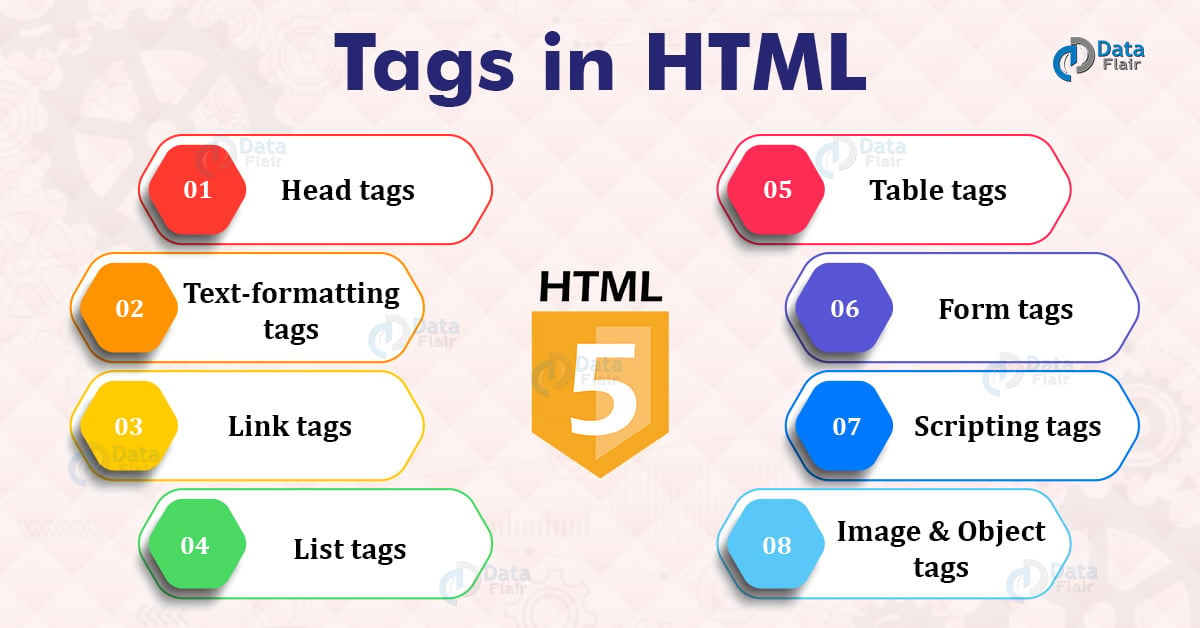
Credit: data-flair.training
Key Html Tags To Improve Seo
HTML tags shape how search engines read and rank your webpage. Using the right tags helps improve SEO and user experience. These tags tell search engines what your content is about and how important it is. Understanding key HTML tags can boost your site’s visibility in search results.
Title Tag Best Practices
The title tag shows the main topic of your page. Keep it under 60 characters to avoid cuts in search results. Include your primary keyword near the start. Make it clear and unique for each page. Avoid keyword stuffing. A good title tag increases click rates.
Meta Description Tips
Meta descriptions summarize your page content. Write between 150 and 160 characters for best display. Use simple language that invites clicks. Include relevant keywords naturally. Each page needs a unique meta description. It doesn’t directly affect ranking but boosts click-through rates.
Header Tags (h1-h6) Usage
Headers organize your content and guide readers. Use one H1 tag for the main title. Subheadings use H2 to H6 tags to break content into sections. Include keywords in headers but keep them natural. Proper header use improves readability and SEO. It helps search engines understand content structure.
Alt Text For Images
Alt text describes images for search engines and users with disabilities. Write short, descriptive text that explains the image. Include relevant keywords if they fit naturally. Avoid keyword stuffing in alt text. Good alt text improves image SEO and accessibility.
Canonical Tags Role
Canonical tags prevent duplicate content issues. They tell search engines which version of a page is the main one. Use canonical tags on pages with similar content. This helps consolidate ranking signals to one URL. Correct use of canonical tags protects your site’s SEO value.
Optimizing Html Tags For Speed
Optimizing HTML tags for speed improves website performance and user experience. Clean and efficient code helps pages load faster. Faster loading reduces visitor bounce rates and boosts search rankings.
Small changes in HTML structure can have big effects. Focus on writing clear, simple, and well-structured tags. This makes the browser’s job easier and speeds up rendering.
Minimizing Code Bloat
Remove unnecessary tags and spaces from your HTML. Extra code slows down page loading time. Use only essential tags to keep the code light. Avoid inline styles and scripts inside HTML. Keep your markup clean and simple.
Proper Tag Nesting
Always nest tags in the correct order. Incorrect nesting confuses browsers and delays rendering. For example, put
Avoiding Duplicate Tags
Do not use the same tag multiple times unnecessarily. Duplicate tags increase page size and slow down loading. Check your HTML for repeated IDs and meta tags. Use unique identifiers and avoid repeated metadata. Cleaner code loads faster and works better on all devices.
Common Html Tag Mistakes To Avoid
HTML tags structure a web page. They tell browsers how to display content. Using tags correctly helps search engines understand your site. Many beginners make common mistakes with these tags. These errors can hurt your site’s SEO and user experience. Avoiding these mistakes improves your website’s clarity and ranking.
Missing Title Or Meta Tags
The title tag shows the page’s main topic. It appears in search results and browser tabs. Missing the title tag means search engines miss key information. Meta tags provide details like description and keywords. Without meta tags, search engines struggle to summarize your page. Always include clear and relevant title and meta tags.
Overstuffing Keywords
Some add too many keywords inside tags to rank higher. This is called keyword stuffing. It makes the content hard to read and looks spammy. Search engines may penalize sites that use too many keywords. Use keywords naturally and only where they fit well. Focus on quality, not quantity, of keywords in tags.
Incorrect Header Tag Hierarchy
Headers organize content into sections. They range from
to . The tag is for the main title only. Subheadings should use or tags in order. Skipping levels or mixing tags confuses readers and search engines. Keep headers in a proper, logical order for best results.
tag is for the main title only. Subheadings should use or tags in order. Skipping levels or mixing tags confuses readers and search engines. Keep headers in a proper, logical order for best results.
tags in order. Skipping levels or mixing tags confuses readers and search engines. Keep headers in a proper, logical order for best results.
Tools To Analyze And Improve Html Tags
Understanding and improving HTML tags is key for better website performance. Tools help check if tags follow rules and boost SEO. They save time and avoid mistakes in code.
These tools highlight errors and suggest fixes. They also guide on using tags correctly for search engines. Here are some useful tools to analyze and improve your HTML tags.
Seo Audit Tools
SEO audit tools scan your website to find HTML tag issues. They check title tags, meta descriptions, and header tags. These tools show how tags affect your search ranking. Some popular options are SEMrush, Ahrefs, and Screaming Frog.
They provide clear reports and easy steps to fix problems. Using these tools helps make your site more search-friendly. They also track improvements over time.
Browser Extensions
Browser extensions offer quick HTML tag analysis right in your browser. Extensions like Web Developer or SEOquake highlight tag errors on any page. They show tag structure and missing elements instantly.
These tools are great for fast checks during web development. They also help learn best tag practices by showing real examples. No need to leave your browser or use complex software.
Automated Tag Generators
Automated tag generators create HTML tags based on your content. They build meta tags, alt attributes, and structured data automatically. This saves time and ensures tags follow SEO rules.
Tools like Meta Tag Generator and Open Graph Generator simplify tag creation. They reduce errors and improve website visibility. These generators fit well for beginners and busy site owners.
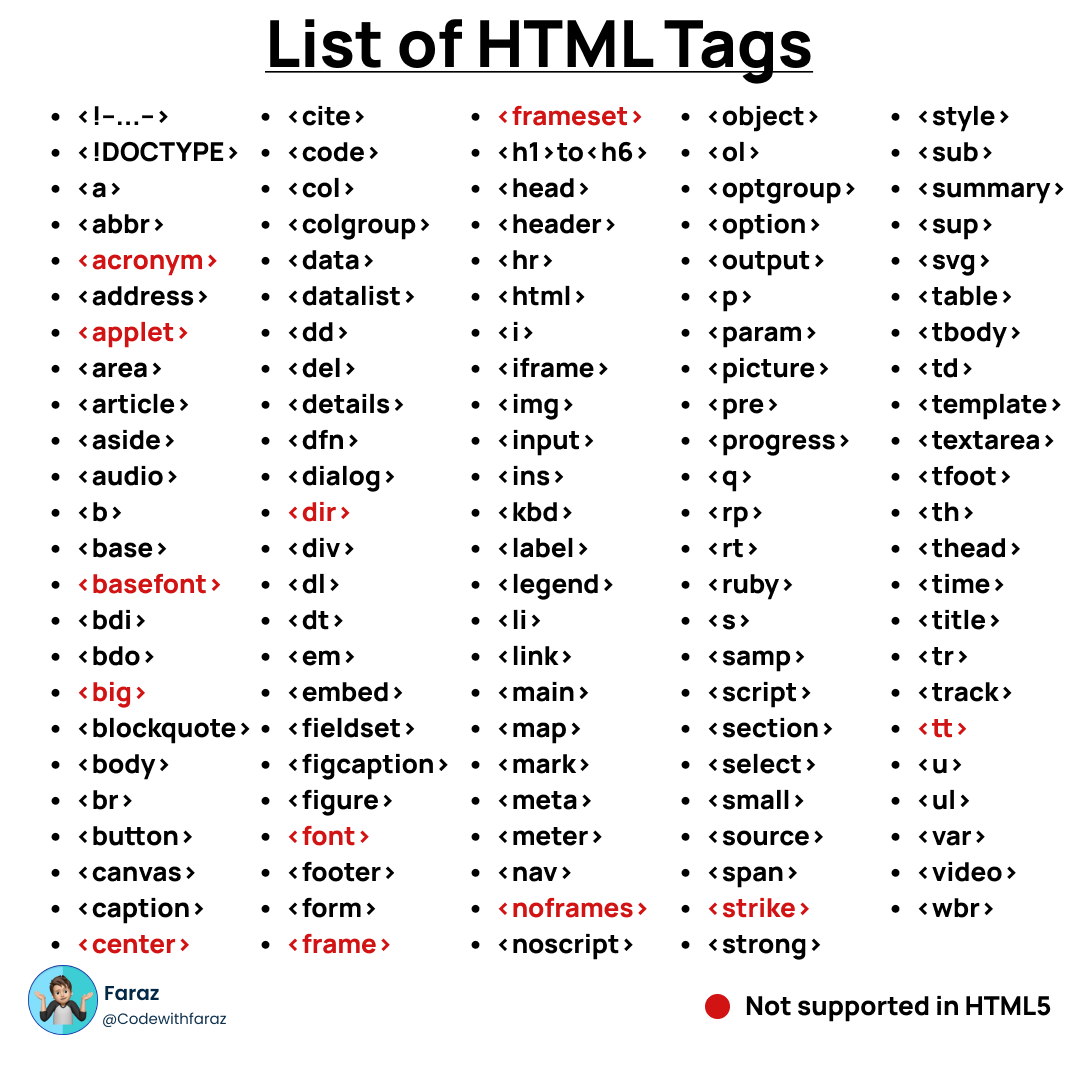
Credit: www.codewithfaraz.com
Frequently Asked Questions
What Are Html Tags And Their Purpose?
HTML tags define elements in a web page’s structure. They tell the browser how to display content like text, images, and links. Tags usually come in pairs, with opening and closing tags. They form the building blocks of all web pages.
How Do Html Tags Affect Webpage Design?
HTML tags organize content and add meaning to elements. They work with CSS to style pages and JavaScript to add interactivity. Proper use of tags improves accessibility and SEO. Tags like