


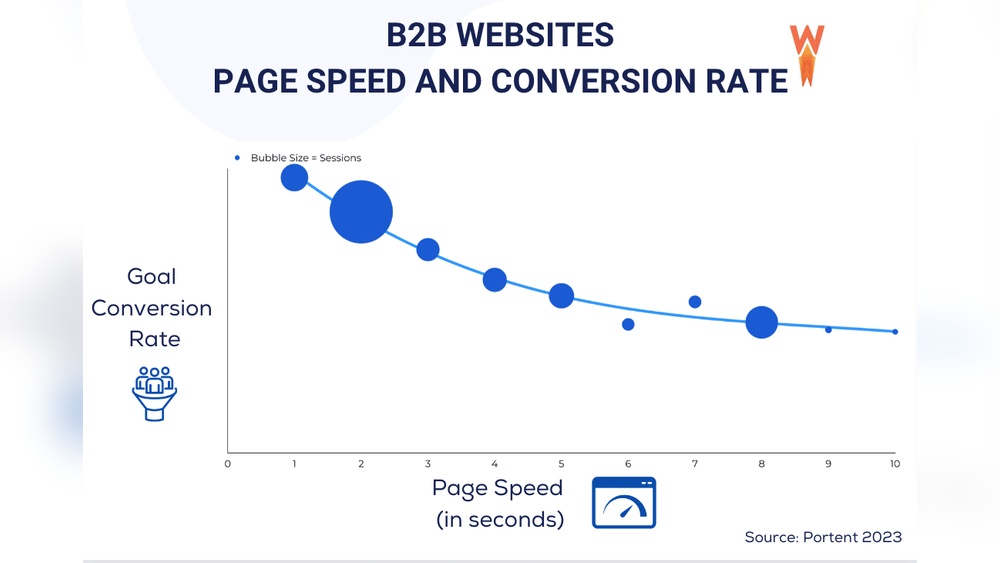
How fast does your website load? You might not realize it, but every second counts.
Slow page speed can turn visitors away before they even see what you offer. Understanding your page speed stats gives you the power to fix problems and keep people engaged. You’ll discover why these numbers matter, how to check them easily, and simple steps to boost your site’s performance.
Ready to make your website faster and more successful? Let’s dive in.

Credit: backlinko.com
Importance Of Page Speed
Page speed is a key factor for any website. It controls how fast pages load for visitors. Fast pages keep users happy and reduce bounce rates. Slow pages cause frustration and lost visitors. This makes page speed very important for online success.
Many sites ignore page speed but it affects many areas. From user experience to search rankings, speed matters. Improving page speed can bring more visitors and better results.
Impact On User Experience
Users expect websites to load quickly. A delay of even a few seconds can cause them to leave. Fast pages make browsing smooth and enjoyable. Visitors stay longer and explore more. This creates a positive impression of your site. Slow pages cause frustration and drive users away. Good page speed helps keep users engaged and satisfied.
Effect On Seo Rankings
Search engines use page speed as a ranking factor. Faster sites get higher positions in search results. This means more visibility and traffic from Google and others. Slow sites may rank lower and get less traffic. Improving page speed helps search engines crawl your site better. It also signals a good user experience, which search engines reward. Fast loading pages boost your SEO performance significantly.
Key Metrics To Measure Page Speed
Page speed is important for user experience and search rankings. Measuring it requires understanding key metrics. These metrics help identify how fast your page loads and becomes usable.
They show different aspects of speed, from initial content display to full interactivity. Tracking these numbers allows you to spot problems and make improvements. Here are the main metrics to watch closely.
First Contentful Paint
First Contentful Paint (FCP) measures the time until the first text or image appears. It shows when users see something on the screen. A faster FCP means users feel the site loads quickly.
Slow FCP can cause visitors to leave early. Aim for FCP under 2 seconds for a good user experience.
Largest Contentful Paint
Largest Contentful Paint (LCP) tracks when the biggest visible element loads. This could be a large image or headline. It reflects when the main content is ready.
LCP is crucial because it signals when users can start reading or interacting. A fast LCP, under 2.5 seconds, improves satisfaction.
Time To Interactive
Time to Interactive (TTI) measures how long it takes before the page is fully usable. This means all buttons and links work properly. Users can interact without delay.
High TTI frustrates visitors who want to click or scroll. Keep TTI low, ideally under 3 seconds, for smooth use.
Cumulative Layout Shift
Cumulative Layout Shift (CLS) tracks unexpected content movement during loading. For example, text or images jumping around. This can annoy users and cause mistakes.
Good CLS scores are close to zero. Reducing layout shifts creates a stable and pleasant experience.
Common Causes Of Slow Load Times
Slow load times hurt user experience and search rankings. Many factors cause delays in page speed. Understanding these helps improve website performance. Below are common reasons for slow loading.
Unoptimized Images
Large image files take longer to load. Using high-resolution images without compression adds weight. Images in wrong formats slow down pages. Optimizing images reduces file size and speeds up loading.
Excessive Javascript
Too much JavaScript can block page rendering. Scripts that run inefficiently delay the display of content. Multiple JavaScript files increase load time. Minimizing and deferring scripts improves speed.
Poor Hosting Solutions
Cheap or slow hosting affects server response time. Shared servers can cause traffic bottlenecks. Hosting with limited resources slows website delivery. Choosing reliable hosting improves load times.
Too Many Http Requests
Each file on a page causes an HTTP request. More requests mean longer loading times. Too many scripts, styles, and images increase requests. Combining files and reducing requests speeds up pages.

Credit: bloggingwizard.com
Techniques To Boost Page Speed
Page speed affects user experience and search rankings. Faster pages keep visitors engaged and reduce bounce rates. Several techniques improve loading times effectively. These simple steps help websites run smoother and faster.
Image Compression And Formats
Large images slow down page loading. Compress images to reduce file size without losing quality. Use modern formats like WebP or AVIF for better compression. Smaller images load faster and save bandwidth. Optimize images before uploading to your site.
Minification Of Css And Javascript
CSS and JavaScript files often contain extra spaces and comments. Minification removes these unnecessary parts. It reduces file size and speeds up loading. Use tools to minify code automatically. This makes your site lighter and faster.
Leveraging Browser Caching
Browser caching stores parts of your site on a visitor’s computer. It reduces the need to download files on repeat visits. Set expiration dates for static resources like images and scripts. Caching saves time and server resources. Visitors see your site load quickly.
Using Content Delivery Networks
Content Delivery Networks (CDNs) store your site’s files on many servers worldwide. They deliver content from the closest server to the visitor. This lowers loading time and reduces server load. CDNs improve site speed for global visitors. Choose a reliable CDN for better performance.
Tools For Analyzing Page Speed
Page speed affects user experience and search rankings. Testing tools reveal how fast a page loads. They show what slows down your site. Use these tools to find issues and improve loading times.
Google Pagespeed Insights
Google PageSpeed Insights checks your page speed on desktop and mobile. It gives a score from 0 to 100. The tool lists problems and suggests fixes. Easy to use for beginners and experts alike.
Gtmetrix
GTmetrix analyzes page speed and performance. It shows detailed reports with grades and scores. It highlights slow elements and offers recommendations. You can test from different locations worldwide.
Lighthouse
Lighthouse is an open-source tool by Google. It audits performance, accessibility, and SEO. Run it in Chrome DevTools or as a command-line tool. It provides clear advice to boost your site speed.
Webpagetest
WebPageTest tests your site from many global locations. It measures load time, speed index, and more. You see a filmstrip view of the page loading. Use it to compare different browsers and devices.
Monitoring And Maintaining Speed
Keeping your website fast is key to user happiness and better search rankings. Speed can drop over time due to updates, new content, or server issues. Monitoring and maintaining speed helps catch problems early. It ensures your site stays quick and smooth for visitors.
Regular Performance Audits
Run speed tests often to check your site’s health. Look at load times, server response, and file sizes. Compare results with past audits to spot slowdowns. Use tools like Google PageSpeed Insights or GTmetrix. These audits reveal what needs fixing or updating.
Automated Alerts
Set up alerts to know when speed drops. Alerts notify you immediately about performance issues. This quick response helps you fix problems fast. Many services offer email or SMS alerts. Staying informed saves time and keeps your site reliable.
Continuous Optimization Strategies
Speed is not a one-time fix. Keep improving images, scripts, and code regularly. Use caching and compression to reduce load times. Update plugins and themes to avoid slowdowns. Small, steady changes keep your website running smoothly.
Credit: prerender.io
Frequently Asked Questions
What Is Page Speed And Why Does It Matter?
Page speed measures how fast a webpage loads. Faster pages improve user experience and reduce bounce rates. It also boosts SEO rankings by satisfying search engine algorithms that prioritize quick-loading sites.
How Can I Check My Website’s Page Speed Stats?
Use tools like Google PageSpeed Insights, GTmetrix, or Pingdom. These tools analyze your site and provide detailed speed scores and improvement suggestions to enhance performance.
What Factors Affect Website Page Speed Stats?
Page speed depends on image sizes, server response time, code efficiency, and browser caching. Optimizing these elements leads to faster load times and better site performance.
How Do Page Speed Stats Impact Seo Rankings?
Search engines favor websites with faster loading times. Improved page speed enhances user engagement, reduces bounce rates, and increases the likelihood of higher search rankings.
Conclusion
Page speed directly affects user experience and site success. Fast pages keep visitors happy and reduce bounce rates. Slow loading times can hurt your rankings on search engines. Regularly checking speed stats helps catch problems early. Simple fixes often improve load times significantly.
Focus on optimizing images, scripts, and server response. A faster website leads to better engagement and more conversions. Keep speed a priority for lasting online growth. Your site’s performance matters—small changes make a big difference.