


If you want your website to rank higher on search engines, mastering technical SEO is a must. It’s the foundation that helps your site get noticed and understood by Google.
But technical SEO can feel confusing and overwhelming. Don’t worry—this guide breaks it down into simple steps you can follow right now. By the end, you’ll know exactly what to fix and how to boost your site’s performance. Ready to take control of your website’s success?
Let’s dive in.
Site Speed Optimization
Site speed is a key factor for good SEO and user experience. Fast websites keep visitors happy and reduce bounce rates. Slow sites lose traffic and rank lower in search results. Optimizing site speed involves several technical steps. These steps help pages load quickly on all devices. Let’s explore important methods to improve your site speed.
Reducing Server Response Time
Server response time is the delay before a page starts loading. A slow server slows down the entire site. Use a reliable hosting provider with fast servers. Optimize your database to handle requests efficiently. Avoid heavy plugins that slow down server processing. Keep your server software updated for best performance.
Leveraging Browser Caching
Browser caching stores parts of your site on a visitor’s device. This reduces loading time on return visits. Set cache expiration times for images, scripts, and stylesheets. Use tools or plugins to enable caching easily. Proper caching cuts down repeated downloads and speeds up page loading.
Optimizing Images And Videos
Large images and videos slow down your site significantly. Compress images without losing quality using online tools or software. Choose the right format like WebP for images. Use lazy loading to delay video and image loading until needed. Resize media files to fit the display size on your site.
Mobile-friendly Design
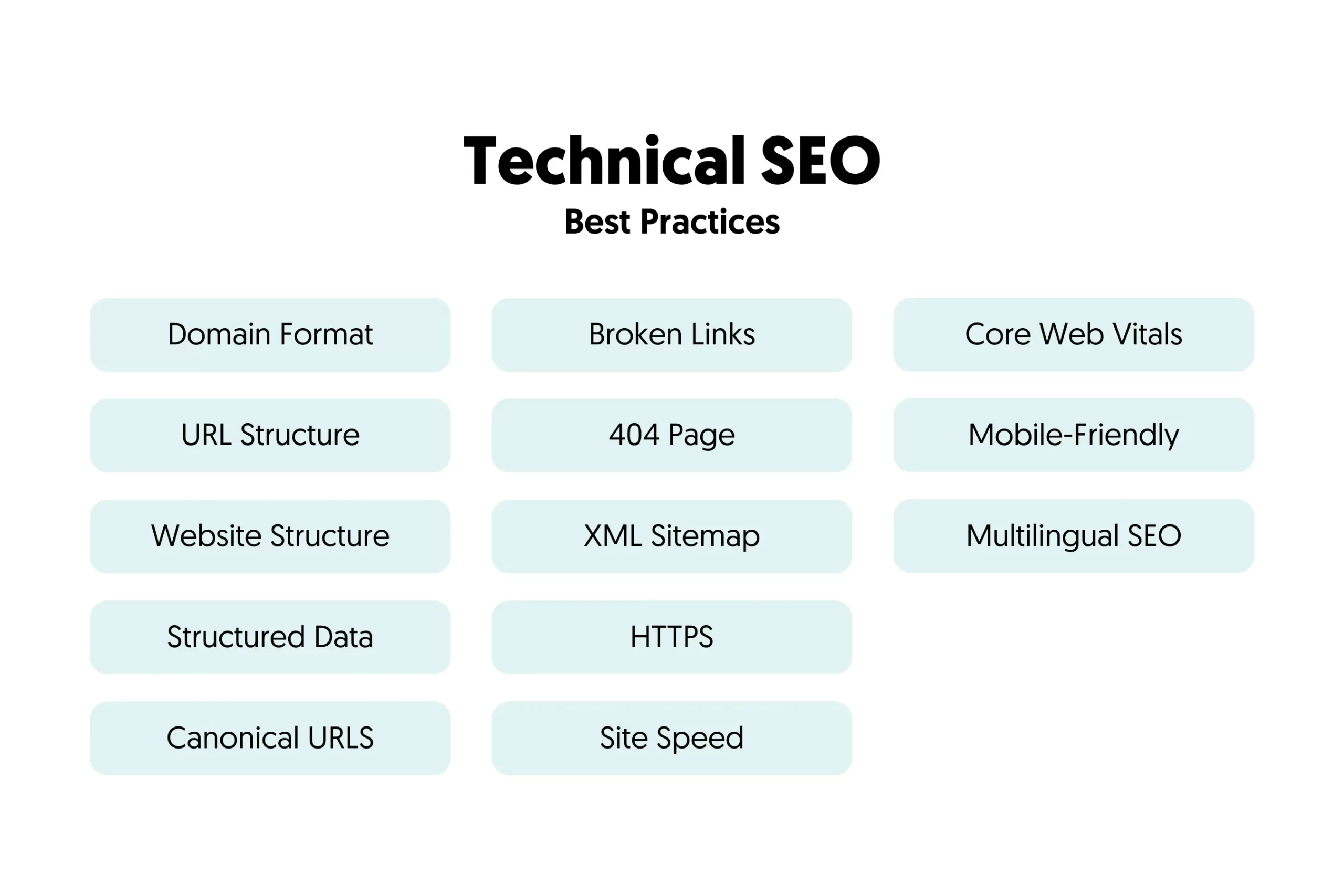
Mobile-friendly design is essential for any website today. It ensures your site looks good and works well on all devices. Mobile users expect fast, easy access without zooming or scrolling sideways. Search engines also favor mobile-friendly sites in their rankings. This helps your site reach more visitors and keeps them engaged longer.
Responsive Layout Techniques
Responsive design adjusts your website layout to fit any screen size. It uses flexible grids and images that resize automatically. CSS media queries control styles based on device width. This approach avoids separate mobile sites and reduces maintenance. Visitors get a smooth experience whether on a phone, tablet, or desktop. Responsive layouts improve loading times and usability on small screens.
Accelerated Mobile Pages (amp)
AMP is a special coding method to speed up mobile pages. It strips down unnecessary elements and uses optimized scripts. Pages load almost instantly, which lowers bounce rates. Google often shows AMP pages in special search results. This can increase your visibility and traffic. AMP works best for news, blogs, and e-commerce sites. It improves user experience by delivering content faster on mobile.
Mobile Usability Testing
Testing your site on multiple devices is vital. It helps find layout issues, broken links, or slow loading times. Google’s Mobile-Friendly Test tool shows if your site meets mobile standards. Manual testing on real phones reveals real user problems. Check touch buttons, font sizes, and navigation ease. Fixing usability issues increases visitor satisfaction and search rankings. Regular testing keeps your site updated with new device trends.
Crawlability And Indexing
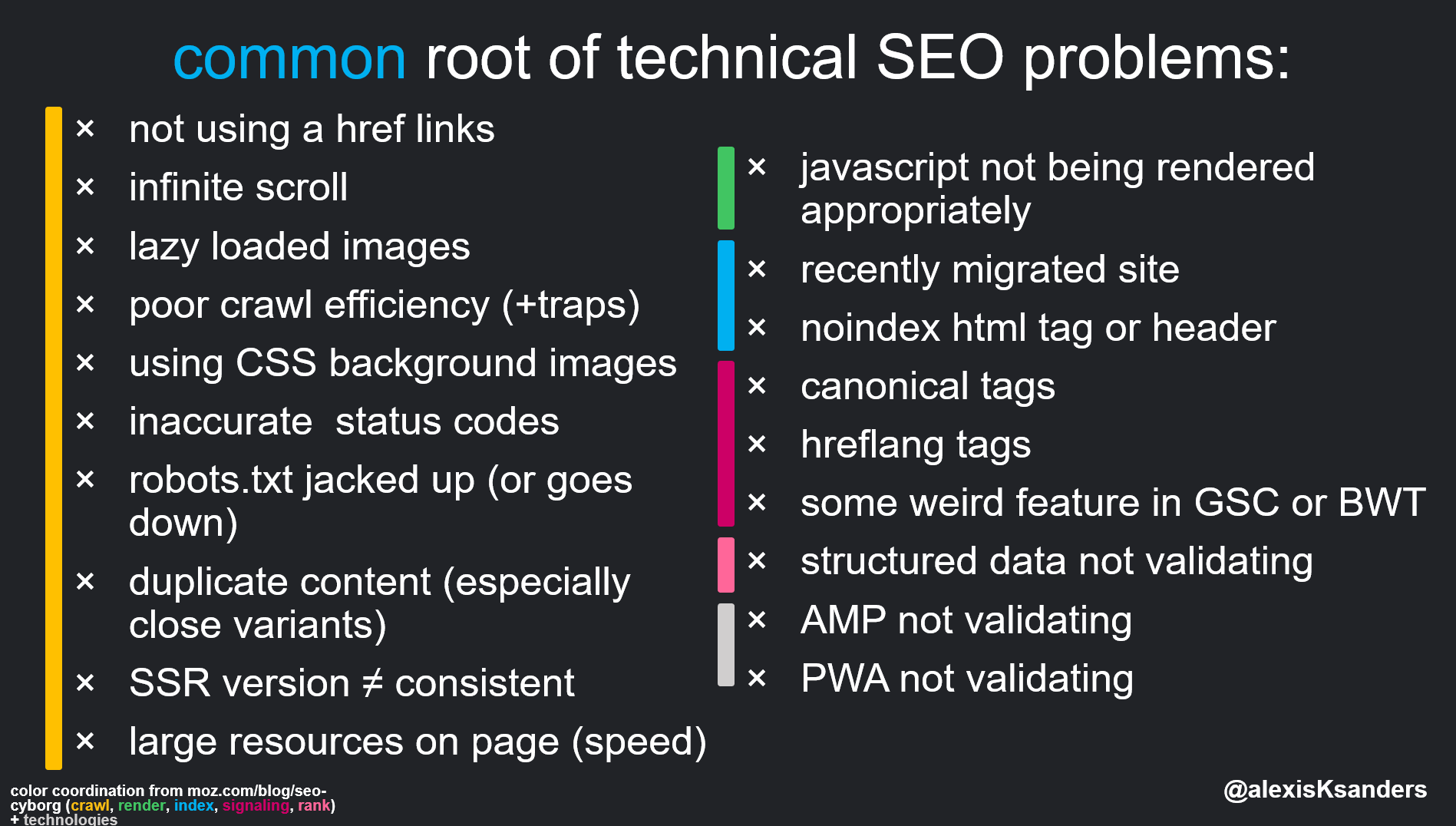
Crawlability and indexing are key parts of technical SEO. They help search engines find and understand your website pages. If search engines cannot crawl or index your pages, your site won’t show up in search results.
Crawlability means how easily search engines can browse your website. Indexing means storing your pages in search engines’ databases. Both must work well to improve your site’s visibility.
Robots.txt Best Practices
The robots.txt file guides search engine bots on which pages to crawl. Use it to block pages that don’t need indexing, like admin areas or duplicate content.
Keep the file simple and clear. Avoid blocking important pages by mistake. Test your robots.txt with Google’s tool to ensure it works well.
Xml Sitemap Optimization
An XML sitemap lists all important pages on your site. It helps search engines discover your content quickly. Update your sitemap regularly to include new pages.
Make sure your sitemap only has URLs that you want indexed. Submit it through Google Search Console. This speeds up indexing and improves your site’s crawl efficiency.
Handling Duplicate Content
Duplicate content confuses search engines. It lowers your site’s ranking. Use canonical tags to tell search engines which page is the main version.
Remove or rewrite duplicate pages when possible. Keep your content unique and valuable. This ensures better indexing and higher search rankings.
Credit: technicalseo.com
Structured Data Implementation
Structured data helps search engines understand your website content better. It uses special code to explain details about your pages. This code improves how your site appears in search results. Implementing structured data can boost your site’s visibility and click-through rates.
Schema Markup Types
Schema markup is the most common type of structured data. It defines elements like articles, products, events, and reviews. Each type uses specific tags to describe content clearly. Choosing the right schema type depends on your page content. For example, use “Product” for online store items and “Event” for concerts.
Enhancing Rich Snippets
Rich snippets show extra information in search results. They can display star ratings, prices, or event dates. Structured data helps generate these snippets automatically. Enhanced snippets make your listing stand out from others. This can attract more visitors to your website.
Testing And Validation Tools
Testing your structured data ensures it works correctly. Google offers tools like the Rich Results Test and Schema Markup Validator. These tools check for errors and show how snippets appear. Fixing errors improves your chances of rich snippet display. Regular testing keeps your structured data accurate and effective.
Secure Website Setup
Setting up a secure website is crucial for protecting your data and users. Secure sites build trust and improve search engine rankings. This section covers key steps to secure your website properly.
Https Migration Steps
Start by buying an SSL certificate from a trusted provider. Next, install the certificate on your web server. Change all website URLs from HTTP to HTTPS. Use 301 redirects to send traffic from old HTTP pages to new HTTPS pages. Check for mixed content issues where some elements still load over HTTP. Test your site thoroughly to ensure HTTPS works without errors.
Ssl Certificate Management
Renew your SSL certificate before it expires to avoid security warnings. Monitor the certificate status regularly to catch problems early. Use automated tools to manage renewals if possible. Keep your private key safe and never share it. Update your server software to support the latest SSL protocols and ciphers.
Security Headers Configuration
Configure security headers to protect your site from attacks. Use Content-Security-Policy to control which resources load on your pages. Add X-Content-Type-Options to prevent MIME type sniffing. Enable X-Frame-Options to stop clickjacking attempts. Use Strict-Transport-Security to force browsers to use HTTPS only. These headers add layers of defense for your site.
Credit: www.reliablesoft.net
Url Structure And Navigation
URL structure and navigation play a key role in technical SEO. They help search engines understand your website better. Clear URLs and easy navigation improve user experience. This section covers best practices for both.
Creating Seo-friendly Urls
SEO-friendly URLs are short and descriptive. Use words that explain the page content clearly. Avoid long strings of numbers or symbols. Include main keywords naturally in the URL. Separate words with hyphens, not underscores. Keep URLs lowercase to avoid confusion. Clean URLs help search engines and users scan links fast.
Internal Linking Strategies
Internal links connect pages within your website. They guide visitors to related content easily. Use clear anchor text that describes the linked page. Link to important pages often to boost their SEO value. Avoid linking the same phrase repeatedly on one page. Good internal linking spreads page authority across your site.
Breadcrumb Navigation Benefits
Breadcrumbs show users their location on a site. They appear near the top of the page. Breadcrumbs improve site usability by reducing clicks. Search engines use breadcrumbs to understand site hierarchy. Adding breadcrumbs can lower bounce rates and increase time on site. Simple breadcrumbs make navigation clear for all users.
Fixing Common Technical Errors
Fixing common technical errors is key for good SEO. These errors can stop search engines from reading your site well. They can also hurt user experience. Fixing them helps your site rank higher and keeps visitors happy.
Below are simple ways to solve frequent technical issues.
404 Error Handling
A 404 error happens when a page is missing. It shows users a broken link. This can make visitors leave your site fast. To fix this, create a custom 404 page. This page should help users find other content. Also, check for broken links often and update or remove them.
Redirects And Canonicalization
Redirects send users from one URL to another. Use 301 redirects for permanent moves. This keeps search engines from losing your page’s ranking. Canonical tags tell search engines which page is the main one. This stops duplicate content issues. Set up redirects and canonical tags correctly to keep your SEO strong.
Resolving Crawl Errors
Crawl errors happen when search engines can’t access your pages. These errors stop pages from being indexed. Use tools like Google Search Console to find these errors. Fix URL mistakes, server errors, and blocked pages. Making sure your site is crawlable helps improve your search rankings.
Monitoring And Reporting
Monitoring and reporting are key to a strong technical SEO strategy. They help you see what works and what needs fixing. Regular checks keep your site healthy and search-friendly. Tracking tools give clear data on traffic and rankings. Reports guide your next steps and show progress.
Using Google Search Console
Google Search Console shows your site’s performance in Google. It reports errors like broken links or crawl issues. You can see which keywords bring visitors. The tool alerts you to security problems. It helps you fix problems quickly to keep your site strong.
Tracking With Analytics Tools
Analytics tools track visitor behavior on your site. They show which pages get the most views. You learn how visitors find your site and what they do next. This data helps you improve user experience. It reveals parts of your site that need work.
Regular Seo Audits
SEO audits check your site’s technical health regularly. They find problems like slow speed or duplicate content. Audits review your site structure and indexing status. Fixing these issues improves rankings and user trust. Schedule audits to keep your SEO up to date.
Credit: www.abstraktmg.com
Frequently Asked Questions
What Is Technical Seo And Why Is It Important?
Technical SEO optimizes website infrastructure for search engines. It improves crawling, indexing, and user experience. Proper technical SEO boosts rankings and site speed, making your website more visible and accessible to users and search engines.
How Do I Improve Site Speed For Seo?
Improve site speed by optimizing images, enabling caching, and minimizing code. Use tools like Google PageSpeed Insights to identify issues. Fast-loading sites enhance user experience and positively impact search rankings.
What Role Does Mobile-friendliness Play In Technical Seo?
Mobile-friendliness ensures your site works well on all devices. Google prioritizes mobile-first indexing, so responsive design is crucial. A mobile-optimized site improves usability and search visibility on smartphones and tablets.
How Can I Fix Crawl Errors On My Website?
Identify crawl errors using Google Search Console. Common errors include broken links and server issues. Fixing these improves search engine access and ensures all pages are indexed correctly.
Conclusion
Technical SEO builds a strong base for your website’s success. Clear site structure helps search engines find your pages. Fast loading speed improves user experience and rankings. Fixing errors keeps your site healthy and trustworthy. Regular checks make sure your SEO stays effective.
Small changes can bring steady traffic growth. Keep learning and applying these tips step by step. Your website will become easier to find and use. Good SEO takes time but gives lasting benefits. Stay patient and consistent with your efforts.