Moving your website to a new platform or domain can feel overwhelming. One small mistake could cost you traffic, rankings, or even sales.
But it doesn’t have to be that way. With the right plan, you can make your website migration smooth and stress-free. This checklist will guide you step-by-step, so you don’t miss anything important. Keep reading, and you’ll learn how to protect your SEO, keep your visitors happy, and make your new site a success from day one.
Your website’s future depends on it.
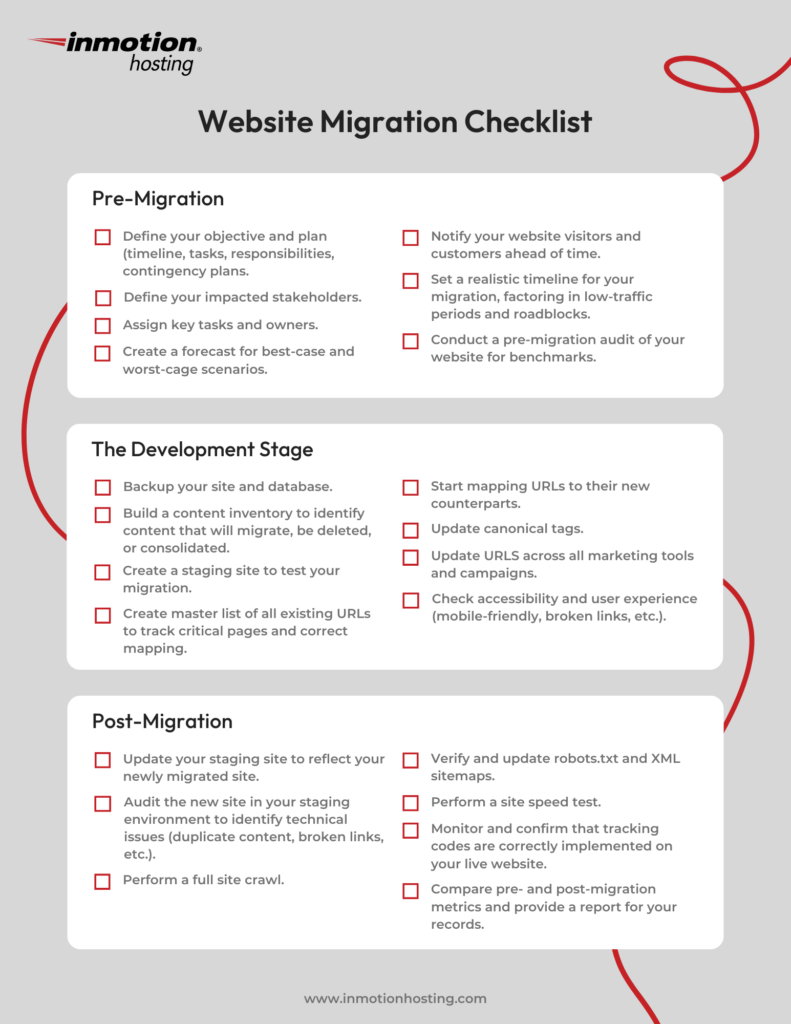
Credit: www.inmotionhosting.com
Planning Your Migration
Planning your website migration carefully saves time and avoids errors. It helps keep your SEO and user experience intact. Start by understanding what you want to achieve. Then review your current website’s health. Choose the best migration type to match your needs. A clear plan makes the process smooth and successful.
Setting Clear Objectives
Know why you are moving your website. List your main goals. Improve site speed? Update design? Change hosting? Clear objectives guide every step. They help measure success later. Share these goals with your team to stay aligned.
Assessing Current Site Performance
Check your website’s current stats and health. Look at traffic, rankings, and user behavior. Identify top-performing pages and keywords. Find any technical issues like slow loading or broken links. This info sets a baseline and highlights risks.
Choosing The Right Migration Type
Decide which migration fits your needs. Options include domain change, platform switch, or redesign. Each type has different steps and challenges. Pick the one that matches your objectives and resources. Plan according to its specific tasks.
Preparing For Migration
Preparing for a website migration is a critical step. It sets the foundation for a smooth transfer. Careful preparation helps avoid data loss and downtime. It also ensures the new site works well from day one.
Start with clear plans and organized tasks. Know what needs moving and when. This preparation saves time and reduces errors during migration.
Backing Up Website Data
Always back up all website data before migration. This includes databases, files, images, and code. Use reliable tools to create full backups. Store backups in multiple safe locations. Backups protect your site if something goes wrong.
Inventorying Site Content And Assets
List all site content and digital assets. Check pages, posts, media files, and plugins. Note down URLs and file paths. This inventory helps track what moves to the new site. It also reveals outdated content to remove or update.
Creating A Detailed Migration Timeline
Make a step-by-step timeline for the migration. Assign dates and responsible team members. Include pre-migration checks and post-migration tests. A timeline keeps the process on track. It helps everyone know what to do and when.
Technical Setup
The technical setup is a critical step in website migration. It ensures your new site runs smoothly without downtime or errors. Proper setup protects your site’s SEO and user experience. This section covers key tasks to prepare your new environment and keep your site secure.
Configuring The New Hosting Environment
Start by choosing a reliable hosting provider. Set up the server with the right software and versions. Upload your website files and databases carefully. Check file permissions to avoid access issues. Test the site on the new host before making it live. This step prevents surprises after launch.
Setting Up Dns And Ssl Certificates
Update your domain’s DNS records to point to the new server. Use a low TTL value to speed up propagation. Install an SSL certificate for secure HTTPS connections. Verify the certificate works correctly on all pages. Secure sites build trust and improve search rankings.
Preparing Redirects And Url Mapping
Create redirect rules to link old URLs to new ones. Use 301 redirects to transfer SEO value. Map URLs carefully to avoid broken links. Test redirects to ensure visitors land on the right pages. This step maintains traffic and search engine rankings.

Credit: www.edwindanromero.com
Content And Seo Considerations
Content and SEO are key parts of any website migration. Moving your site without care can hurt your search rankings. It can also confuse visitors and reduce traffic.
Focus on keeping your SEO strong. Keep your content clear and easy to find. Check all links and metadata to avoid errors. This helps search engines and users find your pages fast.
Maintaining Seo Rankings
Keep the same URLs or set up proper redirects. Use 301 redirects to send visitors to the new pages. This tells search engines the page has moved permanently.
Keep your page content the same or better. Avoid dropping important keywords or text. Check your backlinks and update them if possible. Track your rankings to spot any drops early.
Updating Internal Links
Change all internal links to match the new URLs. Broken links cause bad user experience and lower SEO. Use a link checker tool to find broken or old links. Fix them before launching the new site.
Keep navigation easy to follow. Make sure menus and buttons point to correct pages. This helps visitors find what they need quickly and keeps SEO strong.
Optimizing Metadata And Sitemaps
Update all meta titles and descriptions for the new pages. Use clear, keyword-rich text to improve search visibility. Avoid duplicate metadata to prevent confusion.
Create an updated sitemap and submit it to search engines. This helps bots crawl your new site faster. Keep your robots.txt file updated to allow access to important pages.
Testing Before Launch
Testing before launch is a key step in website migration. It ensures the new site works well and meets all requirements. Skipping this step can cause errors, lost visitors, and lower rankings. Careful testing helps catch issues early and fix them fast. It saves time and protects your site’s reputation.
Verifying Functionality And Performance
Check all links and buttons for proper action. Forms should send data correctly without errors. Test site speed on different devices and browsers. Pages must load quickly to keep visitors happy. Watch for broken images or missing content. Confirm scripts and interactive elements run smoothly. Functional sites build trust and keep users engaged.
Checking Mobile Responsiveness
More people use phones to browse websites. The site must look good and work well on small screens. Test layout on various screen sizes and orientations. Text should be readable without zooming. Buttons need to be easy to tap. Images and menus should resize correctly. Mobile-friendly sites improve user experience and SEO.
Conducting Seo Audits
Check that all URLs redirect properly to avoid errors. Verify meta tags, titles, and descriptions are intact. Use tools to find broken links and duplicate content. Ensure sitemap and robots.txt files are updated. Track keyword rankings before and after migration. Fix any issues that could hurt search engine ranking. SEO audits help maintain and improve site visibility.
Launching The New Site
Launching the new site is an important step in website migration. It means your new website is live and ready for visitors. Careful actions during launch ensure a smooth transition.
Follow the right steps to avoid downtime and errors. Watch the site closely to fix any issues fast. Keep users informed about the changes to reduce confusion.
Executing Dns Switch
Changing the DNS points your domain to the new site. This step makes visitors see the new website. DNS changes can take time to spread worldwide. It may take a few hours or up to 48 hours.
Check that the DNS records are correct before switching. Use a reliable DNS provider for faster updates. Avoid making other big changes during the DNS switch.
Monitoring Site Performance
Watch your site closely after launch. Track loading speed and user interactions. Use tools to check for broken links and errors. Fix problems quickly to keep visitors happy.
Compare performance with the old site to ensure improvements. Monitor server uptime and response times. Keep an eye on traffic patterns for unusual drops or spikes.
Communicating Changes To Users
Tell your visitors about the new site launch. Use emails or banners to share important news. Explain any new features or changes clearly.
Prepare FAQs to answer common questions. Provide support contact details for help. Clear communication builds trust and keeps users engaged.
Post-migration Tasks
After moving your website, several important tasks follow. These tasks help keep your site working well and maintain its search engine rankings. Post-migration work is key to a smooth transition and ongoing success.
Tracking Analytics And Rankings
Check your website’s analytics data right after migration. Make sure tracking codes like Google Analytics still work. Watch for any drops in traffic or changes in visitor behavior. Monitor your search engine rankings to spot any sudden shifts. Early detection helps fix problems before they grow.
Fixing Broken Links And Errors
Scan your website for broken links and missing pages. Use tools to find 404 errors or redirect issues. Fix or update all broken links quickly. Broken links hurt user experience and SEO. Keep your site clean and easy to navigate for visitors and search engines.
Gathering User Feedback
Ask users about their experience on the new site. Use simple surveys or feedback forms. Listen to their issues and suggestions carefully. User feedback shows problems that tools may miss. Make changes based on real user input to improve your site.
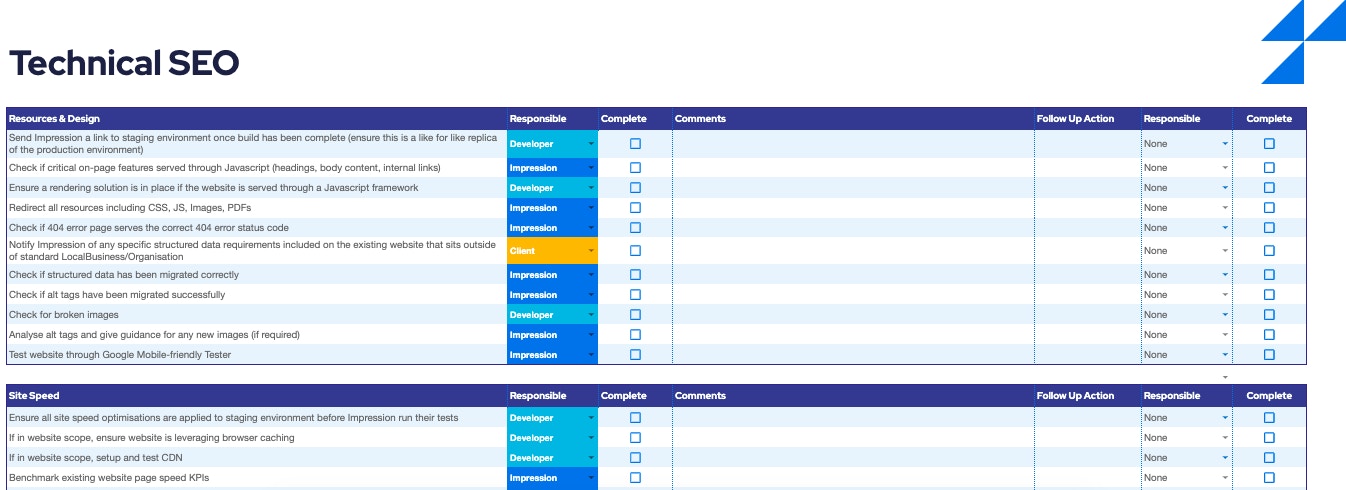
Credit: www.impressiondigital.com
Frequently Asked Questions
What Is A Website Migration Checklist?
A website migration checklist is a step-by-step guide. It helps ensure a smooth transition when moving your website. It covers technical, SEO, and content aspects. Using it prevents errors and downtime during migration.
Why Is Website Migration Important For Seo?
Website migration impacts SEO by affecting rankings and traffic. Proper migration preserves backlinks and page authority. It avoids broken links and indexing issues. This maintains your site’s search visibility and user experience.
How Do I Prepare For A Website Migration?
Prepare by backing up your website and data. Audit your current site for SEO issues. Plan URL redirects and update internal links. Test the new site before going live to ensure functionality.
What Are Common Website Migration Mistakes To Avoid?
Common mistakes include missing redirects, broken links, and lost content. Ignoring SEO factors can lead to traffic loss. Not testing the new site causes errors. Proper planning and testing prevent these issues.
Conclusion
A website migration needs careful planning and clear steps. Follow the checklist to avoid common mistakes. Check your links, SEO settings, and site speed often. Keep backups ready to protect your data. Test everything after moving your site. Watch your traffic and rankings closely.
Stay patient; results take time. This process helps your website stay strong and user-friendly. Simple steps make migration smooth and safe.